Key takeaways
- Buy AP automation software when your process is standard, your ERP is on the vendor's integration list and you want a supported product running quickly.
- Build a custom AI agent when your invoices, approval rules or systems do not fit a packaged workflow, or you want to own the logic and the data.
- Pricing models differ. BILL lists per-user plans, Tipalti starts at $99 a month and adds volume-based fees, and Stampli publishes no prices (all as of November 2026).
- Most buyers do not have to pick one for good: a custom agent can sit in front of or beside a packaged tool and handle only the work it cannot.
- Test either option on 50 to 100 of your own invoices before you commit. Demos on clean sample invoices tell you little.
Buy AP automation software if your invoice process is fairly standard and your ERP appears on the vendor's integration list. Build a custom AI agent if your invoices, approval rules or systems do not fit a packaged workflow, or you want to own the logic and the data. Many teams do both: software for the standard flow, and an agent for the exceptions the software cannot handle.
This post compares the two routes fairly. It uses facts from three well-known vendors' own sites (BILL, Tipalti and Stampli, all checked in November 2026), gives you five tests to apply to your own process, and describes what a 30-day pilot of a custom agent delivers. For what AP automation covers end to end, start with our intelligent invoice processing guide.
What do AP automation software vendors offer?
Packaged AP tools capture invoices, code them, route approvals, sync with your accounting system and often pay suppliers. They differ in who they are built for. The three below show the range. Features and prices change, so treat this as a snapshot as of November 2026 and confirm on each vendor's site.
| BILL | Tipalti | Stampli | |
|---|---|---|---|
| Core offer | Bill capture, approvals, accounting sync and payments | Invoice capture, PO matching, approvals, global payments, ERP sync | Procure-to-pay platform with AP, procurement, vendor management and payments |
| Pricing (public) | $49, $65 and $89 per user per month on three plans; Enterprise by quote | AP plans "starting at $99/month"; fees depend on payment volume, entities and modules | None on the product page; contact sales |
| ERP and accounting links | QuickBooks and Xero on lower plans; NetSuite, Sage Intacct and Dynamics on Enterprise | NetSuite, Sage Intacct, QuickBooks, Microsoft Dynamics, SAP, Acumatica (US only) | Sage Intacct, NetSuite, SAP, Dynamics, Acumatica, QuickBooks and others |
| How it describes itself | Four plans, from Essentials to Enterprise | "AI-powered AP automation software built to scale" | Best fit: "mid-market and enterprise finance teams with operational complexity" |
| AI | AI multi-line coding on Team and above | An AP Agent for review and approval of non-PO invoices | Suggested coding, approval routing and matching, with human review before ERP posting |
Sources: BILL pricing, Tipalti AP automation, Tipalti pricing, Stampli.
A few details are worth knowing before you shortlist anything:
- BILL charges per user, and the pricing page lists separate payment fees, for example $0.59 for an ACH payment and $1.99 for a check as of November 2026. Per-user pricing is simple, but it grows with every approver you add.
- Tipalti says on its pricing page that it uses a subscription with transaction-based pricing layered on top, and that it does not charge per-user or per-approver fees. Its AP page says payments reach 200+ countries and territories. It also says the AP Agent's launch scope ends at review and approval for non-PO invoices.
- Stampli says its best fit is mid-market and enterprise finance teams, and states that "the ERP remains the system of record". It also says all suggested entries "remain subject to human review and approval before posting to the ERP", which is the right design.
None of these is a bad choice. Each does well for the customers it targets. The question is whether you are one of them.
What does a custom AI agent do differently?
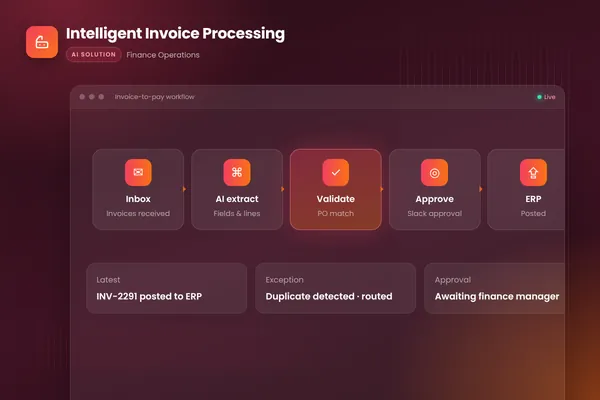
A custom agent is built around your process rather than a vendor's. It watches your invoice inbox, extracts every field, checks the values, matches lines to purchase orders, routes approvals in the tools your team already uses and posts approved invoices to your ERP with an audit trail. That is the workflow in BufferSol's intelligent invoice processing build, which runs on document AI, Temporal for durable workflows, Slack for approvals and the QuickBooks API.
The extraction step uses the same kind of building block most packaged tools do. Microsoft's invoice model handles "phone-captured images, scanned documents, and digital PDFs" in 27 languages and returns structured data. The difference is what you build around it: your own matching rules, your coding logic, your exception queue and your approval matrix, with nothing you do not need.
- 011. CaptureInvoice arrives by email, upload or portal; the agent extracts every field from any format.
- 022. CheckPlain code verifies totals, supplier, duplicates and PO match; mismatches are explained in words.
- 033. RouteClean invoices go to the right approver by your rules; exceptions go to a review queue.
- 044. PostAfter approval, the invoice is posted to your ERP; every step is logged.
Source: BufferSol intelligent invoice processing build
BufferSol Technologies · buffersoltech.com
Payments are a separate matter. We keep payment release with an authorized person, and the agent prepares and checks the run. The same rule applies to the vendors above: Tipalti's AP Agent does not execute payments, and Stampli requires human review before posting.
Five tests to decide between them
Score your own situation against these. If most answers point one way, that is your route.
| Test | Points to software | Points to a custom agent |
|---|---|---|
| 1. ERP fit | Your ERP is on the vendor's integration list and your chart of accounts is standard | Your ERP is niche, heavily customized or has an internal system the vendor cannot reach |
| 2. Invoice variety | Mostly PO-based invoices from a stable supplier list | Many formats, languages, utilities, contractor bills and emailed statements |
| 3. Approval logic | Amount-based approval chains | Rules that depend on project, contract, budget owner or conditions in the email thread |
| 4. Pricing model | Few approvers, steady volume, a plan that fits | Many approvers or rapid growth that would make per-user or per-transaction fees climb |
| 5. Data control | A vendor-hosted tool passes your security review | You need the logic and data kept in your own cloud, or full access to the audit trail |
Two points deserve more detail.
Pricing over time. Software fees recur and scale with users, entities, modules or payment volume. A custom build is a one-off project plus the cost of running it (hosting, model usage and a small amount of maintenance). Which is cheaper depends on your numbers, so ask each vendor for a written quote at your volume and ask any builder to separate build, run and maintain costs. We will cover the full cost model in a separate post.
Invoice variety. Fixed-template tools do well on clean, repeated formats. Agents earn their place on the messy tail: a contractor's photographed receipt, a statement with three invoices in one PDF, a supplier email that says "see attached, new bank details". Those cases need reading and judgment, plus a rule that the agent never changes bank details from an email. Our post on AP automation with AI agents covers that risk in depth.
When is a custom agent the better choice?
A custom agent usually wins in four situations:
- Your process is the competitive detail. Approval rules, coding logic or compliance checks are specific to your business, and bending them to a packaged workflow loses value.
- Your systems are unusual. The agent connects to whatever you run, including internal databases and older platforms, through its API or a controlled integration.
- You want to own it. The logic, prompts, rules and logs live in your environment, with no per-seat or per-approver fees and no dependency on a vendor's roadmap.
- The exceptions are the problem. Your team already has a tool, but a large share of invoices still lands in manual queues. An agent that clears the exceptions delivers more than a second tool would.
Software usually wins when you are small or mid-sized, your process is standard, and you want vendor support, a ready-made supplier payments network and no engineering to maintain.
Can you use both?
Yes, and it is often the sensible answer. Keep the packaged tool for what it does well, such as standard invoices and supplier payments, and add a focused agent for the work it cannot do: unusual formats, supplier emails, odd coding rules or a system the tool does not reach. The agent returns clean, checked results to the tool or the ERP, and anything risky still goes to a person. Our post on touchless invoice processing shows how to measure which invoices could skip human edits, and invoice approval workflow automation covers the approval layer.
What does a 30-day build deliver?
Within 30 days we deliver a working agent on your real invoices, not a slide deck. A realistic plan looks like this:
- Week 1: gather 50 to 100 recent invoices with their correct coding and posted values, your approval rules and read-only access to the ERP and the invoices inbox.
- Weeks 2 to 3: a prototype extracts and checks invoices and matches them to purchase orders, with results measured against your known answers.
- Week 4: a live pilot on a first slice of the work, such as one entity or one supplier group, with every output reviewed by your team, a review queue for exceptions and full logging.
Full rollout of every edge case takes longer. We typically plan 4 to 8 weeks for the complete workflow. You can see the ready-made version of this workflow on our invoice processing and AP automation page, and our autonomous workflows team builds the custom version around your ERP and approvers.
How to run a fair comparison
Whichever route you lean toward, run the same test:
- Pull 50 to 100 real invoices, including the awkward ones, with the correct coding and final posted values.
- Ask each vendor, or the builder, to process them and show results against your answers.
- Count how many invoices needed a human edit, and why.
- Get written pricing at your volume, with every fee listed: users, entities, modules, payments and implementation.
- Check what happens when you leave: can you export your data, rules and history?
A demo on clean sample invoices shows polish. A test on your own invoices shows fit.
Frequently asked questions
What is the difference between AP automation software and a custom AI agent?
AP automation software is a packaged product with a fixed workflow, built-in integrations and a subscription. A custom AI agent is built around your invoices, approval rules and systems, and acts inside the tools you already use. Software is faster to start and supported by a vendor. An agent fits unusual processes better and leaves you owning the logic.
How much does AP automation software cost?
It depends on the vendor. As of November 2026, BILL lists Essentials at $49, Team at $65 and Corporate at $89 per user per month, plus per-payment fees. Tipalti lists plans starting at $99 a month with fees tied to payment volume, entities and modules. Stampli does not publish prices. Always get a written quote based on your invoice volume.
When does a custom AP agent make more sense than software?
It makes sense when your ERP or approval rules are not on a vendor's standard list, when invoices need judgment that fixed rules cannot capture, when per-user pricing grows faster than the value, or when you need the data and logic inside your own environment. If a packaged tool already fits, buying it is usually cheaper and quicker.
Can I use both software and a custom agent?
Yes. A common pattern is to keep a packaged tool for standard invoices and payments, and add a small agent for the exceptions it cannot handle, such as unusual formats, supplier emails or odd coding rules. The agent hands clean results back to the tool or the ERP, and a person approves anything risky.
Sources
- Pricing and plans, BILL
- AP automation, Tipalti
- Pricing, Tipalti
- Stampli: AI-powered Procure-to-Pay platform, Stampli
- Invoice data extraction – Document Intelligence, Microsoft Learn
Cite this article
BufferSol Editorial Team (2026). AP Automation Software vs a Custom AI Agent: Which Should You Choose?. BufferSol Technologies. https://buffersoltech.com/blog/ap-automation-software-vs-custom-ai-agent
BufferSol Editorial Team
AI & software engineering team
Senior engineers, AI specialists and product leads at BufferSol Technologies who design, build and run AI agents, autonomous workflows and custom software for companies in the US, UK and Europe.
Reviewed by Sufyan K., Senior Writer, BufferSol Technologies.