Key takeaways
- Touchless invoice processing means an invoice goes from inbox to approved-and-posted without anyone editing or re-keying it. Approval itself can still be a person's one click.
- Treat it as a series of gates: extraction confidence, validation, matching, policy and fraud checks. An invoice is touchless only if it passes every gate.
- To raise the touchless share, measure which gate stops each invoice and fix the biggest cause first, often supplier data, missing receipts or tolerances.
- Never make invoices touchless by removing checks. Bank detail changes, new suppliers and unusual amounts should always stop for a person.
- Track touchless share by supplier and by reason, not just as one number.
Touchless invoice processing means an invoice goes from the inbox to approved and posted without anyone editing or re-keying it. The system captures it, reads every field, checks the data, matches it to the purchase order and receipt, and routes it for approval, where a person can still approve with one click. Only invoices that fail a check stop, and they reach a reviewer with the reason already written.
This post treats touchless processing as a series of gates, shows how to find which gate stops each invoice, and explains how to raise the touchless share without weakening controls. It builds on the intelligent invoice processing workflow we built, and our intelligent invoice processing guide covers the full design.
Touchless is a set of gates
An invoice is touchless only if it passes every gate. Each gate is a check in code, not a judgment by the model.
- 011. Extraction confidenceEvery required field read above the confidence threshold you set.
- 022. ValidationTotals add up, tax is consistent, supplier exists, invoice number is not a duplicate.
- 033. MatchLines match the purchase order and goods receipt within agreed tolerances.
- 044. PolicyAmount, cost center and supplier fall inside the rules for straight-through approval routing.
- 055. Fraud checksBank details match the verified supplier record; no recent unverified change.
Source: BufferSol intelligent invoice processing workflow
BufferSol Technologies · buffersoltech.com
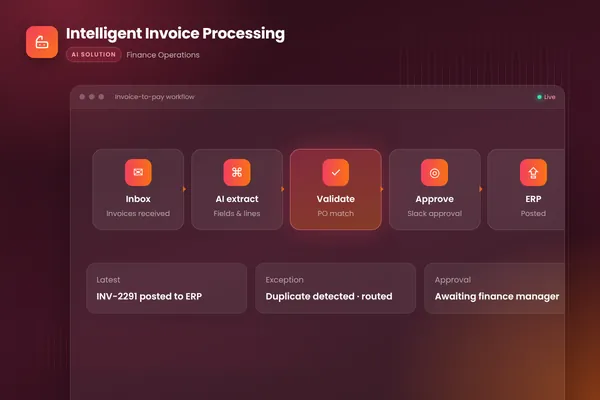
Our workflow follows this pattern. It watches the invoices inbox, extracts every field with document AI, matches lines to purchase orders and receipts, flags mismatches and likely duplicates, routes clean invoices to the right approver in Slack and posts approved invoices to the accounting system with a full audit trail. Invoices that fail a gate go to a review queue with the reason explained.
Gate 1: extraction confidence
Document AI returns a value for each field and a confidence score. Microsoft's invoice model, which our build uses, handles digital PDFs, scanned documents and phone photos and returns structured data. Set a threshold per field. A low-confidence total or invoice number sends the invoice to review; a low-confidence footer note may not matter.
Gate 2: validation
Plain code checks what the model returned: required fields present, line items adding up to the subtotal, tax and total consistent, the supplier known, and the invoice number new for that supplier. These checks catch most plausible-but-wrong extractions.
Gate 3: matching
Two-way matching compares the invoice with the purchase order; three-way matching adds the goods receipt. Tolerances decide how strict this gate is: a small rounding difference should pass, a quantity difference should not. Agree tolerances with finance and write them down.
Gate 4: policy
Some invoices should always see a person, whatever their data quality: above a value limit, for certain cost centers, or from suppliers on a watch list. Policy rules decide which invoices may take the fast route.
Gate 5: fraud checks
Changed bank details are the classic sign of payment fraud. The FBI's Internet Crime Complaint Center reported business email compromise exposed losses of over $55 billion between October 2013 and December 2023, and advises verifying requests to change account information through a secondary channel. An invoice with bank details that differ from the verified supplier record must never be touchless.
Find out which gate stops each invoice
The touchless share is one number, but improving it needs the reasons behind it. Record the first gate each invoice fails, then report:
| View | What it shows |
|---|---|
| Stops by gate | Whether the problem is reading, data, matching, policy or fraud checks |
| Stops by supplier | Which suppliers cause most of the work |
| Stops by reason within a gate | For example, "no goods receipt" versus "price difference" in matching |
| Trend by month | Whether fixes are working |
In most AP teams, a small number of causes explain most stops. That is good news: each fix moves many invoices.
Raising the touchless share, safely
Work through the biggest causes first:
- Supplier master data. Missing or duplicate supplier records fail validation. Clean the records and add a supplier onboarding check.
- Goods receipts. Invoices often arrive before the receipt is booked, so the match fails. Get receipts booked promptly, and let the workflow wait and re-try the match rather than stopping at once. Our build runs on Temporal, whose documentation describes durable execution that preserves a workflow's state even through failures, so an invoice can wait days for a receipt without being lost.
- Tolerances. Too-tight tolerances stop invoices for rounding. Agree realistic ones with finance, by supplier type if needed.
- Supplier invoice quality. For frequent suppliers with messy invoices, ask for cleaner formats or e-invoices.
- Reviewer corrections. Every correction is a rule or a test case. Turn repeated corrections into rules so the same stop does not happen again.
What you should never do is make invoices touchless by removing checks. New suppliers, bank detail changes and unusual amounts stay with people however good the numbers look. OpenAI's practical guide to building agents lists making payments among the high-risk actions that should trigger human oversight; touchless processing speeds up everything before that decision, not the decision itself.
What "touch" should mean
Teams count touches differently, which makes touchless figures hard to compare. Agree a definition before you measure, and keep it fixed:
- Counts as a touch: editing any extracted field, re-keying data, changing coding, resolving a mismatch, contacting the supplier, or moving the invoice manually between steps.
- Does not count: a one-click approval by the budget holder, or a sampled review after posting.
With that definition, approval stays a deliberate human decision, and the touchless share measures the work the system removed rather than the controls it skipped. Report reviewed invoices alongside, with the minutes each took, so improvements in the review queue show up too. A queue that takes two minutes per invoice instead of ten is a real gain even if the touchless share has not moved.
The review queue for stopped invoices
Invoices that stop are where the AP team spends its time, so the queue deserves as much design as the gates. Group items by reason, show the invoice, the purchase order and the receipt side by side, and state the problem in plain words, such as "invoice quantity 120, received 100". Let the reviewer fix the data and send the invoice back through the gates, rather than finishing it by hand outside the system.
Touchless does not mean unwatched
Even touchless invoices need oversight:
- Sample them. Review a random sample of touchless invoices every week to confirm the gates are working.
- Watch for drift. A supplier changing its invoice layout can lower extraction confidence overnight. Alert on sudden drops in a supplier's touchless rate.
- Keep the log. Every gate result is recorded with the invoice, so auditors can see why it went straight through.
- Re-test after changes. Run the full test set of past invoices after any change to prompts, models, rules or tolerances.
What to measure
Track touchless share overall, by supplier and by gate; time from receipt to posting for touchless and reviewed invoices; reviewer minutes per stopped invoice; errors found in the weekly sample; and duplicates or fraud attempts caught by the gates. For the stages before and after these gates, see our post on AP automation with AI agents.
Getting started
Take a month of invoices and, for each one, note whether someone had to edit or re-key it and why. That gives your baseline and your first list of causes. At BufferSol, you get a working invoice agent on your real invoices in under 30 days, with full rollout typically in 4 to 8 weeks. Our autonomous workflows team builds the gates, the review queue and the reporting around your accounting system.
Frequently asked questions
What is touchless invoice processing?
Touchless invoice processing means an invoice is captured, read, checked, matched and approved for posting without anyone editing or re-keying data. The invoice still passes every validation and matching check, and a person may still approve it with one click. Only invoices that fail a check go to a reviewer, with the reason explained.
Can every invoice be processed touchlessly?
No, and it should not be the goal. Invoices from new suppliers, invoices with changed bank details, unusual amounts, missing purchase orders or failed matches need a person. The aim is to send the predictable majority straight through and give reviewers a short, well-explained queue for the rest.
How do you increase the share of touchless invoices?
Record which check stops each invoice, then fix the biggest cause first. Common fixes are cleaning supplier master data, getting goods receipts booked on time, agreeing sensible matching tolerances, asking frequent suppliers for cleaner invoices and adding rules learned from reviewers' corrections. Re-measure every month.
Sources
- Invoice data extraction – Document Intelligence, Microsoft Learn
- Business Email Compromise: The $55 Billion Scam, FBI Internet Crime Complaint Center (IC3)
- What is Temporal?, Temporal Technologies
- A practical guide to building agents, OpenAI
Cite this article
BufferSol Editorial Team (2026). Touchless Invoice Processing: How to Get Most Invoices Through With No Human Touch. BufferSol Technologies. https://buffersoltech.com/blog/touchless-invoice-processing
BufferSol Editorial Team
AI & software engineering team
Senior engineers, AI specialists and product leads at BufferSol Technologies who design, build and run AI agents, autonomous workflows and custom software for companies in the US, UK and Europe.
Reviewed by Sufyan K., Senior Writer, BufferSol Technologies.