Key takeaways
- Put a human in the loop at the actions that matter, not at every step: payments, large refunds, cancellations, messages to key accounts and decisions about people.
- Use explicit thresholds enforced in code, such as an amount, an account tier or a confidence score, rather than asking the model to decide when to ask for help.
- Give reviewers everything on one screen: the proposed action, the reason, the evidence and one-click approve, edit or reject.
- Watch for automation bias. If reviewers approve almost everything without reading, the check is no longer working.
- Treat thresholds as settings you tune from data: start conservative, measure approval outcomes, and relax only where reviewers consistently agree with the agent.
Human-in-the-loop design for AI agents means deciding which actions an agent may take on its own and which need a person's approval first, then making that approval fast and meaningful. Put approval in front of actions that are high-value, irreversible or significant for a person, enforce the thresholds in code, and give the reviewer the proposed action, the reason and the evidence on one screen. Then tune the thresholds from real approval data.
This post sets out a design framework, using two approval points from systems BufferSol has built: the refund threshold in our support agent and the high-value account queue in our sales system. For the wider build process, see our guide to AI agent development.
When an agent should stop and ask
OpenAI's practical guide to building agents names two triggers for human intervention. The first is exceeding failure thresholds: if the agent fails to understand a request or retries too many times, it should escalate. The second is high-risk actions, which it describes as "sensitive, irreversible, or have high stakes," with examples such as canceling user orders, authorizing large refunds or making payments.
The OWASP Top 10 for LLM applications gives the security reason. It lists excessive agency, an agent with more autonomy than its job needs, among the top risks for LLM applications. An approval step is one of the most direct ways to limit that autonomy where it matters.
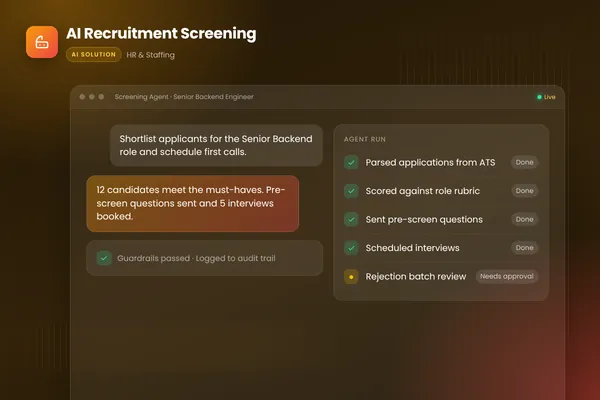
We add a third trigger: any decision that significantly affects a person, such as rejecting a job candidate. Our recruitment screening agent scores applications with written reasons, but a person reviews every batch of rejections.
Step 1: Sort actions into risk tiers
List every action the agent can take, then sort them.
| Typical actions | Approval rule | |
|---|---|---|
| Tier 1: read only | Look up orders, records, documents, shipment status | Run freely; log every call |
| Tier 2: low-risk writes | Create a return label within policy, add a CRM note, draft a reply | Run automatically within limits; sample for review |
| Tier 3: consequential writes | Refunds above a threshold, messages to key accounts, record changes | Human approval before the action runs |
| Tier 4: never automatic | Payments, bank detail changes, account deletion, decisions about people | Agent prepares the case; a person decides and acts |
Source: BufferSol design framework, informed by OpenAI's guidance on high-risk actions
BufferSol Technologies · buffersoltech.com
Step 2: Choose the threshold type
A threshold is the rule that moves an action from automatic to approval. Use rules your code can check, not the model's own judgment of when to ask.
| Threshold type | Example | Good for |
|---|---|---|
| Amount | Refunds above a set value go to a person | Money movements |
| Account or customer tier | Messages to high-value accounts need sign-off | Relationship risk |
| Policy fit | Anything outside the written policy is escalated | Exceptions and edge cases |
| Confidence | Low classifier or extraction confidence triggers review | Uncertain inputs |
| Failure count | Repeated retries or misunderstandings escalate | Stuck conversations |
| Volume or rate | More than a set number of actions per hour pauses the agent | Loops and attacks |
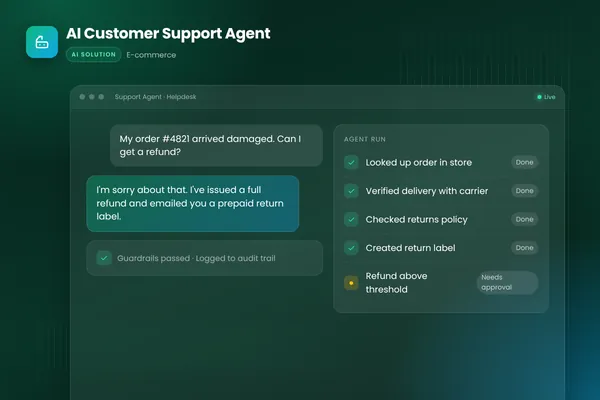
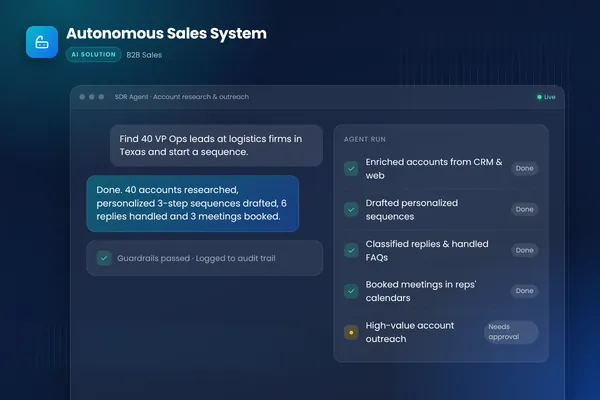
Our AI customer support agent uses an amount threshold. It looks up orders and creates return labels on its own, but refunds above a set threshold go to a person with a summary of the case and a suggested reply. Our autonomous sales system uses an account-tier threshold: high-value accounts require human approval before anything is sent, alongside send limits on every account.
Step 3: Design the reviewer's screen
The approval step is only as good as the decision the reviewer can make. Article 14 of the EU AI Act, which sets human-oversight requirements for high-risk AI systems, is a useful checklist even for systems outside its scope. According to the Commission's AI Act Service Desk, it requires that people overseeing such systems can "correctly interpret the high-risk AI system's output," remain aware of the tendency to over-rely on it, "disregard, override or reverse the output," and interrupt the system "through a 'stop' button" or a similar procedure.
In practice, a good review screen shows:
- The proposed action, stated plainly: "Refund the full order amount to the original card."
- The reason the agent proposes it, in one or two sentences.
- The evidence: the order, the policy clause, the conversation, the tool results.
- Why it needs approval: which threshold it crossed.
- One-click approve, edit or reject, with an optional note.
Put the screen where reviewers already work, such as the helpdesk, Slack or Teams, and set a response-time target so customers are not left waiting.
Step 4: Guard against rubber-stamping
Automation bias is the tendency to accept a system's suggestion without really checking it. Article 14 names it directly. If reviewers approve nearly everything within seconds, the human in the loop has become a formality.
Some practical defenses:
- Track approval rates and time to decision per reviewer and per action type.
- Occasionally include cases where the right answer is to reject, and check they are caught.
- Rotate reviewers on high-volume queues.
- Remove approval from action types where it adds nothing, so attention goes where it matters.
Step 5: Tune thresholds from data
Start conservative. Record every approval decision: approved unchanged, edited or rejected. After enough cases, look at each action type. Where reviewers almost always approve unchanged, consider raising the threshold or moving the action down a tier. Where they often edit or reject, tighten the threshold or improve the agent's instructions and tools first. Re-run your evaluation set before any change goes live.
Approval decisions are also your best source of new test cases. Every edited or rejected proposal shows exactly where the agent's judgment differs from your team's.
What happens after a rejection
Approval design usually focuses on the approve button. The reject path matters just as much, because it decides what the customer or colleague experiences next.
When a reviewer rejects or edits a proposal, three things should happen. First, the agent should not retry the same action on its own. Second, the case needs a clear owner: either the reviewer handles it from there, or it returns to the agent with the reviewer's instruction attached. Third, the decision and the reviewer's note go into the log and, where useful, into the evaluation set.
Timeouts need a rule too. If nobody approves within the agreed time, the safe default is to hold the action and alert someone, not to proceed. For customer-facing cases, the agent can send a holding reply so the customer knows a person is looking at the request.
Approval in multi-agent systems
When several agents work together, put approval at the point where the combined work becomes an action with consequences, not inside each agent. In a sales system, for example, the research and writing steps can run freely, while the send step for high-value accounts waits for a person. That keeps the number of approvals small and lets the reviewer see the full context: the research brief, the draft and the account history together.
The legal backdrop
Most business agents are not high-risk AI systems, but two regimes are worth knowing. In the EU, Article 14 applies to high-risk systems. In the UK, the ICO's draft guidance on automated decision-making covers decisions "based solely on automated processing" with a "legal or similarly significant effect" on a person, and the safeguards that apply, including human intervention. If your agent makes or shapes decisions about people, design a meaningful human decision point and record it.
Getting started
List your agent's actions, sort them into the four tiers, choose a threshold type for each tier-three action and sketch the review screen. Our AI agent development team can work through that design with you, or you can talk to an engineer.
Frequently asked questions
What does human in the loop mean for AI agents?
It means a person reviews and approves certain actions before the agent carries them out, or takes over when the agent cannot proceed. The agent does the research and proposes the action. The person decides on the steps with real consequences, such as payments, refunds above a limit or messages to important customers.
Does human in the loop slow everything down?
Only if approvals are placed badly. When approval sits in front of a small number of high-risk actions, and the reviewer sees the evidence and a recommendation on one screen, most decisions take seconds. The rest of the work runs automatically. Approving every step, by contrast, slows the process and trains reviewers to click through without reading.
Is human oversight a legal requirement for AI agents?
For high-risk AI systems under the EU AI Act, Article 14 requires that they can be effectively overseen by people while in use. In the UK, rules on solely automated decisions with significant effects on people include safeguards such as human intervention. Most business agents are not high-risk, but approval for consequential actions is still good practice and often expected by customers and auditors.
Sources
- A practical guide to building agents, OpenAI
- Article 14: Human oversight, European Commission AI Act Service Desk
- Automated decision-making, including profiling, Information Commissioner's Office
- 2025 Top 10 Risk & Mitigations for LLMs and Gen AI Apps, OWASP Gen AI Security Project
Cite this article
BufferSol Editorial Team (2026). Human-in-the-Loop AI Agents: How to Design Approvals That Work. BufferSol Technologies. https://buffersoltech.com/blog/human-in-the-loop-ai-agents
BufferSol Editorial Team
AI & software engineering team
Senior engineers, AI specialists and product leads at BufferSol Technologies who design, build and run AI agents, autonomous workflows and custom software for companies in the US, UK and Europe.