Key takeaways
- RPA automates a task by operating an application's screen the way a person would. AI workflow automation runs a process through APIs and events, with AI handling the steps that need reading or judgment.
- RPA breaks when screens or input formats change. AI workflows cope with messy inputs, but every AI step needs validation and an evaluation set.
- RPA still fits stable, rule-based tasks on legacy systems that have no API, such as terminal applications.
- The two combine well: AI reads and decides, a workflow engine orchestrates, and a bot types into the one old screen that cannot be reached any other way.
- When modernizing, rank bots by how often they break and how much work they touch, then rebuild the worst first on APIs.
AI workflow automation and RPA both remove manual work, but they reach it differently. RPA (robotic process automation) automates a task by operating an application's screen the way a person would: clicking, typing and copying between fields. AI workflow automation runs a whole process through APIs and events, and uses AI for the steps that need reading or judgment, such as understanding an email or extracting data from a PDF. RPA follows fixed rules on fixed screens. AI workflows handle variation.
This post compares the two in practice, explains when RPA is still the right tool, shows how to combine them, and ends with the checklist we use to decide which bots to keep, rebuild or retire. For the full picture of how AI workflows are designed, see our guide to AI workflow automation.
What RPA is, and what it is good at
RPA tools record or script the actions a person takes in an application and replay them. Microsoft's documentation for its RPA product, Power Automate desktop flows, describes them as designed for "simple or complex rule-based tasks", able to automate legacy applications such as terminal emulators as well as modern web and desktop apps, and interacting with the machine "by using application UI elements, images, or coordinates."
That last point is both RPA's strength and its weakness. A bot can automate an application that has no API at all, which is why RPA became popular for old ERP screens, mainframe terminals and internal tools nobody wants to touch. But the bot depends on the screen staying the same. Move a button, rename a field or add a pop-up, and the bot stops or, worse, types into the wrong place.
RPA also depends on the input being predictable. A bot can copy an invoice total from a fixed position on a known form. It cannot read a supplier's PDF in a new layout, or understand an email that says "please hold the second shipment until we confirm."
What AI workflow automation is
AI workflow automation treats the process, not the screen, as the thing to automate. A workflow engine listens for an event, such as a new email, file or form, and runs the steps in order: calling APIs, waiting for approvals, retrying when a system is down. AI is used inside specific steps, such as extracting fields from a document, classifying a request or drafting a reply. Ordinary code then checks the AI's output before anything changes in a system of record.
OpenAI's practical guide to building agents captures the difference with an example from fraud analysis: a traditional rules engine "works like a checklist", flagging transactions on preset criteria, while a model-based system weighs context and subtle patterns more like an experienced investigator. The same guide is clear that where rules work, "a deterministic solution may suffice." AI is for the parts rules cannot handle: nuanced decisions, rule sets that have become unmanageable, and unstructured data.
Two engineering choices make AI workflows dependable. Each AI step is narrow, with a fixed output format that code can validate. And the orchestration runs on a durable engine. Temporal's documentation, for example, describes durable execution as preserving a workflow's state and progress "even in the face of failures", so a run picks up where it stopped after a crash or outage.
AI workflow automation vs RPA, side by side
| RPA | AI workflow automation | |
|---|---|---|
| What it automates | A person's actions on a screen | A business process, step by step |
| How it connects | UI elements, images, screen coordinates | APIs, events, databases and files |
| Inputs it handles | Structured data in fixed layouts | Emails, PDFs, scans and free text as well |
| Decisions | Fixed rules written in advance | Rules plus AI judgment inside checked steps |
| What breaks it | Screen changes, pop-ups, new input formats | API changes and AI errors, caught by validation |
| How you test it | Replay on test screens; hard to cover variation | Unit tests plus an evaluation set of real examples |
| Best fit | Stable tasks on legacy apps with no API | High-volume processes with messy inputs and several systems |
BufferSol Technologies · buffersoltech.com
The failure modes are the most useful row to think about. An RPA bot fails loudly when a screen changes, and fixing it means re-recording or re-scripting. An AI workflow fails more quietly: an extraction step can return a plausible but wrong value. That is why every AI step needs a check after it (totals add up, the supplier exists, the purchase order is open) and an evaluation set of real examples that is re-run whenever a prompt or model changes. Designed that way, AI errors land in an exception queue with a reason attached rather than in your ledger.
When RPA is still the right choice
We still recommend RPA, or keep existing bots, in a few situations:
- The system has no API and never will. A terminal application or an old desktop tool with no integration options, where the vendor will not add one.
- The task is stable and fully rule-based. The same screens, the same fields, the same structured input every time.
- The volume is modest and the process is short-lived. A temporary bridge during a migration does not justify a full rebuild.
- The bot rarely breaks. If it has run for months without attention, leave it alone and spend the effort elsewhere.
What we advise against is using RPA to read unstructured documents or make judgment calls, or chaining many bots together to run a long, multi-system process. That is where bots become fragile and expensive to maintain.
The hybrid pattern: AI decides, the workflow orchestrates, a bot types
Most real processes have one awkward system in them. A practical design uses each tool for what it does best:
- A workflow engine receives the trigger and runs the process end to end, with retries, approvals and logging.
- AI steps read the documents and emails, extract fields and classify requests.
- Validation code checks every AI output against business rules and source records.
- API calls update every system that has an API.
- A small RPA bot enters the final, validated result into the one legacy screen that has no API.
- People handle the exceptions, with the reason and the evidence on screen.
Keeping the bot's job small matters. It should receive clean, checked data and do nothing but type it in. If the screen changes, only that one step needs fixing, and the rest of the process keeps its logs and state.
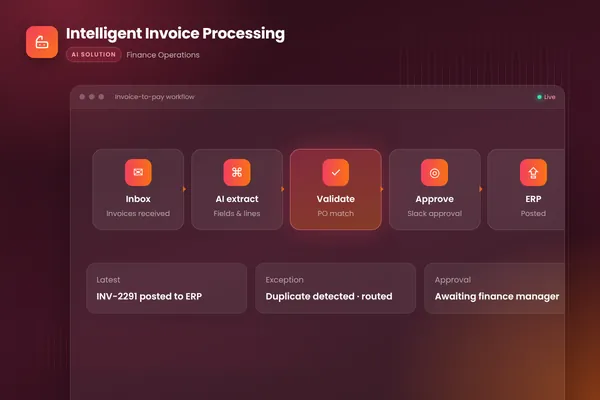
Our intelligent invoice processing build shows the API-first version of this pattern. The workflow watches the invoices inbox, uses document AI to extract every field from PDFs, scans and email bodies, matches lines against purchase orders, routes approvals in Slack and posts approved invoices to the accounting system. Posting goes through the accounting system's API, so no bot is involved, and the whole process runs on Temporal as its workflow engine.
RPA modernization: which bots to keep, rebuild or retire
If you already run a fleet of bots, do not rebuild them all at once. This is the checklist our autonomous workflows team uses to rank them.
| Question | Points to keep | Points to rebuild with AI and APIs |
|---|---|---|
| How often does it break? | Rarely | Regularly, after screen or format changes |
| What does it read? | Fixed fields on known forms | Emails, PDFs, scans, free text |
| Does the target system have an API now? | No | Yes, or one is planned |
| How long is the process? | A single short task | Many steps across several systems |
| How many exceptions go to people? | Few | Many, often without context |
| Who can maintain it? | Your team, easily | Nobody wants to touch it |
Score each bot, then start with the one that breaks most often and touches the most work. For that process:
- Map the full process, not just the bot's part of it, including what people do before and after.
- Collect real examples with known outcomes. They become the evaluation set.
- Replace screen steps with API calls wherever an API exists.
- Add AI only to the steps that need reading or judgment, each followed by validation.
- Keep a small bot only for screens with no other way in.
- Run the new workflow in shadow mode alongside the bot, compare results, then switch over.
How to choose
Ask three questions about the process in front of you. Does it involve reading unstructured content or making judgment calls? Does it span several systems? Do those systems have APIs? Two or three "yes" answers point to AI workflow automation. Three "no" answers on a short, stable task point to RPA, or to a simple scripted integration. Anthropic's advice in Building effective agents holds here too: find the simplest solution that works, and add complexity only when it clearly improves results.
If you want a second opinion on your bots or a process you are planning to automate, our autonomous workflows and AI agent teams can review it with you. You can also talk to an engineer directly.
Frequently asked questions
Is RPA being replaced by AI?
Not entirely. Language models take over the parts RPA was never good at, such as reading emails, PDFs and free text and making judgment calls. But RPA still has a place where a legacy application has no API and the task is stable and rule-based. In practice many teams keep a few bots for those screens and move everything else to API-based workflows with AI steps.
What is intelligent automation?
Intelligent automation is a broad term for combining automation with AI, so processes can handle unstructured inputs and decisions as well as fixed rules. It covers RPA bots with AI add-ons, API-based workflows with AI steps, and AI agents. The label matters less than the design: where the AI sits, how its output is checked and how exceptions reach people.
Can AI workflow automation work with legacy systems?
Yes. The first choice is an API, a database connection, a file export or an integration the vendor already offers. When none of those exist, a hybrid works: the AI workflow does the reading, checking and routing, and an RPA bot enters the final result into the legacy screen. Keep that bot's job as small as possible, because it is the part most likely to break.
Is AI workflow automation more expensive than RPA?
The costs sit in different places. RPA usually means platform licences and ongoing bot maintenance whenever screens change. AI workflows add model usage per item and the work of building and maintaining evaluation sets, but they need less fixing when layouts change. Compare the total cost over two or three years, including maintenance and exceptions, not just the build.
Sources
- Introduction to desktop flows, Microsoft Learn
- A practical guide to building agents, OpenAI
- Building effective agents, Anthropic
- What is Temporal?, Temporal Technologies
Cite this article
BufferSol Editorial Team (2026). AI Workflow Automation vs RPA: What Is the Difference, and When Should You Use Each?. BufferSol Technologies. https://buffersoltech.com/blog/ai-workflow-automation-vs-rpa
BufferSol Editorial Team
AI & software engineering team
Senior engineers, AI specialists and product leads at BufferSol Technologies who design, build and run AI agents, autonomous workflows and custom software for companies in the US, UK and Europe.
Reviewed by Sufyan K., Senior Writer, BufferSol Technologies.