Key takeaways
- AI invoice processing turns invoices in any format into structured data, checks it, matches it to purchase orders and receipts, routes it for approval and posts it to the accounting system.
- Extraction is only the first step. Validation, matching, approvals and exception handling decide whether the workflow can be trusted with payments.
- Every extracted value should be checked by code before it is used: totals, supplier, duplicates and the matching purchase order.
- People approve payments and review exceptions. The workflow's job is to make both fast, by doing the reading, checking and explaining first.
- Treat invoice text as untrusted input, keep payment actions behind approval, and log every step for audit.
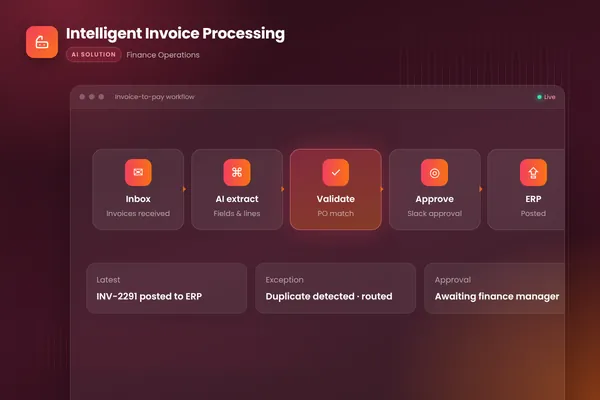
AI invoice processing works in six stages. The workflow captures each invoice from an inbox or upload, uses document AI to extract the supplier, dates, totals and line items from any layout, checks that data with business rules, matches it against purchase orders and receipts, routes clean invoices to the right approver, and posts approved ones to the accounting system. Anything that fails a check goes to a person with the reason explained.
If you are comparing scanners with this approach, see invoice scanning software vs AI invoice agents for why OCR templates break and a test to run on your own invoices.
This post walks through each stage using the intelligent invoice processing workflow we built for a finance team that was keying hundreds of supplier invoices a month by hand from PDFs, scans and emails, then chasing approvals over email. For the full picture, including controls, KPIs and a 30-day pilot plan, see our intelligent invoice processing guide. For the general approach to designing workflows like this, see our guide to AI workflow automation.
The six stages of an AI invoice workflow
- 011. CaptureWatch the invoices inbox; each email with an attachment starts a workflow run.
- 022. ExtractDocument AI reads supplier, invoice number, dates, totals and line items from PDFs, scans and email bodies.
- 033. ValidateCode checks required fields, totals, supplier records and duplicates.
- 044. MatchLines are matched to the purchase order and goods receipt; mismatches are flagged and explained.
- 055. ApproveClean invoices go to the right approver in Slack, with reminders and time limits.
- 066. PostApproved invoices are posted to the accounting system with a full audit trail.
BufferSol Technologies · buffersoltech.com
1. Capture
Invoices arrive in many ways: attachments to a shared inbox, links in email bodies, supplier portals and uploads. In our build, the workflow watches the invoices inbox, and each new email with an invoice starts its own workflow run. Capture also handles the dull but important details: separating multiple invoices in one email, ignoring signatures and logos, and recording where each document came from.
2. Extract
This is the AI step. A document AI model reads the invoice and returns structured data. Microsoft's documentation for its Document Intelligence invoice model, which our build uses, says it handles invoices "of various formats and quality including phone-captured images, scanned documents, and digital PDFs," extracts key fields and line items, and returns them as structured JSON. The same page calls accurate extraction "typically the first and one of the most critical steps in the invoice automation process."
Extraction is only as useful as what happens next, though. A model can return a plausible but wrong value, especially on a poor scan, so nothing extracted is trusted until it has been checked.
3. Validate
Plain code should check every extracted invoice before it moves on. These are the checks we recommend:
- Required fields are present: supplier, invoice number, date, currency, total.
- Line items add up to the subtotal, and tax and total are consistent.
- The supplier exists in your records, and bank details match what you hold.
- The invoice number has not been seen before for that supplier (duplicate check).
- Field-level confidence is above the threshold you set; low-confidence fields go to review.
The bank-details check deserves attention on its own. Changed payment details on an invoice can be a sign of fraud, so any mismatch should stop the invoice and alert a person, never update the supplier record automatically.
4. Match
The workflow matches each line to the purchase order and, where goods are involved, to the goods receipt. This three-way match confirms that you ordered the item, received it and are being billed the agreed price and quantity. In our build, mismatches and likely duplicates are flagged with a plain-language explanation, so the reviewer sees something specific, for example "invoice quantity 120, received 100", rather than a generic error.
5. Approve
Invoices that pass every check go to the right approver based on your policy: by amount, cost center or supplier. In our build, approvals happen in Slack, with reminders when an approval stalls. Approvers see the invoice, the match result and any notes in one place, and approve or reject with one click.
People stay in control of payments by design. OpenAI's practical guide to building agents lists making payments among the high-risk actions that should trigger human oversight. The workflow's job is to make that decision fast, not to make it.
6. Post
Approved invoices are posted to the accounting system through its API, with the extracted data, the match result, the approver and the time recorded. That audit trail answers the questions auditors ask: who approved this, based on what, and when. For the steps after posting, such as payment runs, supplier queries and statement reconciliation, see our post on AP automation with AI agents.
The exception queue is half the design
Every invoice that fails a check lands in a review queue with the reason already written: missing purchase order, price mismatch, possible duplicate, unreadable scan, changed bank details. The reviewer starts from an explanation, not a blank screen.
Design this queue as carefully as the main path. Group exceptions by reason, show the evidence side by side, and let the reviewer fix the data and send the invoice back into the flow. Then review the queue every week. It tells you exactly which suppliers, formats or rules cause the most work, and where the next improvement should go.
Why the orchestration layer matters
An invoice can take days to clear: waiting for a receipt to be booked, an approver to return, or a supplier to send a corrected copy. A chain of scripts loses track of where each invoice is when something fails halfway.
Our build runs on Temporal, a durable workflow engine. Temporal's documentation describes durable execution as preserving a workflow's state and progress "even in the face of failures," so a run resumes from its last recorded step after a crash or outage. For invoices, that means no half-posted entries and no invoice silently lost between approval and posting.
Security controls for invoice workflows
Invoices are documents written by outside parties, and the workflow reads every word. The OWASP Top 10 for LLM applications ranks prompt injection first, and text hidden in an invoice is a realistic way to attempt it. Practical controls:
- Treat all invoice text as data. Never let instructions inside a document change what the workflow does.
- Give the extraction step no write access to anything. Only the posting step can write to the ledger, and only after approval.
- Never update supplier bank details from an invoice. Route changes through a separate, verified process.
- Log every step, input and decision so any outcome can be traced.
Off-the-shelf AP software or a custom workflow?
Many accounts payable platforms now include AI extraction, and for a team with standard processes and a supported accounting system they can be the quickest route. A custom workflow makes more sense when invoices arrive through several channels, when matching rules are specific to your business, when approvals need to happen in the tools your team already uses, or when the workflow must connect to several systems at once, such as an ERP, a procurement tool and a warehouse system.
The questions to ask are the same either way: how is extracted data checked, how are exceptions explained, who approves payments, and what does the audit trail show? A tool that cannot answer those clearly is a risk, whatever it costs.
How to measure an AI invoice workflow
Record the baseline before you build, then track the same measures after launch: invoices per month, minutes of handling per invoice, time from receipt to approval, share of invoices that pass straight through without a human touch, exception rate by reason, and duplicates or errors caught before payment. The client outcomes we target are the ones from our build: manual keying removed, faster approvals and a smoother month-end, and duplicates and mismatches caught before payment.
Getting started
Collect fifty to a hundred recent invoices with their correct posted values, across your main suppliers and formats, and measure how well extraction and matching perform on them before anything else. Our autonomous workflows team can run that test with you on your own invoices and accounting system. You can also talk to an engineer about your current invoice process.
Frequently asked questions
What is the difference between OCR and AI invoice processing?
OCR turns an image of text into machine-readable text. AI invoice processing goes further: it identifies which text is the supplier, the invoice number, the due date, the total and each line item, whatever the layout, and returns structured data. A full workflow then validates that data, matches it to purchase orders and receipts, routes it for approval and posts it to the accounting system.
Can AI invoice processing handle scanned and photographed invoices?
Yes, within limits. Document AI services such as Microsoft's invoice model accept digital PDFs, scanned documents and phone-captured images. Quality still matters: blurred photos, tiny print or multiple documents in one image make extraction less reliable. A good workflow scores its confidence in each field and sends low-confidence invoices to a person instead of guessing.
Should AI approve or pay invoices automatically?
We recommend against letting AI approve payments on its own. Payments are hard to reverse, and OpenAI's agent guidance lists making payments as an action that should trigger human oversight. The workflow should do the work before approval, extraction, checks, matching and a clear summary, so the approver can decide in seconds, and post to the ledger only after a person approves.
Sources
- Invoice data extraction – Document Intelligence, Microsoft Learn
- What is Temporal?, Temporal Technologies
- A practical guide to building agents, OpenAI
- 2025 Top 10 Risk & Mitigations for LLMs and Gen AI Apps, OWASP Gen AI Security Project
Cite this article
BufferSol Editorial Team (2026). AI Invoice Processing: How It Works End to End, From Inbox to Ledger. BufferSol Technologies. https://buffersoltech.com/blog/ai-invoice-processing
BufferSol Editorial Team
AI & software engineering team
Senior engineers, AI specialists and product leads at BufferSol Technologies who design, build and run AI agents, autonomous workflows and custom software for companies in the US, UK and Europe.
Reviewed by Sufyan K., Senior Writer, BufferSol Technologies.