Key takeaways
- Modern finance IT solutions add AI agents on top of the ERP, bank feeds and AP and AR tools: agents read documents, match records, chase people and explain exceptions, while people approve and sign off.
- The best first tasks are frequent, rule-based and easy to check: bank and account reconciliation, cash application, collections reminders, invoice processing and close checklists.
- Agents never move money or post journals on their own. Payments, write-offs and journal entries go through human approval, and every step is logged.
- Durable workflows, narrow permissions and treating every document as untrusted input are what make finance agents auditable.
- A realistic 30-day pilot puts a working agent on your real data for one process; full rollout across processes typically takes 4 to 8 weeks.
Finance IT solutions are the systems a finance team runs on: the ERP or accounting system, bank feeds, AP and AR tools, expense and payroll systems, and the reports built on top. What has changed is the layer above them. AI agents can now do much of the repetitive work across those systems: reading invoices and statements, matching records, chasing people for documents and explaining every exception, while the finance team approves, signs off and handles judgment calls.
This guide covers which finance tasks agents can take on today, how they connect to your ERP and bank, the controls that keep them auditable, how to measure results and what a realistic 30-day pilot looks like. The worked example throughout is the intelligent invoice processing workflow BufferSol built for a finance team that keyed hundreds of supplier invoices a month by hand and chased approvals over email, with a slow, error-prone month-end as a result.
What AI agents add to finance IT solutions
Most finance teams already have good systems of record. The gaps are between them. Someone downloads a statement, opens a spreadsheet, matches lines by eye, emails a colleague for a missing receipt, keys a correction and writes a note for the auditors. That glue work is where time goes, and where errors creep in.
An AI agent, in OpenAI's practical guide to building agents, is a system that uses a model to manage a workflow and make decisions, with tools to gather context and take actions, inside guardrails. In finance, the tools are your ERP, bank data, document store, email and chat. The agent's job is to do the reading, matching and chasing, and to hand people a short list of decisions with the evidence attached.
Finance work is also mostly predictable, which matters. Anthropic's engineering team, in Building effective agents, separates workflows, where code follows predefined paths, from agents that direct their own steps, and advises using the simplest design that works. Our invoice build follows that advice: it is an autonomous workflow with AI steps where documents need reading and judgment, and plain code everywhere else.
Which finance tasks agents can take on
The table maps common finance operations work to what an agent does and where a person stays in charge.
| Process | What the agent does | Where a person decides |
|---|---|---|
| Invoice processing (AP) | Reads invoices, validates, matches to POs and receipts, routes approvals, posts after approval | Approves payment; reviews exceptions |
| Bank reconciliation | Matches bank lines to ledger entries, proposes matches for the rest, explains breaks | Accepts proposed matches; resolves breaks |
| Cash application | Matches incoming payments and remittance details to open invoices | Approves partial or unclear matches |
| Collections (AR) | Sends reminders by policy, logs promises to pay, flags disputes | Handles disputes, credit holds and write-offs |
| Expense audit | Checks receipts against policy, flags missing or unusual items | Decides on flagged claims |
| Close checklist | Tracks tasks, gathers evidence, chases owners, prepares reconciliations for review | Reviews and signs off each account |
| Reporting questions | Answers questions about finance data in plain English, with the query and source shown | Interprets results; owns reported numbers |
The pattern is the same in every row. The agent does the preparation and the explaining. People keep authority over money, journals and judgments.
One process end to end: invoice to pay
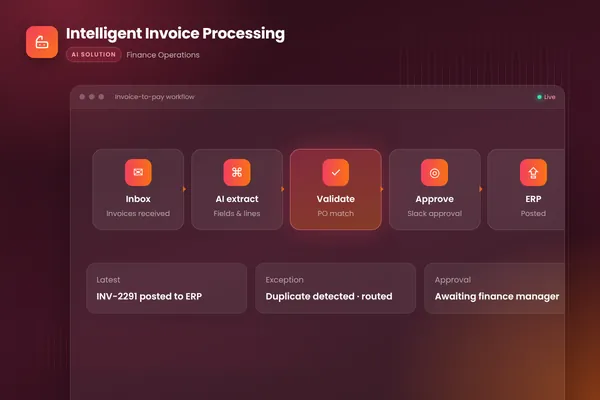
Our invoice workflow shows how the pieces fit. It watches the invoices inbox, extracts every field with document AI from PDFs, scans and email bodies, checks the data, matches lines to purchase orders and receipts, and flags mismatches and likely duplicates. Clean invoices go to the right approver in Slack, with reminders, and are posted to the accounting system once approved. Exceptions land in a review queue with the reason already explained.
- 011. CaptureWatch the inbox or upload folder; each new document starts a tracked workflow run.
- 022. ReadDocument AI extracts supplier, dates, totals and line items from any format.
- 033. CheckCode validates totals, supplier records, duplicates and bank details.
- 044. MatchLines are matched to the purchase order and receipt; mismatches are explained.
- 055. ApproveThe right approver decides in Slack, with reminders and time limits.
- 066. Post and logApproved items post to the accounting system with a full audit trail.
Source: BufferSol intelligent invoice processing workflow
BufferSol Technologies · buffersoltech.com
The outcomes the client wanted were manual keying removed from the invoice process, faster approvals and a smoother month-end, and duplicates and mismatches caught before payment. Our intelligent invoice processing guide covers that process in depth. The same six stages, capture, read, check, match, approve, post and log, carry over to most of the processes in the table above.
Reconciliation and cash application
Reconciliation is matching work: this bank line against that ledger entry, this payment against those invoices. Much of it follows simple rules, such as same amount, same reference, same date within a few days, and plain code should handle those. The agent earns its place on the rest: references written differently, one payment covering several invoices, remittance details arriving separately by email or as a PDF.
A practical design:
- Rules first. Exact and near-exact matches are made by code, with the rule recorded against each match.
- Agent for the remainder. For unmatched lines, the agent reads remittance emails and documents, looks up open items and proposes a match with its reasoning.
- People accept or reject. A reviewer sees the proposal and the evidence side by side and accepts, edits or rejects it. Nothing posts without that step at first.
- Learn from decisions. Rejected proposals and manual matches feed new rules and test cases, so the share of lines needing review falls over time.
Statements often arrive as PDFs rather than data feeds. Document AI helps here too. Microsoft's bank statement model, for example, extracts account details, statement details and transactions from US bank statements and returns structured JSON. Where you have a direct bank feed, use it; it is cleaner than reading documents.
Collections and accounts receivable
Collections is a good fit for an agent because the work is repetitive, follows policy and depends on keeping track of many conversations. The agent can send reminders on schedule in the right tone for each customer segment, read replies, log promises to pay with dates, attach copies of invoices on request and spot disputes early.
The limits matter as much as the tasks. Disputes, payment plans, credit holds and write-offs are decisions for people. When a customer says an invoice is wrong, the agent should stop the reminder sequence for that invoice, gather the details and hand the case to the right person with a summary. It should never threaten, change terms or promise discounts. Keep the wording of every reminder in an approved template set, and let the agent choose and fill templates rather than write freely.
Close and reporting
Month-end close is a long checklist with many owners. Agents help in three ways.
Tracking and chasing. The agent knows which tasks are open, who owns them and what evidence is missing, and it sends specific reminders ("the accruals schedule for cost center 410 is not in the close folder yet") instead of generic ones.
Preparing reconciliations. For balance sheet accounts, the agent pulls the balances, matches supporting detail, lists unexplained differences and prepares the reconciliation for a reviewer. The reviewer signs off; the agent never does.
Answering questions. Controllers and FP&A teams ask the same questions every month: why did this line move, which suppliers drove the increase, what is still unpaid over 60 days. An agent with read-only access to the ledger and reporting data can answer in plain English, showing the query it ran and the source data, so the answer can be checked. Read-only access is the important part.
Controls that keep finance agents auditable
Finance agents are only useful if auditors and controllers trust them. These controls are the minimum.
| Stage | Control | Why |
|---|---|---|
| Input | Treat every document and email as untrusted data | Stops instructions hidden in a document from changing behavior |
| Extraction | Confidence thresholds; low-confidence fields go to review | Prevents plausible but wrong values from flowing through |
| Checks | Validation rules in code, not in the prompt | Rules that always run the same way are easier to test and audit |
| Master data | Bank detail and supplier changes never made from a document | Changed bank details are a common fraud signal |
| Approval | People approve payments, journals and write-offs | Keeps authority where it belongs |
| Duties | The agent cannot approve its own work or change its own rules | Keeps segregation of duties intact |
| Records | Every input, check, decision and approval logged | Answers "who did what, based on what, and when" |
The OWASP Top 10 for LLM applications ranks prompt injection first and excessive agency among the top risks. Both are real in finance, because agents read documents written by suppliers and customers. The answer is narrow permissions: the step that reads a document has no write access to anything, and the step that posts to the ledger only acts after an approval it can verify.
Make payments a hard boundary. OpenAI's guide lists making payments among the high-risk actions that should trigger human oversight. Our invoice workflow posts to the accounting system only after a person approves in Slack, and it never pays anyone on its own.
For a broader governance framework, NIST's AI Risk Management Framework is intended for voluntary use to help organizations manage risks from AI and build trustworthiness into how AI systems are designed, developed, used and evaluated. Its structure maps well onto finance controls work: decide who is accountable, map where the agent acts, measure its accuracy and manage the exceptions.
Integrations: ERP, bank, documents and chat
An agent is only as good as its connections. A typical integration checklist for finance:
- ERP or accounting system: read access to vendors, customers, open items, purchase orders and the chart of accounts; write access limited to the specific posting the process needs, after approval. Our invoice build posts to QuickBooks through its API.
- Bank data: a direct feed or regular statement files; read-only.
- Document intake: the invoices or remittance inbox, an upload folder, or a supplier portal export.
- Chat and email: for approvals, reminders and questions. Our build routes approvals through Slack with reminders and time limits.
- Reporting store: a read-only copy of ledger data for questions and analysis, so the agent never queries production systems heavily.
Long-running processes need durable orchestration. An invoice can wait days for a receipt or an approver. Our build runs on Temporal, whose documentation describes durable execution as preserving a workflow's state and progress even in the face of failures, so a run resumes from its last step after an outage. For finance, that means no half-posted entries and no item lost between approval and posting.
Choosing the first process
Score candidate processes before you build. The best first pilot is frequent, rule-based, easy to check and low risk if a proposal is wrong, because a person reviews it.
| Question | Good first pilot | Later |
|---|---|---|
| How often does it run? | Daily or weekly, many items | Quarterly or rare |
| How rule-based is it? | Clear matching or policy rules | Mostly judgment |
| Can results be checked quickly? | Yes, with evidence side by side | Needs deep investigation |
| What does an error cost before review? | Nothing; a person reviews first | Money moves or numbers are reported |
| Is the data reachable? | API, feed or regular files | Locked in a system with no export |
Invoice processing, bank reconciliation, cash application and collections reminders usually score well. Revenue recognition judgments, tax positions and anything that goes straight into external reporting belong later, with heavier review. Our post on workflow exception handling explains how to design the review queue that every one of these processes needs.
Data protection and security
Finance data includes bank details, salaries, customer debts and supplier contracts. Decide what each agent can see, keep processing in the region your policies require, and keep logs of access. Check what any AI provider does with your data. BufferSol uses enterprise API terms that exclude client data from training, can deploy in your own cloud or with self-hosted models when policy requires it, and signs NDAs and DPAs on request. Our DPA checklist for AI vendors lists what that agreement should cover.
Measuring results
Record a baseline before you build, then track the same measures after launch.
| Measure | What it tells you |
|---|---|
| Items per month, by process | Volume the agent is handling |
| Minutes of handling per item | Time returned to the team |
| Share of items with no human edits | How much is truly automated |
| Exceptions by reason | Where rules, data or suppliers cause work |
| Errors found after approval | Whether checks and review are working |
| Days to close | Whether month-end is getting smoother |
| Overdue receivables and dispute age | Whether collections work is effective |
Review the exception queue every week with the team that works it. It shows exactly which rule, supplier or data source to fix next.
Testing before go-live
Collect a test set from real history for each process: invoices with their correct posted values, bank lines with their correct matches, customer replies with the right classification. Run the agent on the test set before launch and after every change to prompts, models, rules or integrations. Measure accuracy per field and per decision, and read every error. Our post on AI agent evaluation explains how to build the set and set pass criteria. Add deliberate tests for the controls: a document with hidden instructions, a changed bank detail, a duplicate invoice, an approval from the wrong person. Each should be stopped and logged.
Roles in the finance team after launch
Agents change the work; they do not remove the need for finance judgment.
- The controller or finance lead owns the control design, the approval limits and sign-off.
- AP and AR specialists work the exception queues, approve proposals and give feedback on rules and wording.
- Finance systems or operations owns integrations, master data and the agent's configuration.
- Internal or external audit reviews the control design and the evidence the agent produces.
Plan the first weeks so specialists review every output. As accuracy is proven, move low-risk items from full review to sampled review, and keep full review for payments, journals and anything above your thresholds.
Off-the-shelf finance software or a custom agent?
Many AP, AR and close tools now include AI features, and for a team with standard processes and a supported ERP they can be the quickest route. A custom agent makes sense when work spans several systems, when your matching or approval rules are specific, when approvals need to happen in the tools your team already uses, or when data must stay in your environment.
| Situation | Finance software with AI features | Custom finance agent |
|---|---|---|
| Standard process, supported ERP | Usually the quicker start | Often more than you need |
| Work spans ERP, bank, inbox, chat and other systems | Limited to built-in integrations | Built around your systems |
| Specific matching, approval or policy rules | Settings the tool exposes | Enforced in code to your rules |
| Data must stay in your environment | Depends on the vendor | Can run in your cloud or with self-hosted models |
| Ownership of code, rules and prompts | Stays with the vendor | You own 100% of the IP |
Ask any option the same questions: how is extracted data checked, how are exceptions explained, who approves money and journals, and what does the audit trail show?
A 30-day pilot plan
A realistic first month puts a working agent on your real data for one process, with your team reviewing every output. Full rollout across processes, with every integration and a staged launch, typically takes 4 to 8 weeks.
- 01Days 1 to 5: choose and mapPick one process; document steps, rules, approvals and exceptions; collect a test set from real history.
- 02Days 6 to 14: prototypeA working agent on your real data, measured against the test set; ERP and bank access set up read-only.
- 03Days 15 to 21: controlsApproval routing, exception queue, audit log and control tests; agree the design with your controller.
- 04Days 22 to 30: live pilotRunning on a first slice of live items with full human review; results compared with the baseline.
Source: BufferSol delivery approach; prototype in about two weeks
BufferSol Technologies · buffersoltech.com
We work in two-week sprints with a demo every week, so your finance team sees real outputs on its own data early and can correct rules before anything goes live.
Common pitfalls
- Starting with the hardest process because it hurts most, instead of one that can be checked quickly.
- Putting validation rules in the prompt, where they cannot be tested like code.
- Letting the agent update supplier or customer master data from documents.
- Skipping the baseline, so nobody can show what changed.
- Treating the exception queue as an afterthought; it is where the team spends its time.
- Giving the agent broad ERP access "for now" during the pilot.
After the pilot: extending safely
When the first process runs well, extend in steps. Move low-risk items from full review to sampled review, add the next process from your scoring table, and reuse what you built: the document intake, the approval routing, the exception queue, the audit log and the test set all carry over. A team that starts with invoice processing often adds supplier statement reconciliation next, because it uses the same data, then cash application and collections on the AR side. Keep payments, journals and write-offs behind approval however well the agent performs.
Getting started
Pick the process that costs your team the most repetitive hours each month. Pull fifty to a hundred recent items with their correct outcomes, write down the rules your team follows and the approvals each item needs, and check how the agent will reach the data: API, feed or files. That is enough to start a prototype. Our autonomous workflows team builds finance processes like invoice-to-pay and reconciliation, and our AI agents team handles the steps that need an agent, such as reading replies or answering questions about your data. For where approvals should sit, see human-in-the-loop AI agents.
Frequently asked questions
What are finance IT solutions?
Finance IT solutions are the systems a finance team runs on: the ERP or accounting system, bank connections, AP and AR tools, expense and payroll systems, reporting and the integrations between them. Today the term increasingly includes AI agents and automated workflows that do the repetitive work across those systems, such as reconciliation, invoice processing and collections, with people approving the decisions.
Which finance tasks can AI agents handle?
Agents work well on frequent, rule-based tasks that need reading or matching: extracting data from invoices and statements, bank and account reconciliation, matching incoming payments to invoices, sending collections reminders, gathering close evidence and answering questions about finance data. Judgment calls, approvals, journal sign-off and anything that moves money stay with people.
Can AI post journal entries or make payments?
It should not do either on its own. OpenAI's agent guidance lists making payments among the high-risk actions that should trigger human oversight. A good design lets the agent prepare the entry or payment run, with evidence and an explanation, and posts it only after an authorized person approves it. The approval is logged with the entry.
Do we need to replace our ERP to use AI agents?
No. Agents work on top of the systems you already have, through their APIs, exports or secure file drops. Our invoice-to-pay workflow, for example, posts approved invoices to the existing accounting system through its API. If a system has no API, a reviewed file import is often enough for a first pilot.
How do auditors view AI in finance processes?
Auditors care about the same things they always do: who did what, based on which evidence, and who approved it. An agent that logs every input, check, decision and approval, keeps segregation of duties and cannot change its own rules usually makes evidence easier to produce. Agree the control design with your auditors before go-live.
How long does an AI finance automation project take?
At BufferSol, you get a working agent on your real data for one process in under 30 days: about two weeks to a prototype, then a pilot on a first slice of the work with your team reviewing every output. Full production rollout, with integrations, controls and a staged launch, typically takes 4 to 8 weeks.
Sources
- A practical guide to building agents, OpenAI
- Bank statement US extraction model, Microsoft Learn
- What is Temporal?, Temporal Technologies
- AI Risk Management Framework, NIST
- 2025 Top 10 Risk & Mitigations for LLMs and Gen AI Apps, OWASP Gen AI Security Project
- Building effective agents, Anthropic
Cite this article
BufferSol Editorial Team (2026). Finance IT Solutions: How AI Agents Run Reconciliation, Close, Collections and Reporting. BufferSol Technologies. https://buffersoltech.com/blog/finance-it-solutions-guide
BufferSol Editorial Team
AI & software engineering team
Senior engineers, AI specialists and product leads at BufferSol Technologies who design, build and run AI agents, autonomous workflows and custom software for companies in the US, UK and Europe.
Reviewed by Sufyan K., Senior Writer, BufferSol Technologies.