Key takeaways
- AI accounting software is strongest at reading documents, categorizing transactions, matching records and drafting first versions; accountants still own judgment, sign-off and anything reported externally.
- The PCAOB staff's 2024 outreach found preparers using generative AI for first drafts and for repetitive work such as account reconciliations, with human review still essential.
- Sort your work into three bands: automate with checks, let AI draft for review, and keep with the accountant.
- You rarely need new accounting software to use AI. An agent can sit on top of your existing ledger through its API, with read access by default and writes only after approval.
- Judge any option on how it checks its own output, explains exceptions and records who approved what.
AI accounting software is good today at the reading and matching work in accounting: capturing invoices, receipts and statements, suggesting categories and GL codes, matching bank lines to the ledger, flagging unusual items and drafting first versions of reconciliations and summaries. Accountants still own the judgment: accounting treatments, estimates, sign-off, anything reported externally and advice to the business. The best setups give AI the first pass and keep people on the decisions.
This post maps accounting work into what AI can automate, what it can draft for review and what stays with an accountant, and shows how an AI agent can sit on top of the ledger you already have. It describes the software category in general rather than ranking vendors. For the wider picture, see our finance IT solutions guide.
What the evidence says so far
The most useful public evidence comes from the PCAOB, the US audit regulator. In a July 2024 staff Spotlight on generative AI in audits and financial reporting, staff described integration as "in its early stages but rapidly evolving." Preparers reported using generative AI to create first drafts of internal documents, and some used it "to assist in the performance of less complex and repetitive processes, such as preparing account reconciliations or to assist with identifying reconciling items."
The same report is clear on oversight. Firms investing in these tools expected AI "to augment, but not replace, humans in auditing or in financial reporting," and preparers stressed that human involvement in supervising AI and reviewing its output continues to be important. That matches what we see in practice: AI earns its place on volume and repetition, and people stay accountable for the numbers.
Three bands of accounting work
Sort every task into one of three bands. The band decides how much review it needs.
| Examples | How AI is used | |
|---|---|---|
| Automate with checks | Invoice and receipt capture, bank line matching on clear rules, duplicate detection, data entry | Runs on its own; code checks every result; exceptions go to a person |
| Draft for review | Category and GL code suggestions, reconciliations, accrual lists, variance explanations, client queries | AI prepares with reasons and sources; an accountant reviews and approves |
| Keep with the accountant | Accounting treatments, estimates and judgments, journal sign-off, tax positions, reported numbers, advice | AI may gather evidence; the decision and sign-off stay with a person |
Source: BufferSol; oversight principle consistent with PCAOB staff observations (July 2024)
BufferSol Technologies · buffersoltech.com
Automate with checks
These are high-volume tasks with a right answer that code can verify. Reading documents is the main one. Microsoft's bank statement model, for example, extracts account details, statement details and transactions from US bank statements and returns structured data. Our invoice processing workflow uses Microsoft's invoice model the same way, then checks totals, suppliers and duplicates in code before anything moves on.
"Automate" never means "unchecked". Every extracted value is validated, low-confidence results go to a person, and the exception queue is reviewed weekly.
Draft for review
This is where most of the time savings are, and where AI's mistakes are easiest to catch. The AI prepares the work and shows its reasoning; the accountant reviews it.
- Categorizing and coding: a suggested category or GL code per transaction, with the reason ("same supplier coded to Software on the last eight invoices").
- Reconciliations: balances pulled, supporting detail matched, unexplained differences listed with likely causes.
- Month-end lists: goods received but not invoiced, invoices waiting for approval, items stuck in exceptions.
- Variance commentary: a first draft of why a line moved, with the transactions that drove it.
- Client or colleague questions: a draft reply with the figures and their source.
Keep with the accountant
Some work is judgment by definition: revenue recognition and other accounting treatments, estimates and provisions, impairments, tax positions, journal sign-off, anything that goes into reported numbers, and advice. AI can collect the evidence and draft the memo, but the decision and the sign-off belong to a qualified person.
How an agent sits on top of your ledger
You rarely need to replace your accounting system to use AI. Many packages now include AI features, and for standard work inside one system those may be enough. When work spans several systems, such as the ledger, bank, inbox, document store and chat, an agent on top can do more.
OpenAI's practical guide to building agents describes agents as systems that use tools to gather context and take actions in external systems, within guardrails. In accounting, that design looks like this:
| Access | What the agent does |
|---|---|
| Read: ledger, vendors, customers, open items | Looks up records to match, code and explain |
| Read: bank data and documents | Extracts and compares transactions |
| Write: draft items only | Prepares entries, reconciliations and replies as drafts |
| Write: posting, after approval | Posts only what an authorized person approved |
| Never | Changes bank details, releases payments, signs off |
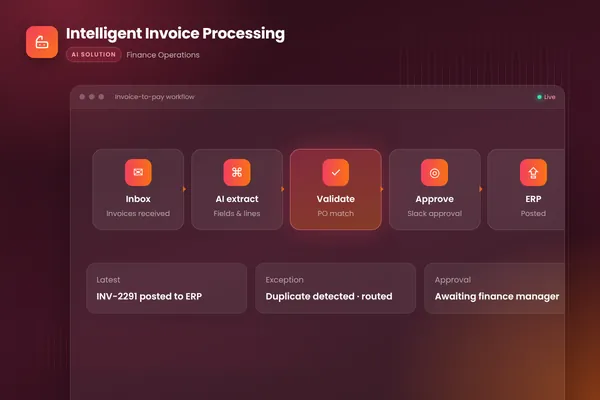
Our invoice workflow follows this pattern: it extracts and checks invoices, matches them to purchase orders and receipts, routes approvals in Slack and posts approved invoices to the accounting system with a full audit trail. The agent never pays anyone on its own.
Where AI goes wrong in accounting
Knowing the failure modes tells you where to put the checks.
- Plausible but wrong values. A model can read a blurred total or a date in the wrong format and return something that looks right. Validation in code (totals add up, dates fall in the period, the supplier exists) catches most of these.
- Pattern-following on a changed situation. A coding suggestion based on history will repeat last month's treatment even when the contract or the accounting changed. New suppliers, new contracts and unusual amounts should always go to review.
- Confident explanations without evidence. A variance comment that sounds right but cites no transactions is worse than none. Require every explanation to point at the entries behind it.
- Instructions hidden in documents. Invoices and emails come from outsiders. Treat their text as data, never as instructions, and give the reading step no write access.
None of these is a reason to avoid AI. Each is a reason to keep the three bands, the checks and the review in place.
How to judge any option
Whether you are comparing accounting packages with AI features or a custom agent, ask the same questions:
- How does it check its own output? Look for validation rules, confidence levels and an exception queue, not just a claim of high accuracy.
- Does it explain itself? Every suggestion should come with a reason and a source an accountant can check in seconds.
- What does the audit trail show? Who or what did each step, based on which evidence, and who approved it.
- What can it change without approval? The answer should be "nothing that matters".
- What happens to your data? Where it is processed, who can see it and whether it is used for training.
For governance more broadly, NIST's AI Risk Management Framework is intended for voluntary use to help organizations manage AI risks and build trustworthiness into how AI systems are designed, developed, used and evaluated. Its approach of deciding accountability, mapping where AI acts, measuring accuracy and managing exceptions translates well to accounting controls.
Related reading: our posts on AP automation and on accounts receivable automation software apply the same three bands to payables and collections.
Getting started
List the tasks your team does every month and put each in one of the three bands. Pick the "draft for review" task that takes the most hours, collect a month of real examples with the correct outcomes, and test AI on them before changing anything. At BufferSol, you get a working agent on that data in under 30 days, with full rollout typically in 4 to 8 weeks. Our autonomous workflows team builds finance processes around your ledger, and our AI agents team handles the steps that need reading and judgment.
Frequently asked questions
What is AI accounting software?
AI accounting software uses machine learning and language models to do parts of accounting work: reading invoices, receipts and statements, suggesting categories and GL codes, matching bank lines to ledger entries, flagging unusual items and drafting summaries or reconciliations. It can be built into an accounting package or run as an agent on top of the ledger you already use.
Will AI replace accountants?
The evidence so far points to AI taking on repetitive work, not replacing accountants. In the PCAOB staff's 2024 outreach, firms investing in generative AI expected it to augment, not replace, people in auditing and financial reporting, and preparers stressed that human review of AI output remains important. Judgment, sign-off and client advice stay with accountants.
Do I need to replace my accounting system to use AI?
Usually not. Many accounting systems now include AI features, and an AI agent can also work on top of your current ledger through its API or regular exports. Our invoice workflow, for example, posts approved invoices to the existing accounting system. Start with read access and add write actions only behind approval.
Sources
Cite this article
BufferSol Editorial Team (2026). AI Accounting Software: What It Automates Today and What Still Needs an Accountant. BufferSol Technologies. https://buffersoltech.com/blog/ai-accounting-software
BufferSol Editorial Team
AI & software engineering team
Senior engineers, AI specialists and product leads at BufferSol Technologies who design, build and run AI agents, autonomous workflows and custom software for companies in the US, UK and Europe.
Reviewed by Sufyan K., Senior Writer, BufferSol Technologies.