Key takeaways
- Invoice scanning software turns a document into text and fields. An AI invoice agent also checks the data, matches it to your purchase orders and acts on the result.
- Template OCR breaks when a supplier's layout changes, because it looks for values in expected places. Model-based extraction reads the document in context instead of relying on position.
- Even good extraction is not the finish line. A field can be read perfectly and still be wrong for your books, for example a duplicate, a changed bank account or a price that does not match the purchase order.
- Judge any option on your own invoices. Score field accuracy, how often confidence is honest, and how many invoices need no human touch.
- Keep scanning where your invoices are uniform. Add an agent where the messy tail and the follow-up work cost you the most time.
Invoice scanning software reads a document and hands you text and fields: supplier, invoice number, dates, totals, lines. An AI invoice agent starts from the same extracted data, then checks it, matches it to your purchase orders and receipts, routes it for approval and posts it to your accounting system. Template-based OCR breaks when a supplier's layout changes, because it looks for values in fixed positions.
This post explains why templates break, what model-based extraction changes, and where an agent adds value that scanning alone cannot. It ends with a test you can run on your own invoices before you buy anything. It sits alongside our intelligent invoice processing guide and our comparison of AP automation software and a custom AI agent.
What invoice scanning software actually does
Scanning software has two jobs. First, it reads the page: OCR (optical character recognition) converts pixels into characters. Second, it decides which characters are which field. The first job is largely solved for clean documents. The second is where products differ.
Older tools solve the second job with templates or zones. You tell the tool that for Supplier A the total sits in the bottom right and the invoice number sits under the logo. It works well when Supplier A never changes anything.
Newer extraction models learn what an invoice number or a total looks like across many layouts. Microsoft describes its prebuilt invoice model as using OCR to extract key fields and line items from invoices "of various formats and quality", including phone photos, scans and digital PDFs, and returning structured JSON. Amazon says its Textract invoice analysis works on "almost any invoice or receipt without the need for any templates or configuration", and maps different labels such as bill number and invoice number to one standard field. Google's Document AI Invoice Parser extracts header and line-item fields in the same way.
So "invoice scanning software" now covers a wide range. The label tells you little. What matters is how a product finds the fields and what it does when it is unsure.
Why OCR templates break
A template stores where things are. Real invoices move.
- 011. Layout driftA supplier updates its invoice design, adds a column or moves the total. The template looks in the old place.
- 022. Long or short tablesA line-item table that runs onto page two, or a one-line invoice, shifts everything below it.
- 033. Many documents in one fileA statement, three invoices in one PDF or an invoice plus a delivery note confuses a one-document-per-file assumption.
- 044. Missing or renamed fieldsNo PO number on the invoice, or 'Tax invoice no.' instead of 'Invoice number', leaves the field empty or wrong.
- 055. Poor inputPhone photos, skewed scans and faint print produce misread characters that no template can fix.
- 066. Nothing happens nextEven a perfect read leaves a person to check totals, find the PO, chase approval and key the invoice into the ledger.
Source: BufferSol analysis
BufferSol Technologies · buffersoltech.com
Microsoft's own guidance is blunt about this. Its custom document models page says template models rely on "a consistent visual template" and that "variances in the visual structure of your documents affect the accuracy of your model". For documents that vary, it recommends custom neural models over template models "for higher accuracy" where the language is supported.
That is the core of the problem. A template is a bet that every invoice from a supplier looks the same forever. The more suppliers you have, the more chances one of them changes its format. Each change is a quiet failure: the tool does not crash, it just reads the wrong box.
The worst failure is the confident one
An empty field is easy to catch. A wrong value that looks plausible is not. If a scanner reads a subtotal as the total, or a PO number as an invoice number, the data still fits the field and flows downstream.
This is why confidence scores matter. Microsoft explains that a field-level confidence score is an estimated probability between 0 and 1 that the prediction is correct, and that "for scenarios where accuracy is critical, confidence can be used to determine whether to automatically accept the prediction or flag it for human review". Its accuracy guidance also notes that not every field returns a confidence score, and that read confidence and extraction confidence are separate numbers you should check together.
For a buyer, the practical point is simple. Ask how a tool signals doubt, and whether anything acts on that signal. A scanner that is wrong and certain is more expensive than one that is wrong and flags itself.
What an AI invoice agent adds
Extraction answers one question: what does this document say? An agent answers the next ones: is it right, is it new, does it match what we ordered, who approves it and what do we do now?
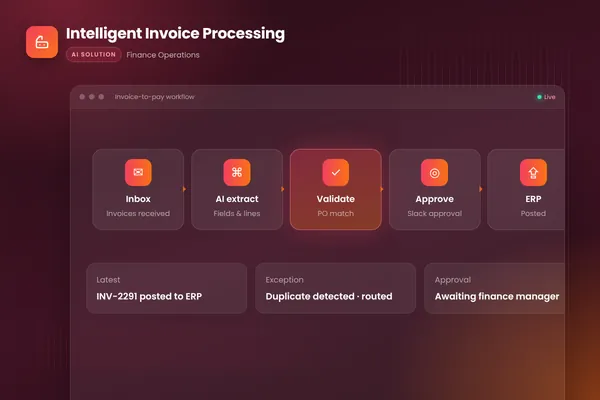
Our intelligent invoice processing build shows the pattern. It watches the invoices inbox, extracts every field with Azure Document Intelligence, matches lines to purchase orders, flags mismatches and likely duplicates, routes clean invoices to the right approver in Slack and posts approved invoices to the accounting system with an audit trail. Invoices that fail a check land in a review queue with the reason already written.
| Invoice scanning software | AI invoice agent | |
|---|---|---|
| Main job | Turn a document into text and fields | Run the invoice from inbox to approved and posted |
| New or changed layout | Template tools need re-setup; model-based tools cope better | Reads in context, and sends low-confidence fields to a person |
| Totals, duplicates, PO match | Often left to your AP or ERP rules | Checked in code before anyone sees the invoice |
| Approvals and posting | Usually a separate step or tool | Routes approvals and posts to the ledger with a log |
| Where a person steps in | Everywhere the data looks wrong | Only on exceptions, with the reason attached |
Source: BufferSol analysis
BufferSol Technologies · buffersoltech.com
Two guardrails make this safe. First, the checks run as code, not as model judgment: totals must add up, the invoice number cannot repeat, the supplier must exist. Second, the agent never changes payment details on its own. The FBI's Internet Crime Complaint Center tracks business email compromise, a scam where criminals pose as suppliers to redirect payments, and our rule is that a bank detail change from an email always goes to a person for verification through a known contact. No extraction model, however accurate, should be allowed to approve that.
Our post on touchless invoice processing shows the gates an invoice passes, and AP automation with AI agents covers the controls in more depth.
The break-point test: run it on your own invoices
Demos use clean invoices. Your real inbox does not. Here is a test you can run in an afternoon, whether you are comparing scanning tools, AP platforms or a custom agent.
- Pull a real sample. Take 50 to 100 invoices from the last six months (a BufferSol recommendation, enough to see patterns without a long project). Include your top suppliers and, on purpose, the awkward ones: phone photos, credit notes, multi-invoice PDFs, non-English suppliers and anything that has caused a posting error.
- Write the answer key. For each invoice, record the correct supplier, invoice number, date, currency, tax, total and PO number. Your team already knows these values.
- Run each option blind. Process the same files through every option. Do not let anyone tune the tool on your sample first, or you are measuring the setup, not the product.
- Score three things.
- Field accuracy: correct fields divided by total fields, tracked per field. A tool that reads totals well but misses PO numbers will still need people.
- Honest confidence: of the wrong values, how many were flagged as low confidence? Wrong and flagged is acceptable. Wrong and confident is the number to fear.
- Hands-off rate: how many invoices could move to approval with no human edit at all, after validation and matching?
- Tag every failure with its cause. Use the six causes above. The pattern tells you what to buy: mostly layout drift points to model-based extraction; mostly "read fine but needed work" points to an agent or an AP workflow around the scanner.
Keep the sheet. It is also your baseline for deciding whether any later change helped.
When to keep scanning software, and when to add an agent
Scanning software is a good fit when your invoices come from a small, stable set of suppliers in consistent formats, your ERP or AP tool already handles matching and approvals, and the main gap is typing.
An agent earns its place when the hours go elsewhere: checking totals, hunting for the PO, chasing approvers, handling exceptions and keying data into more than one system. It also fits when your formats vary widely, or when you want the rules and audit trail to live in your own systems.
You do not need to rip anything out. A custom agent can sit around a scanner you already own, or around a model-based extractor, and handle only the work the scanner leaves behind.
What a 30-day build delivers
Here is what we mean by "under 30 days". In the first two weeks we connect to your invoice inbox and sample files, set up extraction and build a prototype that runs on your real invoices, scored with the break-point test above. In the second half we run a live pilot on a first slice of the work, for example your highest-volume suppliers, with approvals and posting to your system and every exception in a review queue. That gives you measured numbers on your own data. Rolling out every edge case, supplier and entity takes longer, usually several more weeks.
You can see the ready-made version of this workflow on our invoice processing and AP automation page. Our autonomous workflows team builds the custom version around your ERP, approvers and rules.
Frequently asked questions
What is the difference between invoice scanning software and AI invoice processing?
Invoice scanning software captures a document and extracts its text and key fields, such as supplier, invoice number, date and total. AI invoice processing adds the work that follows: validating the data, catching duplicates, matching to purchase orders and receipts, routing approvals and posting to the accounting system. Scanning is the first step; the workflow is what removes manual work.
Why does template-based invoice OCR break?
Template OCR expects each value in a known position on a known layout. When a supplier redesigns an invoice, adds a line, moves a total or sends a different format, the value is no longer where the template looks, so the field comes back empty or wrong. Microsoft's own documentation says variance in visual structure affects the accuracy of its template models.
Do AI invoice agents still use OCR?
Yes. Most pipelines still use OCR or a document-reading model to turn pixels into text. The difference is what happens next: a model-based extractor reads fields in context, and the agent around it checks the result, handles exceptions and acts in your systems. OCR becomes one step instead of the whole solution.
How should I test invoice scanning software before buying?
Run it on 50 to 100 of your own invoices, including the awkward ones: photographed receipts, multi-invoice PDFs, credit notes and non-English suppliers. Compare each field with the correct value, record where it was wrong, and note whether low confidence scores flagged the errors. Vendor demos on clean samples tell you very little.
Sources
- Invoice data extraction – Document Intelligence, Microsoft Learn
- Interpret and improve accuracy and confidence scores, Microsoft Learn
- Custom document models – Document Intelligence, Microsoft Learn
- Analyzing Invoices and Receipts, Amazon Web Services
- Document AI processor list (Invoice Parser), Google Cloud
- Business Email Compromise: The $55 Billion Scam, FBI Internet Crime Complaint Center (IC3)
Cite this article
BufferSol Editorial Team (2026). Invoice Scanning Software vs AI Invoice Agents: Why OCR Templates Break. BufferSol Technologies. https://buffersoltech.com/blog/invoice-scanning-software-vs-ai-invoice-agents
BufferSol Editorial Team
AI & software engineering team
Senior engineers, AI specialists and product leads at BufferSol Technologies who design, build and run AI agents, autonomous workflows and custom software for companies in the US, UK and Europe.
Reviewed by Sufyan K., Senior Writer, BufferSol Technologies.