Key takeaways
- Measure invoice data extraction accuracy yourself, per field, on your own invoices: Stampli, a vendor, says 'Treat any single accuracy number skeptically - results vary by field, document quality, and invoice mix.'
- Confidence is not accuracy: Microsoft says field confidence is 'an estimated probability between 0 and 1 that the prediction is correct', and says custom neural and generative models 'don't provide accuracy scores during training.'
- Test-set advice conflicts: one vendor says start with 20 to 50 invoices, another 20 to 30, and Stampli says 100 to 200, so size the set for the risk and say why.
- Set the review threshold by the cost of an error: AWS says a financial process 'might require thresholds of 90% or higher', and Microsoft recommends a score 'close to 100%' for financial records.
- Google's Document AI page says '1 and 1.00 don't match, even when fuzzy matching is enabled', so decide how numbers are normalised before you score a single invoice.
Invoice data extraction accuracy is the share of invoice fields a system reads correctly, checked against answers a person has verified. Measure it before go-live in seven steps: build a test set of your own invoices, label it twice, score each field, normalise numbers, read confidence honestly, set a review threshold and keep testing in 2027. The sources below were read in November 2026.
For the wider picture, read our intelligent invoice processing guide. For the process view, see our AI invoice processing post and our comparison of invoice scanning software and AI invoice agents.
What does invoice data extraction accuracy actually measure?
It measures whether each field the system returns matches the truth on the document. Stampli, an AP automation vendor, says to "count field-by-field: correct, wrong, or blank." That gives three outcomes per field, and the blank case matters, because a missing total and a wrong total need different fixes.
Accuracy is not one number. Airparser (June 2026), which sells a document extraction tool, says "Vendors claim 95–99% accuracy, but accuracy at what?" and explains that character accuracy checks text recognition, not extraction, so a parser can score 99% on characters and still get invoice numbers wrong. Microsoft's invoice page (updated October 2026) adds the reason it matters: "Accurate extraction of key data from invoices is typically the first and one of the most critical steps in the invoice automation process." BufferSol built this kind of pipeline in its intelligent invoice processing case study.
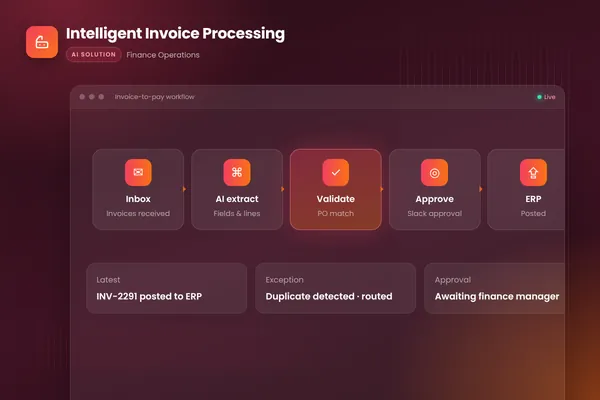
- 011 ReadTake the PDF or photo from the AP inbox and read header fields and line items
- 022 ScoreRecord a confidence value for each field next to the value
- 033 CheckValidate totals, dates and tax against rules and the purchase order
- 044 RouteSend low-confidence or failed fields to a named reviewer
- 055 PostPush approved data to the ERP with the reviewer's name and time
- 066 LearnLog every correction so the test set grows from real errors
BufferSol Technologies · buffersoltech.com
Which seven steps measure invoice extraction accuracy before go-live?
Each step below is something you do on your own invoices, with the evidence behind it and a "choose it if" line. The table gives the short version first.
| Step | What you do | Evidence |
|---|---|---|
| 1 | Pick the invoices | Stampli: "Sample 100 - 200 of your own recent invoices spanning your real vendor mix" |
| 2 | Label them twice | Invoice Data Extraction: two people annotate at least 10 invoices |
| 3 | Score per field | Google: precision, recall and F1 per label |
| 4 | Normalise numbers | Google: "1 and 1.00 don't match" |
| 5 | Read confidence honestly | Microsoft: confidence is an estimate, not a measurement |
| 6 | Set the review threshold | AWS: "90% or higher" for financial decisions |
| 7 | Keep testing after go-live | Microsoft: accuracy can be inconsistent when documents differ from training |
1. How many real invoices should the test set hold?
Enough to include every vendor format that matters, and sources disagree on the number. Invoice Data Extraction (updated May 2026) says "Start with 20 to 50 invoices that represent the real variation your pipeline handles." Its pilot guide (April 2026) says to "run an invoice automation pilot on 20 to 30 real invoices from your actual vendor mix." Stampli says to sample 100 to 200.
| Source | Test-set size | What kind of source |
|---|---|---|
| Invoice Data Extraction, test guide | 20 to 50 invoices | Vendor that sells extraction |
| Invoice Data Extraction, pilot guide | 20 to 30 invoices | Same vendor |
| Stampli | 100 to 200 invoices | AP automation vendor |
| Not stated: the page gives no minimum test-set size | First-party docs |
None of the three numbers is a standard, and none of the first-party pages gives one. As BufferSol view, take 100 to 200 if you can label them, and never fewer than your top vendors' formats plus a handful of ugly scans. The Invoice Data Extraction pilot guide also says to draw from your real supplier mix, not a vendor's demo pack, and that public benchmarks "score models on their own datasets, not on your supplier mix." Choose a small set if you are screening tools. Choose a large set if the agent will post to your ledger.
2. Who labels the answers, and how do you check the labels?
Two people, independently, on a subset. Invoice Data Extraction says to "have two people independently annotate a subset of at least 10 invoices", and that "An inter-annotator agreement rate below 95% on a field means your annotation conventions for that field are underspecified." The page sells extraction, so it has an interest, but the idea is sound: if two clerks disagree on what the "total" is, no tool can be scored fairly.
Write the conventions down first. Is the total before or after tax? Which date is the invoice date? What is a blank? Google's page notes that labels with no test annotations "are not included in aggregated metrics", so a field you forgot to label silently disappears from the score. Our AI agent evaluation post covers how to build a labelled set, and our workflow exception handling post covers who owns disagreements.
Choose double labelling if the invoices go to your ERP. Skip it if you only need a rough tool screen.
3. Which fields and metrics should you score?
Score each field on its own, header and line items apart. Invoice Data Extraction says "Calculate accuracy (matches divided by total test cases) for each field independently", and adds that "Line items need an additional alignment step." Google's evaluation page defines precision as "the proportion of predictions that match the annotations in the test set", recall as "the proportion of annotations in the test set that are correctly predicted" and F1 as "the harmonic mean of precision and recall."
The three vendors name fields differently, so map them to one sheet. The table lists what each first-party page says it extracts.
| Platform page | Fields it names | Page does not show |
|---|---|---|
| Microsoft invoice model | Customer name, billing address, due date, amount due, line items | An accuracy figure |
| Google invoice parser | Header fields such as invoice_id and total_amount, line_item fields such as quantity and unit_price | Review guidance |
| Amazon Textract AnalyzeExpense | Standard fields such as INVOICE_RECEIPT_ID, TOTAL, TAX and line-item UNIT_PRICE | An accuracy figure |
Here is why the split matters. As a BufferSol calculation with assumed numbers, not results: if each of eight header fields is right 98% of the time and errors are independent, the chance that all eight are right on one invoice is 0.98 to the power of 8, about 85%. A "98% accurate" system can leave 15 invoices in 100 needing a fix. Stampli's page says "line tables are structurally messier than headers, so expect line-level performance to trail header-level", and AWS lists merged table cells that span columns as a case that can give inconsistent results. So report four numbers: per-field accuracy, header accuracy per invoice, line-item accuracy and the share of invoices with no error at all.
Choose per-field scores if you want to know what to fix. Skip a single blended score if you ever have to explain a wrong payment.
4. How do you score numbers, dates and names fairly?
Decide the matching rules before the first run. Google's page says "without fuzzy matching, the string ABC does not match abc due to capitalization", and that "1 and 1.00 don't match, even when fuzzy matching is enabled." Fuzzy matching there normalises whitespace, removes certain punctuation and strips currency symbols for money labels. Your own scorer should do the same on purpose, not by accident.
Invoice Data Extraction sets tolerance windows by field type: currency within "plus or minus $0.01 (one cent)", quantities within a relative variance of 0.5% and tax percentages within 0.1 percentage points, and says "If a value falls outside tolerance, that is a genuine extraction failure worth investigating." That is one vendor's convention, not a standard. As BufferSol view, money in AP should be exact to the cent, because a tolerance on a payment amount is a payment error. Use exact match for invoice number, tax ID and bank details, a normalised date format and a stated rule for currency symbols.
A rule that decides the verdict before the test starts is the point. The pilot guide says "Set the decision rule before the first invoice is tested", and "define them before the pilot starts so every tool is judged against the same sheet." Our three-way match automation post shows how tolerances work downstream.
5. What does a confidence score tell you, and what does it not?
It tells you how sure the model is, not whether it is right. Microsoft (updated October 2026) says "Field confidence indicates an estimated probability between 0 and 1 that the prediction is correct. For example, a confidence value of 0.95 (95%) indicates that the prediction is likely correct 19 out of 20 times." It also says "Currently, not all document fields return a confidence score."
AWS says Textract operations "return the percentage confidence that Amazon Textract has in the accuracy of the detected item" through the Confidence field, and that "detections with a low confidence might need visual confirmation by a human." Its invoice page says the AnalyzeExpense API returns "The confidence score associated with each piece of data detected on the document." Microsoft also says "Custom neural and generative models don't provide accuracy scores during training", so for those you can only measure accuracy by testing.
The risk is the confident wrong answer. Airparser says "The most dangerous extraction failure is a confident wrong answer", which pass review routing unnoticed. Its claim that enterprise buyers see a "15–25 percentage point drop" between benchmark and production cites no study, so we treat it as a vendor opinion. The honest test: bucket your test results by confidence and check that fields scored 95% were right about 95 times in 100.
| Confidence score | Accuracy measured on your test set | |
|---|---|---|
| What it is | The model's estimated probability for one result | The share of fields that match checked answers |
| Source | Microsoft Learn: an estimated probability that the prediction is correct | Google Document AI: precision, recall and F1 against a test set |
| Available when | On each analysis, if the field returns one | Only after you build and label a test set |
| Use it to | Route low scores to a person | Decide whether to go live and where to set the threshold |
Source: Microsoft Learn and Google Cloud Document AI documentation as read in November 2026.
BufferSol Technologies · buffersoltech.com
Choose confidence for routing. Skip confidence as proof of accuracy. Our AI agent architecture post shows where the review gate sits.
6. Where should you set the threshold for human review?
At the point where the cost of a wrong field exceeds the cost of a person looking. AWS says "For archival purposes, such as documenting handwritten notes, it might be as low as 50%. Business processes involving financial decisions might require thresholds of 90% or higher." Microsoft says "It's best to target a score of 80% or higher. For more sensitive cases, like financial or medical records, we recommend a score of close to 100%." Note the difference: Microsoft's figure is about the training-time accuracy score of a custom model, and AWS's is about a per-result confidence threshold, so they are not the same dial.
Google's page explains the trade-off: a higher threshold gives "higher precision, because the predictions are more likely to be correct" and "lower recall, because there are fewer predictions." In AP terms, a high threshold means fewer wrong postings and more invoices sent to a person. It also says the default threshold maximises F1, which is a score balance, not a cost balance. AWS adds that applications "sensitive to detection errors (false positives)" should enforce a minimum score and "discard results below that threshold or flag situations as requiring a higher level of human scrutiny."
A review-queue calculation, as a BufferSol calculation using the threshold idea from AWS, with assumed numbers, not results: 2,000 invoices a month. At one threshold your test shows 15% of invoices have a field below it, so 300 invoices go to a person at 4 minutes each, 20 hours a month. At a stricter threshold, 30% go, so 600 invoices and 40 hours. Compare that with the cost of one wrong payment, and set the line per field: tight on total, bank details and invoice number, looser on a free-text description. Our human-in-the-loop AI agents post explains the approval pattern, and our invoice approval workflow post covers what happens after review.
Choose a high threshold if a wrong field becomes a payment. Choose a lower one if the field is only for search or reporting.
7. How do you keep measuring accuracy after go-live?
Re-run the test on a schedule, and feed every correction back. Microsoft says "Reported accuracy scores can be inconsistent when the analyzed documents differ from documents used in training", and that a document set can look similar to people but dissimilar to a model. A new supplier format, a scanner change or a vendor's new template is such a difference.
No opened page gives a re-test schedule, so this is BufferSol view. Re-run the full test set monthly at first, add every reviewer correction to it and review the five worst fields each month. Alert when the share of invoices sent to review rises by a set amount. Check inputs too: AWS advises "a high quality image, ideally at least 150 DPI", and Microsoft's invoice page says "provide one clear photo or high-quality scan per document." Many accuracy drops are image problems, not model problems. Our AI readiness assessment checks your input quality, and our duplicate invoice detection post shows a related control.
What should a written go-live rule say?
It should say which numbers must be met, on which test set, before the agent posts anything alone. The Invoice Data Extraction pilot guide says to "Use your own thresholds, but define them before the pilot starts", and the idea works at any size. As a BufferSol view, a rule has five lines, and the numbers are yours to set:
- Test set: the invoices, their labels and the date they were frozen.
- Per-field floors: a minimum accuracy for each of total, tax, invoice number, date and bank details, with exact match for money, as Google's matching rules show.
- Review line: the confidence threshold below which a person decides, per field, in the spirit of AWS.
- Stop rule: the error rate on live invoices that pauses posting, so a drop caught by Microsoft's "different documents" warning turns into action.
- Owner: the named person who signs the report each month.
Sign it before the first run, not after. Our AI automation agency pricing post and what an AI automation agency does explain how an agency should hand this over.
Why do vendor accuracy numbers need care?
Because each vendor counts something different. Stampli's page states its headline as "measured as suggestion coverage on structured, ERP-aligned invoice fields across the active customer base", so it counts how often a suggestion is offered, not how often it is right. It also says accuracy "is governed by human validation and ERP-aligned rules, not claimed as standalone precision." We do not repeat Stampli's headline percentage, because that figure has the coverage caveat attached.
Airparser says "Accuracy benchmarks are typically run on the cleanest, best-formatted documents available", and "Vendors reporting accuracy numbers rarely specify how they count silent failures." Airparser sells a rival tool, so its framing is not neutral. The table shows what to ask.
| Claim you may hear | What to ask | Source of the concern |
|---|---|---|
| "99% accurate" | Characters, fields or whole invoices? | Airparser |
| "Our AI performs on average X% of work" | Is that coverage or correctness? | Stampli |
| "Tested on thousands of invoices" | Whose invoices, and how clean? | Airparser |
| "Confidence scores included" | Are they calibrated on my data? | Microsoft |
The Invoice Data Extraction pilot guide agrees: "do not accept one vendor score like" a single headline figure, because it hides the gap between small errors and errors that break the workflow. Our touchless invoice processing post covers the end goal.
What does an extraction system not do?
It does not know your business rules, and it does not guarantee a right answer. It reads what is on the page, and cannot tell that an invoice total is wrong for your purchase order unless a rule checks it. Microsoft's invoice page shows the model analyses invoice text and returns structured data, and says nothing about matching to your orders. Google's invoice page has no review guidance for the Invoice Parser.
Plan for the parts the extraction page leaves out: validation against the PO and receipt, duplicate checks, bank-detail change controls and an approval step. A named owner should own the test set, the thresholds and the monthly review. Our AP automation post and finance IT solutions guide cover the surrounding process.
What do the sources not show about invoice extraction accuracy?
They show first-party definitions and vendor advice, and no independent benchmark of field-level invoice accuracy. Microsoft, Google and AWS explain scores and metrics for their own services. Invoice Data Extraction, Stampli and Airparser sell extraction or AP software, so their test advice has an interest behind it.
None of the pages gives a straight-through rate definition, line-item accuracy figures, a re-test schedule or a build cost. The Stampli page shows no date. Google's page does not state a minimum test-set size. We did not open ABBYY, Rossum or Veryfi, so we name no tool-level results for them. Our AI accounting software post and AI bookkeeping post show how we weigh vendor claims.
What changes in 2027 for invoice extraction accuracy?
No source we opened forecasts invoice extraction in 2027, so this section is BufferSol view, written as reasoning.
We expect buyers to ask for field-level numbers on their own invoices, because Stampli and Airparser already tell buyers to distrust one headline figure. We expect confidence scores to come with calibration questions, since Microsoft states that not all fields return one. And we expect tolerance and normalisation rules to be written into contracts, because Google's matching rules show how much a scoring choice changes a result. Plan the 2027 budget around a labelled test set, not a demo.
Which questions should you ask an extraction vendor in writing?
Ask these before you sign and keep the answers:
- How do you define accuracy: characters, fields, invoices or suggestion coverage?
- Can we run your system on our own labelled invoices before we buy, per field and per queue?
- Do you return a confidence value for every field, including line items?
- Is confidence calibrated on our data, and how do we check?
- How do line items score, and what happens to merged or split tables?
- What happens to a low-confidence field: routed to a person, blocked or posted?
- Where does our invoice data go? Our AI vendor security questionnaire and data processing agreement post cover data handling.
When should you build your own invoice extraction agent?
Build when your invoices, rules and ERP do not fit a packaged tool. Stay with a platform's own extraction when your formats are standard and one system holds all invoices. For tooling choices, see our AP automation software versus custom agent post.
No source we opened covers custom builds, so this is BufferSol view:
- You have many vendor formats, including scans and photos, and need a score for each.
- You need checks beyond extraction, such as PO match and duplicate checks.
- You need your own review rules, with named approvers in your tools.
- You need an audit log of every field, score, correction and posting.
BufferSol's autonomous workflows service builds these. See also how long it takes to build an AI agent, AI workflow automation versus RPA and our AI workflow automation guide.
What would a 30-day pilot deliver?
In 30 days you get a working extraction agent on your real invoices, with a person on every low-confidence field. The plan:
- You bring: a sample of 100 to 200 recent invoices across your vendors, your ERP access, your field list and matching rules, and a named reviewer from AP.
- We build, in about two weeks: a prototype that reads headers and line items, records confidence per field, validates against your rules and routes doubtful fields to review, scored against your labelled set.
- We launch, in the final stretch: a live pilot on one entity or one vendor group, with a log of every field, score, correction and posting, plus a weekly accuracy report.
Success is measured by per-field accuracy, share of invoices with no error, reviewer corrections, review-queue size and time from receipt to posting. The closest ready-made version is our invoice processing automation for accounts payable, built for finance teams. See also the Done For You catalogue, the document intake and data extraction automation, month-end close and reconciliation automation and expense report audit automation. Our financial close automation post shows where the data lands.
Is this right for you?
Check how many describe your team:
- Staff retype or fix invoice fields after the software has read them.
- You cannot say how accurate your current tool is, per field.
- Invoices arrive in many formats, including scans and phone photos.
- You can name who owns the test set and the review threshold.
- You can pull 100 recent invoices with the final posted values.
If few apply, collect the invoices and posted values first, then pilot. Our AI readiness assessment checks your data, and our accounts receivable automation software post shows the same review pattern on the receivable side.
Facts checked November 2026 on the Microsoft accuracy and invoice pages, Google evaluation and processors pages, AWS best practices, response objects and invoice analysis, Invoice Data Extraction (pilot guide), Stampli and Airparser; vendor pages are marketing. Facts we did not re-check: ABBYY, Rossum and Veryfi (not opened, so not described), Stampli's headline percentage, any independent benchmark, any re-test schedule and any price.
If your team still fixes extracted invoice fields by hand, ask BufferSol for a scoped estimate for an extraction agent tested on your own invoices now, so the 2027 budget includes it and the pilot can start in Q1 2027.
Frequently asked questions
What is invoice data extraction accuracy?
Invoice data extraction accuracy is the share of invoice fields a system reads correctly, measured against answers a person has checked. It should be reported per field, such as invoice number, date, total and tax, and separately for line items. Stampli's page says to count each field as 'correct, wrong, or blank' on a sample of your own invoices.
How many invoices do you need to test extraction accuracy?
Sources disagree. Invoice Data Extraction suggests starting with 20 to 50 invoices and a pilot of 20 to 30, while Stampli suggests sampling 100 to 200 recent invoices across your real vendor mix. All three are vendors. BufferSol view: start with the larger sample if you can label it, and make sure every major vendor format is in it.
Is a confidence score the same as accuracy?
No. Microsoft says field confidence is 'an estimated probability between 0 and 1 that the prediction is correct'. That is the model's own estimate for one result, while accuracy is measured against labelled answers. AWS says to use confidence scores for deciding when to discard results or flag them for human scrutiny. Test whether your confidence scores are calibrated.
What confidence threshold should send an invoice to a person?
It depends on the cost of an error. AWS says business processes with financial decisions 'might require thresholds of 90% or higher', and Microsoft recommends a score close to 100% for financial or medical records. Set the threshold per field, test it on your own invoices and send anything below it to a named reviewer.
Why is line item accuracy lower than header accuracy?
Line items are harder because tables vary. Stampli's page says 'line tables are structurally messier than headers, so expect line-level performance to trail header-level', and AWS lists merged cells as a case that can give inconsistent results. Score line items separately from header fields and keep a person on any line the system is unsure about.
Sources
- Interpret and improve model accuracy and confidence scores, Microsoft Learn
- Invoice data extraction - Document Intelligence, Microsoft Learn
- Evaluate performance - Document AI, Google Cloud Documentation
- Processors list - Document AI, Google Cloud Documentation
- Best Practices - Amazon Textract, Amazon Web Services
- Text Detection and Document Analysis Response Objects - Amazon Textract, Amazon Web Services
- Analyzing Invoices and Receipts - Amazon Textract, Amazon Web Services
- How to Test Your Invoice Extraction Pipeline, Invoice Data Extraction
- How to Test Invoice Automation Before You Buy, Invoice Data Extraction
- What is a good invoice data extraction accuracy rate from modern AP automation?, Stampli
- AI Document Extraction Accuracy: What the Benchmarks Actually Mean, Airparser
Cite this article
BufferSol Editorial Team (2026). Invoice Data Extraction Accuracy in 2027: A 7-Step Test Before You Go Live. BufferSol Technologies. https://buffersoltech.com/blog/invoice-data-extraction-accuracy-2027
BufferSol Editorial Team
AI & software engineering team
Senior engineers, AI specialists and product leads at BufferSol Technologies who design, build and run AI agents, autonomous workflows and custom software for companies in the US, UK and Europe.
Reviewed by Sufyan K., Senior Writer, BufferSol Technologies.