Key takeaways
- Seven features separate automated invoice processing software in 2027: extraction, line items, validation and ERP posting, three-way matching, an exception queue, approvals with an audit trail, and e-invoice formats.
- Accuracy figures are self-reported: Docsumo's FAQ says 99% field-level accuracy in production, and no vendor page we opened shows the test method behind its number.
- Tipalti's explainer calls automated 3-way matching the gold standard for most businesses, so test tolerances and what happens to a mismatch.
- Only Docsumo showed public pricing in our check: a 1,000-page free plan for 14 days, with Business and Enterprise listed as Custom.
- Run your own sample before you sign: 100 invoices, 20 of them awkward, scored feature by feature.
Automated invoice processing software is a system that captures supplier invoices, reads their data, checks it against your records, routes it for approval and posts it to your ERP. In 2027 seven features decide whether it saves your team time: extraction, line items, validation and posting, three-way matching, an exception queue, approvals with an audit trail, and e-invoice formats. We checked vendor pages in November 2026.
For the full picture, read our intelligent invoice processing guide. If you are comparing whole suites, our best accounts payable software post covers vendors side by side.
1. Extraction you can measure
Ask how a vendor measures extraction accuracy, then measure it yourself. Docsumo's FAQ says it "reaches 99% field-level accuracy in production and 95%+ of documents are AI Approved without anyone touching them." A customer quote on Nanonets' page says the product "delivered better than I could have expected at almost 99% accuracy of extraction." Rossum's page promises "high accuracy with zero hallucinations through continuous learning from user feedback."
All three are vendor claims, and none of the pages shows the test method, document mix or date range behind the number. A fair test: pull 100 invoices, list the ten fields you care about, and count wrong fields, not wrong documents.
2. Line items, not just totals
Check that the software reads every line, because matching and coding depend on lines. Docsumo's page lists "Every line item, not just header totals" in its invoice section. Hypatos says its agents "match every PO line." A header-only reader cannot catch a short-shipped line or a wrong unit price.
Test it with three awkward invoices: a multi-page bill with 30 lines, a credit note and a bill with a freight line. Compare each extracted line with the paper original.
3. Validation and clean ERP posting
Look for validation before posting, not after. Rossum's page says you can "cross-validate your document data with your master data, ERPs, 3rd party APIs, Gen AI, business rules, etc." Nanonets says "nothing touches the ledger until it has passed every check" and promises "clean, validated data posted to your ERP." Docsumo uses the words "Clean records posted to your ERP."
The pages do not say what happens when an ERP is down mid-posting or how duplicate postings are avoided. Ask both questions in writing. Our guide to touchless invoice processing shows how to count invoices that finish with no human touch.
4. Three-way matching with tolerances
Three-way matching compares the invoice, the purchase order and the goods receipt. Tipalti's explainer (updated July 8, 2026) says "the gold standard for most businesses is automated 3-way invoice matching" and "a match confirms that the business should pay the invoice."
Ask how tolerances work: which price or quantity gap still passes, and who sets it. Then send a short delivery and a price rise through the system. Our post on invoice scanning software vs AI invoice agents explains where scanning ends and matching begins.
5. An exception queue that explains itself
The exception queue is where most of your team's time will go, so inspect it first. Tipalti's explainer advises: "Look for systems that identify exceptions and support resolution workflows to keep approvals moving efficiently." Hypatos says its agents "catch duplicates, and route exceptions."
Every exception should show a reason, a suggested fix and an owner. Our guide to workflow exception handling lists what a good exception record contains.
- 011. SendSubmit a duplicate, a missing PO and a changed bank detail.
- 022. WatchSee which ones the system stops and which it lets through.
- 033. ReadCheck each stop shows a reason in plain words.
- 044. AssignConfirm each stop lands with a named owner.
- 055. ResolveFix one and check the log records who did it and when.
Source: BufferSol process
BufferSol Technologies · buffersoltech.com
6. Approvals with an audit trail
Approval rules and an audit trail go together, so test both. Rossum lets you "automate the approval workflow with rules for auto-approve/reject based on your criteria." Medius says "trust that all risk is automatically flagged, mitigated and logged across the AP lifecycle" and adds that "our AI assistant answers approvers' questions automatically."
No page we opened defines what an audit log must contain, so define it yourself: capture source, validation results, approval decisions, coding and ERP posting, each with a timestamp. Ask to see the full trail for one invoice. Our post on invoice approval workflow automation covers the approval side in detail.
7. E-invoice formats for your suppliers
Match the formats to your suppliers' countries. Hypatos says it "supports xRechnung, ZUGFeRD, Factur-X, FatturaPA, KSeF, and more." OpenPeppol says "Peppol enables the efficient electronic exchange of eInvoices, purchase orders other business documents."
On dates, one vendor blog is our only source. fiskaly's roadmap, published October 8, 2025, lists Germany as "January 2027 (Mandatory sending for >€800k turnover)" and France as "September 2027 (also Issuing for SMEs)". It is a vendor blog, not a regulator, and the EU VAT page we opened gave no dates, so confirm each date with your national tax authority before you plan around it.
What changes in 2027 for invoice software buyers?
No analyst forecast or regulator timeline loaded for this post, so each forward claim is BufferSol view.
We expect vendors to keep moving from reading documents to acting on them. Hypatos already describes agents that "capture invoices on arrival, code and validate tax, match every PO line, catch duplicates, and route exceptions." That makes the exception queue and the audit log, not the extraction rate, the features that separate vendors. We also expect e-invoice formats to matter more for anyone with EU suppliers, as the fiskaly dates above suggest, so put "which formats, which countries" in your first vendor call.
How do you compare the seven features side by side?
Score each vendor from 0 to 2 on each feature, using your own sample:
| Feature | What to test | Evidence to ask for |
|---|---|---|
| Extraction | Wrong fields in 100 invoices | Test method behind the vendor's number |
| Line items | A 30-line bill and a credit note | Line-level output |
| Validation and posting | An ERP outage, a duplicate send | Retry and duplicate rules |
| Three-way matching | Short delivery, price rise | Tolerance settings |
| Exception queue | Duplicate, missing PO | Reason and owner on each stop |
| Approvals and audit | One invoice, start to end | Full log with timestamps |
| E-invoice formats | Your top five supplier countries | Named formats and mandates |
Pricing is thin. Docsumo's page (updated 2026-09-24) says "the free plan covers 1,000 pages for 14 days" and lists Business and Enterprise as "Custom". No other vendor we opened showed a price, so ask for a written annual quote on your volume.
Which questions should you put to every vendor in writing?
Send the same list to each vendor and compare the written answers, not the demos. Vendors that answer in vague terms tell you something too.
- How do you measure extraction accuracy? Ask for the sample size, the fields counted and the document mix behind any number on the website.
- What happens when the ERP is down during posting? Ask whether the invoice retries, queues or fails, and how a duplicate posting is prevented.
- Who sets match tolerances? Ask whether finance can change them without a support ticket, and whether each change is logged.
- Can I export the audit trail? Ask for one invoice's full log, from arrival to posting, in a format your auditor can open.
- Which e-invoice formats and countries are live today? Ask for named formats, not "global coverage".
- What does the quote include? Ask for fees per user, per invoice and for implementation, in one annual figure on your volume.
Keep the answers in one sheet next to your scores from the table above. After a week you will see which vendor answers precisely and which one points you back to a sales call.
What does automated invoice processing software not do?
Software reads and routes. It does not fix a messy supplier master, chase a late purchase order or settle a dispute, and every vendor page we opened keeps a person in the loop for exceptions. Accuracy numbers are self-reported, and no page showed how it handles an ERP outage or what the audit log contains. Treat any gap as a question for the vendor, not a guess.
When does a custom AI agent beat packaged software?
A custom agent wins when your rules are the hard part. Choose software when its standard flow fits your ERP and approval chain. Choose a custom agent when you have several ERPs, unusual approval limits or supplier-specific checks, and you want the logs and prompts in your own environment.
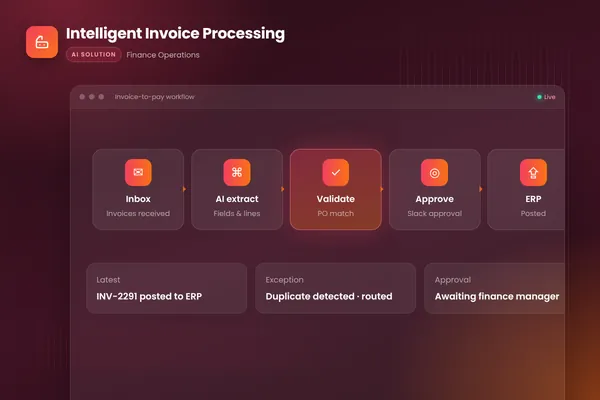
BufferSol's intelligent invoice processing project shows the pattern: it watches the invoices inbox, extracts every field with document AI, matches lines to purchase orders, flags duplicates, routes clean invoices to the approver in Slack and posts to the ERP once approved. Our autonomous workflows team builds that around your systems.
| Packaged software | Custom AI agent | |
|---|---|---|
| Best when | Your standard flow already fits | Your rules, ERPs or exceptions are specific |
| Logs and prompts | Held by the vendor | Held in your environment |
| First step | Test on your sample | A 30-day pilot on your invoices |
BufferSol Technologies · buffersoltech.com
What would a 30-day pilot deliver?
A pilot is a working agent on your real invoices inside 30 days.
- Week 1: you provide a sample of invoices, a PO and supplier export, read access to your ERP and your approval rules.
- Weeks 2 and 3: a prototype reads invoices, matches lines and flags exceptions, scored against your sample.
- Week 4: a live pilot on a first slice, such as one supplier group, with every posting approved by your team.
Success is measured by the share of invoices finishing with no human touch, exceptions caught before payment, and posting errors. The ready-made version is our invoice processing automation for AP, built for finance teams that key most invoices into their ERP by hand.
Is this right for you?
A pilot fits if most of these are true:
- Your team keys or corrects many supplier invoices by hand.
- Your approval rules do not fit a standard template.
- You can export POs and supplier data.
- A person can review exceptions each day.
- You have suppliers in countries with e-invoice formats.
If none applies yet, buy software and test it on your worst 20 invoices. Our post on AP automation software vs a custom AI agent covers the choice.
Facts checked November 2026. Vendor pages carry no dates for most claims, so re-check each one before you sign.
If keying and fixing invoices is costing your team time, ask BufferSol for a scoped estimate for an invoice processing agent, so the 2027 budget includes it and the pilot can start in Q1 2027.
Frequently asked questions
What is automated invoice processing software?
Automated invoice processing software is a system that captures supplier invoices, reads their data, checks it against your records and routes it for approval before posting to your ERP. Tools differ in how well they read messy documents, match to purchase orders and handle exceptions. The best test is a sample of your own invoices, not the vendor's demo.
Which features matter most in automated invoice processing software?
Seven matter most: reliable extraction, line-item capture, validation against master data with clean ERP posting, three-way matching, an exception queue with reasons, approvals with an audit trail, and support for the e-invoice formats your suppliers use. Automated invoice processing software that is strong on the first and weak on exceptions will still leave your team doing manual work.
How accurate is automated invoice processing software?
Vendors state their own figures: Docsumo's FAQ claims 99% field-level accuracy in production, and a Nanonets customer quote on its page says almost 99% accuracy of extraction. None of the pages we opened showed the test method or document mix. Treat such numbers as claims and measure accuracy on your own sample, field by field.
Does automated invoice processing software need a person to approve invoices?
Usually yes for exceptions. Rossum's page describes rules for auto-approve or reject based on your criteria, and Tipalti's explainer says to look for systems that identify exceptions and support resolution workflows. A safe design lets clean invoices pass within limits you set and sends the rest to a named person with the reason written out.
Sources
- AI Document Processing For Transactional Workflows | Rossum, Rossum
- AI Accounts Payable Automation | Nanonets, Nanonets
- Document AI Software | Docsumo, Docsumo
- Invoice Matching Software Explained: Best Solutions and Benefits, Tipalti
- The Agentic Workforce for Global Business Services | Hypatos, Hypatos
- Medius | AP automation, Medius
- The Future Is Open - OpenPeppol, OpenPeppol
- E-Invoicing in Europe 2026: Complete roadmap of mandates and deadlines, fiskaly
Cite this article
BufferSol Editorial Team (2026). Automated Invoice Processing Software: 7 Features That Matter in 2027, and How to Test Each One. BufferSol Technologies. https://buffersoltech.com/blog/automated-invoice-processing-software-2027
BufferSol Editorial Team
AI & software engineering team
Senior engineers, AI specialists and product leads at BufferSol Technologies who design, build and run AI agents, autonomous workflows and custom software for companies in the US, UK and Europe.
Reviewed by Sufyan K., Senior Writer, BufferSol Technologies.