Key takeaways
- A chatbot answers questions in a conversation. An AI agent works toward a goal: it decides the next step, uses your systems through tools and stops when the task is done or a person must step in.
- OpenAI's definition is a useful test: an application that uses a model but does not let it control the workflow, such as a simple chatbot, is not an agent.
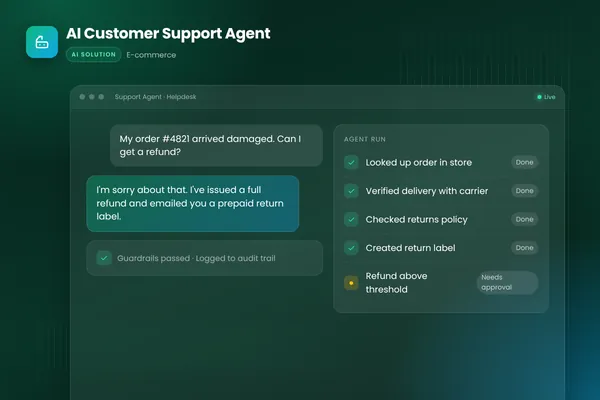
- The difference shows up in the systems it can touch. Our e-commerce support agent looks up orders, checks carriers and creates return labels; a chatbot would only explain the returns policy.
- Agents need more engineering: narrow tool permissions, validation, logs and human approval for risky actions such as refunds above a threshold.
- Choose a chatbot when people mainly need answers. Choose an agent when the work ends with something done in another system.
The difference between an AI agent and a chatbot is what happens after the conversation. A chatbot answers questions in text. An AI agent works toward a goal: it decides what to do next, uses your systems through tools such as an order database or a CRM, checks the result and keeps going until the task is done or a person needs to take over. A chatbot explains your returns policy. An agent processes the return.
This post makes the difference concrete with one customer request, handled first by a typical support chatbot and then by the e-commerce support agent we built. It ends with a checklist for deciding which one your business needs. For the full build process, see our guide to AI agent development, and for support specifically, our AI customer support agent guide.
What is a chatbot?
A chatbot is software that holds a conversation. Older chatbots followed scripted decision trees: pick an option, get a canned reply. Modern chatbots use a large language model, so they understand free-text questions and write natural answers, often grounded in a knowledge base or help center.
What they have in common is that the conversation is the product. The chatbot's job ends when it has replied. If the customer needs something done, such as a refund, a booking change or an address update, the chatbot either sends a link to a form or hands the conversation to a person.
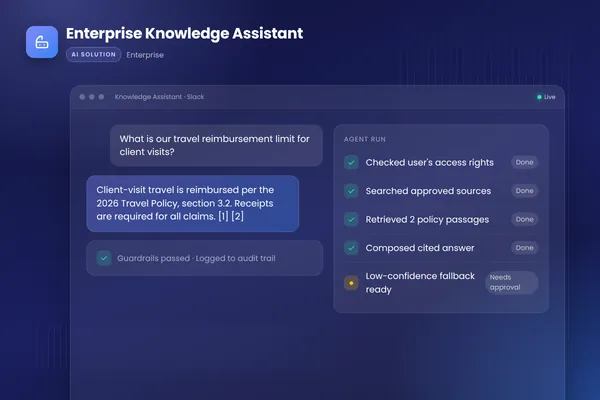
That is not a weakness for every job. A well-built chatbot that answers product, policy and how-to questions accurately, with sources, saves a lot of time. Our enterprise knowledge assistant is in this family: it answers staff questions from approved documents with citations and respects each person's access rights. It does not need to act in other systems, so it does not need to be an agent. When internal support also needs actions, such as access requests, see our post on the AI help desk.
What is an AI agent?
OpenAI's practical guide to building agents gives the clearest working definition: "Agents are systems that independently accomplish tasks on your behalf." It names two core traits. An agent uses a language model to manage the workflow and make decisions, including recognizing when the work is complete and handing control back to a person if it fails. And it has access to tools that let it gather context and take actions in external systems, choosing among them as the task unfolds, within defined guardrails.
The same guide is just as clear about what does not count. Applications that use a language model but do not let it control the workflow, and it names simple chatbots, single-turn LLM calls and sentiment classifiers as examples, are not agents.
Anthropic's engineering team, in Building effective agents, describes agents as systems where models "dynamically direct their own processes and tool usage." So the test is simple. Who decides what happens next, and can the system act on that decision? If the answer is the model, through tools, you have an agent.
The same support ticket, handled two ways
Here is a request that online retailers see every day:
"Hi, my order hasn't arrived and it's been over a week. Also, the blue jacket in that order is the wrong size. Can I send it back?"
How a typical support chatbot handles it
- It recognizes two intents: delivery status and returns.
- For delivery, it explains typical shipping times and offers a link to the tracking page, or asks for an order number and replies with the status shown in the store.
- For the return, it summarizes the returns policy and links to the returns form.
- If the customer pushes back ("the tracking page hasn't updated in five days"), it apologizes and creates a ticket for a person.
The customer still has work to do, and a person still has a ticket to pick up.
How our e-commerce support agent handles it
In our AI customer support agent project, the agent sits inside the helpdesk and connects to the store, the helpdesk and the shipping provider. For the same message it would:
- Identify the customer and look up the order in the store.
- Check the live shipment status with the carrier, not just the status stored in the shop.
- Check the jacket against the store's return rules.
- Create the return and a return label, because that action is within its rules.
- Reply in the brand's tone with the delivery update, the label and next steps.
- If the case falls outside policy, or a refund is above the set threshold, hand it to a person with a summary of the case and a suggested reply.
Both systems understood the message equally well. The difference is that the agent finished the work, and when it could not, it handed over a case that was already investigated.
| Support chatbot | AI support agent | |
|---|---|---|
| Late delivery | Explains shipping times, links to tracking | Checks the order and the carrier's live status, reports back |
| Wrong size | Summarizes the returns policy, links to a form | Checks eligibility, creates the return and the label |
| Systems used | Knowledge base, sometimes order status | Store, helpdesk and shipping provider through tools |
| When it gets stuck | Opens a ticket for a person | Hands over with a case summary and suggested reply |
| Risky actions | None possible | Refunds above a threshold wait for human approval |
| What the customer has to do | Follow links, fill in forms, wait | Read the reply and use the label |
BufferSol Technologies · buffersoltech.com
What makes an agent harder to build
The agent's extra usefulness comes from its access to real systems, and that access is also where the extra engineering goes.
Tools have to be designed, not just connected. Each action the agent can take, such as "look up order" or "create return label", is a tool with a clear description, validated inputs and a narrow purpose. Anthropic's guidance is to put as much care into this agent-computer interface as into a user interface.
Permissions have to be narrow. The OWASP Top 10 for LLM applications lists prompt injection first and excessive agency sixth. A support agent reads text written by customers, so it must not be able to do more than its job needs. Ours can create returns within policy. It cannot issue large refunds on its own.
Some actions need a person. OpenAI's guide names high-risk actions, such as canceling orders, authorizing large refunds or making payments, as triggers for human oversight. We build those approval points into the code, not just into the instructions.
Everything is logged and measured. Every tool call and decision is recorded, and the agent is tested against a set of real past tickets before each release. You track how many tickets it resolves, how often it hands over, and whether each handover was the right call.
A chatbot needs some of this too, especially grounding and testing for wrong answers. But because it cannot act, the risks and the build effort are smaller.
Chatbot or AI agent: which do you need?
Use this checklist. The more "yes" answers in the right-hand column, the stronger the case for an agent.
| Question | Points to a chatbot | Points to an agent |
|---|---|---|
| What do people need most? | Answers and guidance | Something done: a change, a booking, a return |
| Where does the work end? | In the conversation | In another system (store, CRM, ERP, calendar) |
| Do those systems have APIs? | Not needed | Yes, or they can be added |
| How much does a wrong action cost? | Nothing; it cannot act | Manageable, with approvals for high-value actions |
| Who handles the follow-up today? | Few follow-ups | A team doing repetitive lookups and updates |
Many teams start with a good chatbot and add agent capabilities step by step: first read-only tools such as order lookups, then low-risk actions such as return labels, then higher-value actions behind approval. That path builds confidence on both sides, and each step can be measured before the next.
One rule applies to both. In the EU, the AI Act sets transparency duties, such as telling people when they are dealing with an AI system like a chatbot, and the European Commission lists these as taking effect in August 2026. Say clearly that the customer is talking to an AI, and make the route to a person easy to find.
Getting started
If you are deciding between the two, list the five requests your team handles most often and mark which ones end in another system. Those are your agent candidates. Our AI agent development team can test the strongest one on your own data in a short discovery, and our generative AI team builds the answer-focused assistants when a chatbot is the better fit. You can also talk to an engineer about the requests you have in mind.
Frequently asked questions
Is ChatGPT a chatbot or an AI agent?
It depends on how it is set up. Used for conversation alone, a model like ChatGPT works as a chatbot: it answers in text. When the same kind of model is given tools, such as web search, a CRM or an order system, and allowed to decide which to use and when to stop, it behaves as an agent. The model is the same. What changes is control over actions.
Can a chatbot be upgraded to an AI agent?
Often, yes. If the chatbot already understands your customers' questions, you can add tools for the actions that follow, such as order lookups or bookings, plus permissions, validation, logging and escalation rules. The extra work is mostly integration and safety engineering, not a new conversation design. Start with read-only tools, then add actions that change data once testing shows they are reliable.
Are AI agents riskier than chatbots?
They carry different risks, because they can change data and trigger real outcomes. A chatbot's main risk is a wrong or inappropriate answer. An agent can also take a wrong action. That is why agents need least-privilege tool access, checks on every tool call, human approval for high-value or irreversible actions, and tests against prompt injection before launch.
Do customers need to be told they are talking to an AI?
In the EU, yes. The AI Act includes transparency duties, such as telling people when they are interacting with an AI system like a chatbot, and the European Commission lists these as taking effect in August 2026. It is good practice in the US and UK too, because customers trust a clear handover to a person more than a bot pretending to be one.
Sources
- A practical guide to building agents, OpenAI
- Building effective agents, Anthropic
- 2025 Top 10 Risk & Mitigations for LLMs and Gen AI Apps, OWASP Gen AI Security Project
- AI Act, European Commission
Cite this article
BufferSol Editorial Team (2026). AI Agent vs Chatbot: What Is the Difference, and Which Do You Need?. BufferSol Technologies. https://buffersoltech.com/blog/ai-agent-vs-chatbot
BufferSol Editorial Team
AI & software engineering team
Senior engineers, AI specialists and product leads at BufferSol Technologies who design, build and run AI agents, autonomous workflows and custom software for companies in the US, UK and Europe.
Reviewed by Sufyan K., Senior Writer, BufferSol Technologies.