Key takeaways
- AI for accounting firms pays off where the same work repeats across many client files: collecting documents, categorizing transactions, reconciling accounts and chasing clients for what is missing.
- Design for the firm, not one client: one agent design, per-client rules and data kept strictly separate.
- A shared review queue across clients, sorted by risk and deadline, lets staff check AI work fast and lets managers see where each client stands.
- The PCAOB staff's 2024 outreach found generative AI used for repetitive work such as account reconciliations, with human review still essential; client sign-off stays with qualified staff.
- Start with one service line and a handful of clients with clean data, then add clients in groups.
AI for accounting firms works best on the preparation work that repeats across every client file: collecting documents, reading invoices, receipts and statements, categorizing transactions, preparing reconciliations and chasing clients for what is missing. An AI agent does that first pass for each client under that client's rules, and staff review the results in one shared queue. Qualified accountants keep the judgment calls and the sign-off, and spend less of the month on data entry.
This post is a firm-level playbook: which jobs to give AI, how to design for many clients at once, how review should work, and the controls a firm needs. For which accounting tasks AI handles well in general, see our post on AI accounting software.
Why firms are a special case
A company automating its own finance team designs for one ledger, one chart of accounts and one set of suppliers. A firm has dozens or hundreds of each. That changes the design in three ways:
- One design, many rulebooks. The agent's process is the same for every client, but categories, coding rules, approval contacts and deadlines differ per client.
- Strict separation. One client's data must never appear in another client's work, suggestions or emails.
- Capacity is the goal. The value is measured in how many clients each person can look after well, and how evenly the work spreads across the month.
Four jobs AI takes on across client files
- 011. Document intakeInvoices, receipts and statements captured from email, uploads and portals, sorted to the right client and period.
- 022. BookkeepingFields extracted; categories and GL codes suggested per client's rules, with reasons.
- 033. ReconciliationsBank and key accounts matched; differences listed with likely causes for review.
- 044. Client chasingMissing documents and unexplained items requested from clients by email, with reminders.
Source: BufferSol; extraction and matching steps as in our invoice processing workflow
BufferSol Technologies · buffersoltech.com
1. Document intake
The first problem in most firms is getting documents in. The agent watches the firm's intake inboxes and upload folders, identifies which client and period each document belongs to, removes duplicates and files it. Anything it cannot place goes to a person rather than to a guess.
2. Bookkeeping
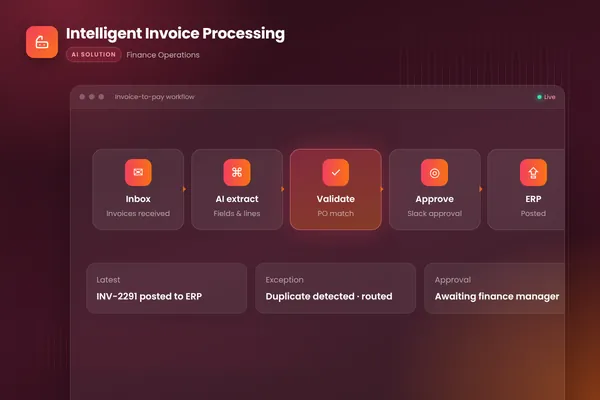
For each document and bank line, the agent extracts the data and suggests a category or GL code using that client's chart of accounts and history. Microsoft's bank statement model, for example, extracts account details, statement details and transactions from US bank statements as structured data. Our invoice processing workflow uses Microsoft's invoice model the same way, then checks totals, suppliers and duplicates in code. Every suggestion carries a reason, so a reviewer can accept it in seconds.
3. Reconciliations
The agent matches bank lines and key balance sheet accounts against the ledger, using rules first and judgment for the rest, and lists unexplained differences with likely causes. In a July 2024 staff Spotlight, the PCAOB noted preparers using generative AI "to assist in the performance of less complex and repetitive processes, such as preparing account reconciliations or to assist with identifying reconciling items." That is exactly this job, done for each client in turn.
4. Client chasing
Every firm spends hours asking clients for receipts, statements and explanations. The agent knows what is missing for each client and period, sends specific requests ("we need the March statement for the business savings account and receipts for these three card payments"), follows up on schedule and files what comes back. Replies it cannot handle go to the client's manager.
One review queue for the whole firm
The review queue is where the firm's capacity is won. Design it for many clients:
| Queue feature | Why it matters |
|---|---|
| Sorted by deadline and risk, across clients | Staff work on what matters most first |
| Grouped by client and period | Reviewers keep context instead of switching constantly |
| Evidence shown with each item | Source document, rule used and the agent's reason side by side |
| One-click accept, edit or reject | Fast review; edits become new rules for that client |
| Status per client | Managers see which clients are ready for review or sign-off |
Corrections should improve that client's rules, not the whole firm's, unless a manager decides a rule should apply everywhere.
Controls a firm needs
The PCAOB staff's outreach found that firms investing in generative AI expected it "to augment, but not replace, humans," and that human review of AI output remains essential. For a firm, that translates into a few concrete controls:
- Client separation. Each client's data, rules and history are isolated. The agent working on one client cannot read another's.
- Least privilege. The agent reads client ledgers and documents, writes only drafts, and posts only after a person approves.
- Sign-off stays with qualified staff. Year-end adjustments, tax positions, judgments and anything filed or reported are signed off by people.
- Engagement terms and client communication. Check your engagement letters and professional rules on using third-party tools, and tell clients how their data is processed.
- Data handling. Processing under terms that exclude client data from model training, in the regions your policies require, with access logged. BufferSol uses enterprise API terms that exclude client data from training and can deploy in your own cloud or with self-hosted models.
- Documented governance. NIST's AI Risk Management Framework gives a voluntary structure for managing AI risks; use it to record who is accountable, where the agent acts and how accuracy is measured.
Agents read documents written by outsiders, so treat their text as data, never as instructions. OpenAI's practical guide to building agents recommends guardrails and human oversight for high-risk actions; for a firm, that includes anything that posts to a client's books or sends a client a figure.
How to roll it out
- Pick one service line, such as monthly bookkeeping, where the work repeats most.
- Choose five to ten clients with clean data, standard systems and responsive contacts.
- Collect a month of their history with the correct outcomes, and test the agent on it before going live.
- Run the pilot with full review, measuring time per client, corrections and items chased.
- Add clients in groups, moving well-performing clients from full review to sampled review.
What changes for staff and managers
Junior staff spend less time keying and matching and more time reviewing, which is a skill to teach: checking the agent's reasons, spotting patterns in its mistakes and knowing when to escalate. Pair new reviewers with a senior for the first weeks.
Managers get a firm-wide view of where each client stands for the period, which documents are missing and which reviews are waiting. That makes it easier to spread work evenly across the month instead of crowding it into the last days before deadlines. Partners keep the client relationship and the sign-off, with more time for advisory work.
What to measure
Track hours per client per month, days from period end to books ready for review, share of AI suggestions accepted without edits, items chased and how fast clients respond, and errors found at sign-off. Compare pilot clients with similar clients worked the old way.
Getting started
List your recurring client work by service line and estimate the hours each takes per month. Pick the line with the most repetition and five clients to start. At BufferSol, you get a working agent on your real client data in under 30 days, with full rollout typically in 4 to 8 weeks. Our autonomous workflows team builds the intake, bookkeeping and review processes, and our AI agents team handles client chasing and the steps that need judgment. For the wider picture, see our finance IT solutions guide.
Frequently asked questions
How are accounting firms using AI?
Firms use AI to read client documents such as invoices, receipts and bank statements, suggest categories and GL codes, prepare reconciliations, chase clients for missing documents and draft first versions of reports and emails. Staff review the AI's work in a queue, and qualified staff keep sign-off. The gains come from doing the same preparation work across many client files.
Is it safe to use AI with client financial data?
It can be, with the right controls: each client's data kept separate, access limited to the staff and agents that need it, processing under terms that exclude data from model training, and a full log of who did what. Check your engagement terms and professional rules on using third-party tools, and tell clients how their data is handled.
Will AI reduce the need for accountants at a firm?
It changes the work more than it removes it. AI takes over much of the data entry, matching and chasing, while accountants spend more time reviewing, advising and handling exceptions. The PCAOB staff's 2024 outreach found firms expected AI to augment, not replace, people, with human review of AI output remaining essential.
Sources
Cite this article
BufferSol Editorial Team (2026). AI for Accounting Firms: Automating Client Bookkeeping, AP and Month-End at Scale. BufferSol Technologies. https://buffersoltech.com/blog/ai-for-accounting-firms
BufferSol Editorial Team
AI & software engineering team
Senior engineers, AI specialists and product leads at BufferSol Technologies who design, build and run AI agents, autonomous workflows and custom software for companies in the US, UK and Europe.
Reviewed by Sufyan K., Senior Writer, BufferSol Technologies.