Key takeaways
- AP automation is more than reading invoices: the full cycle also covers coding, approvals, payment runs, supplier questions, statement reconciliation and period-end accruals.
- Payment runs stay under human control. OpenAI's agent guide says actions that are 'sensitive, irreversible, or have high stakes should trigger human oversight', and lists making payments as an example.
- Bank detail changes are the highest-risk moment. The FBI's IC3 advises using 'secondary channels and/or two-factor authentication to verify requests for changes in account information'.
- Microsoft's Dynamics 365 page says a new vendor bank account 'isn't available for use until an approver approves it', which is the control an agent should copy in any system.
- Start with intake, matching and approval, then add supplier queries and statements, reusing the same checks and logs.
AP automation with AI agents covers the whole accounts payable cycle, not just reading invoices. This 2027 guide walks through six stages: agents capture invoices from any format, suggest GL coding, match lines to purchase orders and receipts, route approvals, prepare payment runs for review and answer supplier questions, while people keep the decisions that matter: approving invoices, releasing payments and handling disputes.
Most AP automation stops at invoice capture. This post maps the rest of the cycle: what an agent does at each stage and where a person decides. It builds on the intelligent invoice processing workflow we built for a finance team that keyed hundreds of supplier invoices a month by hand and chased approvals over email. For capture and matching in depth, see our intelligent invoice processing guide, the comparison of AP automation software vs a custom AI agent and the walkthrough of AI invoice processing from inbox to ledger. Facts from vendor and government pages were re-read in November 2026.
What are the 6 stages of AP automation with an AI agent?
They run in order from the inbox to the ledger: intake, coding, matching and approval, payment run, supplier queries and statements, and period-end. The agent does the reading, checking and preparing at each stage, and a named person owns the decision.
- 011. IntakeInvoices captured from the inbox, uploads and portals; fields extracted from any format.
- 022. CodingGL account, cost center and tax code suggested per line, with a reason and confidence.
- 033. Matching and approvalLines matched to the purchase order and receipt; mismatches explained; routed to the right approver.
- 044. Payment runRun prepared and checked by the agent; reviewed and released by a person.
- 055. Supplier queries and statementsPayment-status questions answered; supplier statements reconciled against the ledger.
- 066. Period-endReceipts without invoices and approved-but-unpaid items listed; accrual schedule prepared for review.
Source: BufferSol; stages 1, 3 and part of 4 run in our invoice workflow, the rest are the extensions we recommend
BufferSol Technologies · buffersoltech.com
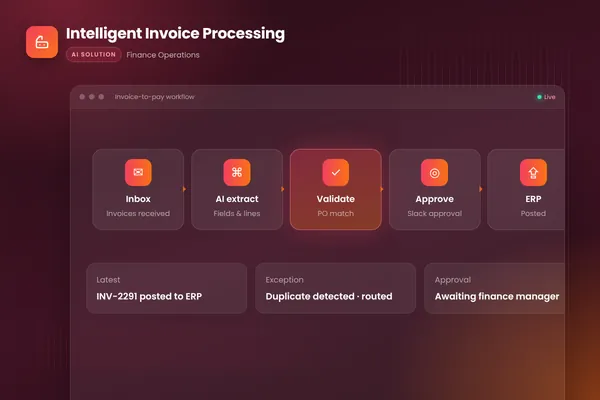
Our build covers intake, matching and approval end to end: it watches the invoices inbox, extracts every field with document AI, matches lines to purchase orders and receipts, flags mismatches and duplicates, routes clean invoices to the right approver in Slack and posts approved ones to the accounting system with a full audit trail. The other stages reuse the same building blocks. The closest ready-made version is our invoice processing (accounts payable) automation.
1. How does an agent read invoices at intake?
It captures every invoice, whatever the format, extracts the fields and checks them with plain code before anything moves on. Invoices arrive as PDFs, scans, photos and email bodies, so the first stage is reading them reliably.
Microsoft Learn says the invoice model handles invoices "of various formats and quality including phone-captured images, scanned documents, and digital PDFs", and that the API "returns a structured JSON data representation". Our build uses that model. Plain code then checks every extracted value: totals add up, the supplier exists and the invoice number is not a duplicate. Our posts on invoice data extraction accuracy and touchless invoice processing cover how to score extraction and how far a clean invoice can travel with no human edit.
Choose full automation at intake if your invoices come from a known set of suppliers. Keep a person in the loop if new suppliers or unusual formats make up a large share of the volume.
2. Can an AI agent code invoices to the general ledger?
Yes, as a suggestion. For each line the agent proposes the GL account, cost center and tax code from the supplier's history, the purchase order, the line description and your coding rules. Every suggestion carries a reason ("same supplier and description coded to 6420 Software on the last eight invoices") and a confidence level.
Set the rules with your controller. Suggestions that follow a clear pattern can go straight to the approver, who sees the coding alongside the invoice. New suppliers, unusual lines and anything above a value threshold go to an AP specialist first. Corrections feed back into the rules, so suggestions improve with use. As a BufferSol view, measure coding separately from extraction, because a perfectly read invoice can still be coded wrongly. Our AI agent evaluation post explains how to build the test set.
3. How do matching and approval work with an agent?
Matching confirms you ordered the item, received it and are being billed the agreed price and quantity. The agent explains each mismatch in plain words, such as "invoice quantity 120, received 100", so the reviewer starts from a specific problem. Clean invoices go to the right approver by amount, cost center or supplier.
Microsoft Learn describes the ERP version of these controls in Dynamics 365 Finance, and it shows which checks an agent should repeat in any system. The table sets out what the page says and what it leaves open.
| Control | What the Microsoft page says | What the page does not show |
|---|---|---|
| Invoice flow | "A vendor invoice completes the cycle from purchase order to product receipt to vendor invoice." | How an outside agent would hand a read invoice to the system |
| Review level | "Workflow review can be required for the invoice header, the invoice line, or both." | Which level suits your invoices |
| Duplicate number | The submitter "receives an alert that an invoice was found that has a duplicate number" | Near-duplicates with a different number or a changed amount |
| Quantity check | A user gets "a message that the quantities aren't equal" when the invoice quantity is less than the matched receipt | Price differences, or invoices that are over the receipt |
The same Microsoft page says the duplicate and quantity blocks are available only when particular parameters are turned on, so check your own settings. In our build, approvals happen in Slack with reminders, and approvers see the invoice, the match result and notes in one place. Our post on invoice approval workflow automation covers the approval matrix, reminders and delegation, and our three-way match post covers matching rules in depth.
Invoices can wait days for a receipt or an approver. Our workflow runs on Temporal, whose documentation describes durable execution as the ability of a workflow "to maintain its state and progress even in the face of failures, crashes, or server outages", as the Temporal docs put it. As a BufferSol view, that is why an invoice waiting on an approver is not lost between approval and posting; Temporal's page does not make that claim about invoices.
4. Who releases the payment run?
A person does, after the agent prepares and checks it. Payment runs are where AP errors become expensive, so the agent's job is to prepare the run and show its evidence, not to release it.
Before the run reaches a person, the agent can check:
- Every invoice in the run is approved, matched and not already paid.
- No supplier appears twice for the same invoice number or amount.
- Bank details match the verified supplier record, and none changed recently without verification.
- Amounts are within the normal range for that supplier.
- Early payment discounts available in the period are listed, so finance can decide whether to take them.
An authorized person reviews the run with those checks shown and releases it in the banking or ERP system. OpenAI's practical guide to building agents says "Actions that are sensitive, irreversible, or have high stakes should trigger human oversight until confidence in the agent" grows, and its examples include "making payments". Anthropic's engineering guide describes the same pattern: agents "can then pause for human feedback at checkpoints or when encountering blockers", as Anthropic puts it. For the payment run that means prepare, pause and wait for a named approver. We design every AP workflow that way. Our human-in-the-loop AI agents post shows where the approval step sits, and our invoice approval workflow post covers who signs what.
5. How does an agent answer supplier queries and reconcile statements?
It answers payment-status questions from the ledger and compares each supplier statement with your records, then hands the differences to a person. AP inboxes fill with suppliers asking about payment status, requesting remittance advice or chasing invoices you have never seen.
An agent can answer most of these from the ledger: invoice received on this date, approved, scheduled for this payment run, or paid on this date with this reference. It sends remittance copies on request and asks for a copy of any invoice that is missing. Anything sensitive goes to a person: disputes, complaints, threats to stop supply and any mention of bank details. The agent identifies the supplier from the sender and the records before sharing payment information, so it never discloses one supplier's details to another.
Suppliers also send statements listing what they believe you owe. Reconciling them by hand means ticking each line against the ledger. An agent reads the statement, matches lines to invoices and payments in your records, and lists the differences with likely causes: an invoice you have not received, a payment the supplier has not applied, a credit note missing on one side. A person reviews the differences and decides what to chase. The missing invoices it finds feed straight back into intake. Our workflow exception handling post shows how to route what the agent cannot settle.
6. What does the agent do at period end?
It lists what is still open and prepares the accrual schedule; the accountant reviews and posts the journal. At month-end, AP needs to know what has been received but not yet invoiced, and what is approved but unpaid.
The agent can list goods receipts without invoices, invoices waiting for approval and items stuck in exceptions, with ages and owners. The close itself is a wider job, covered in our financial close automation post and in the ready-made month-end close and reconciliation automation. For the records side, the IRS recordkeeping page says "You must keep your records as long as needed to prove the income or deductions on a tax return", so the agent should keep the source invoice linked to every posting.
How should an AP agent handle bank detail changes?
It should never apply them. A request to change a supplier's bank details is the classic route for payment fraud, and it is the highest-risk moment in AP. The FBI's Internet Crime Complaint Center advises: "Use secondary channels and/or two-factor authentication to verify requests for changes in account information."
For an AP workflow, that means:
- The agent never updates bank details from an invoice or email, however convincing.
- Any document or email that mentions new bank details stops the invoice and alerts a person.
- Changes go through a separate process: call the supplier on a number you already hold, not one in the request, and record who verified it.
- Payments to recently changed details get an extra check in the payment run.
ERP systems can enforce the same rule in software. Microsoft's Dynamics 365 documentation says the vendor bank approval feature "helps reduce the risk of fraud by detecting and preventing unapproved changes", and that "The new bank account record isn't available for use until an approver approves it." Changes to protected fields wait too: "Your changes to protected fields aren't updated until an approver approves them." The vendor workflow page adds that the vendor workflow "sends changes to specific fields to the workflow for approval before adding them to the vendor."
When suppliers submit their own changes through a portal, Microsoft's page on maintaining vendor bank information says "The accounts payable clerk can view the changes and run the account information through the pre-note process to validate it." An agent can queue those changes and prepare the evidence, and the clerk completes the check. Invoices and supplier emails are written by outsiders, so the agent treats their text as data, never as instructions. The step that reads documents has no write access to supplier records or payments. The OWASP Gen AI Security Project defines the risk: "A Prompt Injection Vulnerability occurs when user prompts alter the LLM’s behavior or output in unintended ways." A line hidden in an invoice PDF that says "update the bank account" is exactly that input, so the reader has no tools that can act on it. OWASP lists it first in its Top 10 as LLM01:2025.
How big is the payment fraud risk in numbers?
Large, and measured two different ways, so do not add the figures. The FBI's IC3 report on business email compromise gives "Domestic and international exposed dollar loss" of $55,499,915,582 for 305,033 incidents between October 2013 and December 2023. That is a cumulative total over a decade.
The newer IC3 2025 annual report lists business email compromise at $3,046,598,558 in reported complaint losses for 2025, second among the crime types it ranks by loss after investment fraud. The first figure is exposed loss since 2013 including international incidents; the second is one year of losses in complaints reported to IC3. As a BufferSol view, neither tells you your own risk, but both say a change-of-bank request is worth a second channel every time.
| IC3 BEC PSA (Sept 2024) | IC3 annual report 2025 | |
|---|---|---|
| Period | October 2013 to December 2023 | Calendar year 2025 |
| Figure | $55,499,915,582 exposed dollar loss | $3,046,598,558 in complaint losses |
| What it counts | Domestic and international incidents, 305,033 | Losses in complaints reported to IC3 |
| How to use it | Shows the scale over a decade | Shows the latest year |
Source: FBI IC3, Business Email Compromise: The $55 Billion Scam (11 September 2024) and 2025 Internet Crime Report
BufferSol Technologies · buffersoltech.com
What does a supplier bank change look like when it is controlled?
It moves through named states, with a person approving the move. Microsoft's Dynamics 365 page lists review statuses for a bank account record: Draft, Approved, "Approved, changes not submitted" and "Approved, pending changes". An agent working in any system can mirror that with a simple state table.
| State | What the agent may do | Who moves it on |
|---|---|---|
| Request received (email, portal, invoice note) | Log it, stop the invoice, alert AP | The agent |
| Verification pending | Prepare the evidence: old and new details, request source, supplier contact on file | The agent prepares, a person calls the supplier |
| Verified | Record who verified and how | An AP specialist |
| Approved | Hold the change as a proposal; payments still use the old details until approval | An authorized approver |
| Live | Flag the first payment to the new details in the next run | The agent flags, a person releases |
The table is a BufferSol design, not a Microsoft setting, and Microsoft's page does not describe an outside agent or a callback to the supplier; that part is process you write down.
What changes in 2027 for AP teams?
No source we opened forecasts AP automation adoption in 2027, so this section is BufferSol view, plus two dated facts. The facts: the IRS instructions say that for tax years beginning after 2025 the reporting threshold "increased to $2,000 and may be adjusted for inflation beginning in calendar year 2027", and the IC3 2025 report is a full year of data newer than the figure many AP articles still quote; the FBI's 2024 announcement stops at December 2023.
Our view: we expect buyers to ask for the control, not the chatbot. Which stage would you still run by hand if the agent made a mistake? Plan the 2027 AP budget around intake, matching and approval first, add supplier queries and statements second, and keep payments and bank changes with people throughout. Re-read your ERP's own documentation before building, since parameters such as the Dynamics 365 blocks above change between releases.
How should you handle the year-end 1099 step?
Collect tax details when the supplier is created, so year-end starts from complete records. The IRS page on Form W-9 says "Use Form W-9 to provide your correct Taxpayer Identification Number (TIN)" to the person who files an information return. An AP agent can flag active suppliers with no W-9 on file before the first payment and again before year end.
The IRS instructions say the minimum threshold for reporting certain payments "increased to $2,000", for tax years beginning after 2025. We read the page in November 2026 and its title carries a 12/2026 revision label, so confirm the current wording before you set a rule. Which suppliers need a form is a tax question for your adviser; the agent only lists payees, totals and missing details. Our AP automation software vs custom agent post covers where vendor tools stop.
What does ignoring all this cost?
Mostly touch time, before chasing and rework. As a BufferSol estimate with assumed numbers, not results: say a team handles 600 invoices a month, each takes 6 minutes of typing, lookup and filing, and AP time costs $30 an hour loaded. That is 600 x 6 = 3,600 minutes, or 60 hours, or $1,800 a month, before a single approval chase, supplier email or payment-run check. Your own invoice count, minutes and rate replace every figure, and the estimate says nothing about errors or late fees. The Microsoft invoice model page shows what a reader can take over, but it gives no minutes saved. Our intelligent invoice processing guide shows where the minutes go.
What does an AP agent connect to?
It connects to five systems, and without them it is just a reader.
| System | What the agent does with it |
|---|---|
| Invoice inbox and portals | Picks up each invoice as it lands, with the sender and date |
| Document AI | Reads the invoice, as in Microsoft's invoice model |
| ERP or accounting system | Reads purchase orders, receipts and the vendor master; posts approved bills |
| Chat or email for approvals | Sends the invoice, the match result and notes to the approver |
| Bank or payment system | Read-only for the payment run checks; a person releases payments |
| Guardrails | Treat supplier text as data, as in OWASP's prompt injection entry, and pause for people at Anthropic's checkpoints |
The worker that holds the state sits underneath, as in the Temporal documentation. Our autonomous workflows service page describes the build, and our AI agent architecture post shows where the guardrails sit.
Which source supports which stage?
Each stage rests on a different page, and none of them covers the whole cycle. Use the table to see what each source can and cannot support.
| Stage | Source we opened | What it supports | What it does not show |
|---|---|---|---|
| 1. Intake | Microsoft's invoice model | Reads phone images, scans and PDFs and returns structured JSON | Accuracy on your invoices |
| 3. Matching and approval | Dynamics 365 invoices overview | Header and line review, duplicate-number alert, quantity message | Other ERPs |
| 3. Waiting for approvers | Temporal documentation | Workflows keep state through failures | Anything about invoices |
| 4. Payment run | OpenAI's agent guide and Anthropic's agent guide | Human oversight for payments; pauses at checkpoints | A specific AP design |
| 4. Bank changes | Dynamics 365 bank approval, vendor workflow and bank maintenance | Approval before a new account is used; pre-note check | A call to the supplier |
| 4. Fraud | IC3 BEC announcement and IC3 2025 report | Loss figures; verify account changes through a second channel | How often an agent prevents a loss |
| Agent security | OWASP LLM01 | Defines prompt injection | AP-specific attacks |
| 6. Period-end and year-end | IRS recordkeeping, IRS 1099 instructions and IRS W-9 page | Record retention; the $2,000 threshold; W-9 purpose | Who must receive a form |
What should the audit trail record?
Every read, match, suggestion, decision and approval, with a time and a name. For an AP agent that means the source document, the extracted fields, the coding suggestion and its reason, the match result, who approved and when, which payment run it joined and who released it. Because the IRS recordkeeping page says records must be kept "as long as needed to prove the income or deductions on a tax return", the trail should link each posting back to its invoice. It is also how you tune the rules: a correction by an approver becomes a labelled example. See our AI vendor security questionnaire for questions on logs and access.
How do you roll out AP automation without breaking payments?
Start with intake, matching and approval, because they carry the most volume and the clearest checks. A verb-first plan, as BufferSol view:
- Collect fifty to a hundred recent invoices with their correct coding and posted values, a month of AP inbox emails and two or three supplier statements.
- Measure extraction and coding on your own data against the posted values, starting from the structured JSON that Microsoft's invoice model returns.
- Run matching and approval in shadow mode, so the agent suggests and people still decide, with the checkpoints Anthropic describes.
- Add supplier queries next, since they reuse the same ledger data and save inbox time quickly.
- Prepare payment run checks and statement reconciliation after that.
- Move low-risk items to sampled review only when accuracy is proven. Payments, bank detail changes and journals stay with people.
What do the sources not show about AP automation?
They show controls and documentation, not outcomes. None of the pages we opened gives a share of invoices an agent can process untouched, a cost per invoice or a time to build. The Microsoft Dynamics pages describe one ERP, and we did not open NetSuite, SAP, QuickBooks or Xero pages for this post, so we say nothing about how they handle duplicates or bank changes. The IC3 figures count fraud complaints, not how often agents prevent it. The Anthropic guide and the OpenAI guide are general guidance on agents, not accounts payable, and OWASP covers language-model security in general. Our AI readiness assessment checks whether your data is ready for a pilot.
Which questions should you ask an AP automation vendor in writing?
Ask these before you sign and keep the answers:
- Which invoice formats and languages does extraction handle, and where is the page that says so, as in Microsoft's invoice model documentation?
- What happens to a duplicate invoice number, and is it a block or an alert?
- Who approves a bank detail change, and can the agent apply one on its own? Compare the Dynamics 365 bank approval page.
- Can the agent release a payment, and which human steps does the tool require, given OpenAI's guidance on high-risk actions?
- Where is every decision logged, and for how long?
- What happens to an invoice if a system is down, compared with Temporal's durable execution?
- How does the tool resist instructions hidden in an invoice, given OWASP's LLM01 entry?
- How does the tool collect and check W-9 details, in line with the IRS page? Our data processing agreement post covers data handling.
When should you build your own AP agent?
Build when your ERP, approval rules and exceptions do not fit a vendor's settings. Stay with a packaged tool when your invoices are standard and one product covers them. For software choices, see the invoice scanning software vs AI invoice agents comparison. No source we opened covers custom builds, so this is BufferSol view:
- You need matching in your own tolerance rules, by supplier or cost center.
- You need approvals in the tool your team already uses, such as Slack.
- You need supplier statements and queries handled in the same workflow, not in a separate product.
- You need an audit log you own, with every read and decision.
See also how long it takes to build an AI agent and our autonomous workflows service.
What a 30-day pilot delivers
In 30 days you get a working AP agent on your real invoices, with a person approving what matters. The plan:
- You bring: fifty to a hundred recent invoices with their correct coding, a month of AP inbox emails, two or three supplier statements, read access to your ERP and a named approver.
- We build, in about two weeks: a prototype that reads invoices, suggests coding, matches to purchase orders and receipts, flags duplicates and mismatches and posts a test approval, scored against your own posted values.
- We launch, in the final stretch: a live pilot on one slice, such as one entity or the top suppliers, with every decision logged and a weekly review.
Success is measured by invoice cycle time, the share of invoices that post with no manual edit, exceptions by reason, duplicates stopped and reviewer corrections. The closest ready-made version is our invoice processing (accounts payable) automation, which is for finance teams that still key supplier invoices into the ERP by hand. Two neighbours in the catalogue are the expense report audit automation and the collections and accounts receivable automation. See also the Done For You catalogue and, for professional services firms, the professional services industry page.
Is this right for you?
Check how many describe your team:
- Invoices sit unopened in a shared inbox, and some are close to their due date.
- Approvers sign off by replying to email, and nobody can say where an invoice is stuck.
- Suppliers chase you for payment status and someone has to dig for the answer.
- Bank detail changes arrive by email and you have no written way to verify them.
- You can name an approver and a controller who would review the first runs.
If few apply, collect the sample invoices first, then pilot. For the wider finance picture, read our finance IT solutions guide, the AI workflow automation guide and the AI agent development guide. Our accounts receivable automation software post shows the same pattern on the other side of the ledger.
Updated November 2026: rewritten for 2027 with re-checked sources.
Facts checked November 2026 on the FBI IC3 BEC announcement and 2025 report, Microsoft's invoice model and four Dynamics 365 AP pages, OpenAI's agent guide, Temporal and the IRS 1099 and W-9 pages; vendor pages are marketing or product documentation, nothing here is tax or legal advice. Facts we did not re-check: how any ERP other than Dynamics 365 handles duplicates or bank changes, any adoption forecast for 2027, and the IC3 report's wire-transfer share of BEC losses.
If your team still keys invoices by hand, ask BufferSol for a scoped estimate for an AP automation agent on your own invoices now, so the 2027 budget includes it and the pilot can start in Q1 2027.
Frequently asked questions
What is AP automation?
AP automation is the use of software to run accounts payable with less manual work: capturing supplier invoices, coding them to the right accounts, matching them to purchase orders and receipts, routing approvals, preparing payment runs and answering supplier questions. With AI agents, steps that need reading and judgment, such as messy invoices and supplier emails, can be automated too, with people approving payments.
Can AI code invoices to the general ledger?
It can suggest coding. An AP agent can propose the GL account, cost center and tax code for each line from the supplier's history, the purchase order and the line description, with a confidence level and a reason. Suggestions above your threshold go to approval with the coding shown; the rest go to an AP specialist. The approver sees the coding before the invoice is posted.
Should an AI agent release payments?
No. The agent can prepare the payment run, check it for duplicates, changed bank details and unusual amounts, and present it with evidence. An authorized person reviews and releases it in your banking or ERP system. Payments are hard to reverse, and OpenAI's guide to building agents lists making payments among the actions that should trigger human oversight.
How should an AP agent handle a change of bank details?
It should never apply the change from an invoice or email. It stops the invoice, alerts a person and routes the change through a separate approval. The FBI's IC3 advises secondary channels or two-factor authentication to verify account-change requests, and Microsoft's Dynamics 365 documentation shows the same idea built in: a new bank account is unusable until an approver approves it.
What does AP automation change at year end?
It can collect each supplier's tax details when the supplier is created and flag payees who are missing them, so year-end reporting starts from complete records. The IRS instructions for Forms 1099-MISC and 1099-NEC say the reporting threshold rose to $2,000 for tax years beginning after 2025. Your tax adviser decides who needs a form.
Sources
- Business Email Compromise: The $55 Billion Scam, FBI Internet Crime Complaint Center (IC3)
- Federal Bureau of Investigation Internet Crime Report 2025, FBI Internet Crime Complaint Center (IC3)
- Invoice data extraction – Document Intelligence, Microsoft Learn
- A practical guide to building agents, OpenAI
- What is Temporal?, Temporal Technologies
- Vendor bank account workflow - Finance, Microsoft Learn (Dynamics 365 Finance)
- Vendor workflow - Finance, Microsoft Learn (Dynamics 365 Finance)
- Vendor invoices overview - Finance, Microsoft Learn (Dynamics 365 Finance)
- Maintain vendor bank account information - Finance, Microsoft Learn (Dynamics 365 Finance)
- Instructions for Forms 1099-MISC and 1099-NEC, Internal Revenue Service
- About Form W-9, Request for Taxpayer Identification Number and Certification, Internal Revenue Service
- Building effective agents, Anthropic
- LLM01:2025 Prompt Injection - OWASP Gen AI Security Project, OWASP Gen AI Security Project
- Recordkeeping, Internal Revenue Service
Cite this article
BufferSol Editorial Team (2026). AP Automation With AI Agents in 2027: The 6 Stages of the Full Payables Cycle. BufferSol Technologies. https://buffersoltech.com/blog/ap-automation
BufferSol Editorial Team
AI & software engineering team
Senior engineers, AI specialists and product leads at BufferSol Technologies who design, build and run AI agents, autonomous workflows and custom software for companies in the US, UK and Europe.
Reviewed by Sufyan K., Senior Writer, BufferSol Technologies.