Key takeaways
- AI workflow automation runs a business process end to end, with a workflow engine handling triggers, retries and integrations, and AI handling the steps that need reading or judgment.
- Automate first where volume is high, inputs are messy (emails, PDFs, forms) and several systems need updating. Leave rare, high-stakes decisions with people.
- Most of the steps in a good AI workflow are plain code. The model handles a few narrow jobs such as extraction, classification and drafting, and its output is checked before anything changes.
- Design the exception queue and the approval points as carefully as the happy path. They decide whether people trust the workflow.
- In the UK and EU, decisions about people (hiring, credit, access to services) carry extra legal duties, so keep a meaningful human review step in those workflows.
AI workflow automation means running a business process end to end with software, where a workflow engine handles the triggers, routing, retries and system updates, and an AI model handles the steps that need reading or judgment. Typical examples are extracting data from an invoice, classifying an email or drafting a reply. People still approve risky actions and handle the exceptions. This guide explains how to choose processes, design the workflow, pick tools, stay compliant and measure the return.
We wrote it from the delivery side. BufferSol builds autonomous workflows for finance, operations, HR and support teams, and what follows is the approach we use with clients.
What is AI workflow automation?
A business workflow is a chain of steps that turns an input into an outcome. An invoice arrives and ends up paid. A job application arrives and ends with an interview or a polite no. A customer email arrives and ends with an updated order and a reply.
Older automation could only handle the parts of that chain that were already structured: a form field, a database row, a fixed file format. Anything a person had to read, such as a scanned PDF, a free-text email or a contract clause, stopped the automation and created a manual task.
Language models changed that. They can read messy inputs and turn them into structured data, sort requests into categories, compare a document against a policy and draft text. AI workflow automation puts those abilities inside a dependable process, so the model does a few narrow jobs and ordinary code does everything else.
Anthropic's engineering team draws a useful line in Building effective agents. Workflows are "systems where LLMs and tools are orchestrated through predefined code paths". Agents are systems where the model directs its own process and tool use. Most business automation should start as a workflow, because predefined paths are easier to test, cheaper to run and simpler to explain to an auditor.
AI workflow automation vs RPA, rules and AI agents
People use "automation" for very different things. The differences matter because they decide cost, reliability and who can maintain the system.
| Rules and RPA | AI workflow automation | |
|---|---|---|
| How it connects | Fixed rules; RPA clicks through screens like a person | APIs and events, with a workflow engine running the steps |
| Inputs it handles | Structured fields and fixed layouts | Emails, PDFs, scans, chat messages and forms in any layout |
| When inputs change | Breaks or needs new rules | The AI step adapts; checks catch what it gets wrong |
| Who decides the steps | The developer, in advance | The developer, with AI inside chosen steps (an agent decides its own steps) |
| Testing | Rule tests; screen bots are hard to test | Unit tests plus an evaluation set for each AI step |
| Best for | Stable, structured, high-volume tasks | High-volume processes with messy inputs and several systems |
BufferSol Technologies · buffersoltech.com
OpenAI's practical guide to building agents compares a traditional rules engine to a checklist and an AI agent to "a seasoned investigator". It names three signals that a process needs AI rather than rules: complex decisions with exceptions, rule sets that have become hard to maintain, and heavy reliance on unstructured data. It also says that when none of those apply, "a deterministic solution may suffice." We agree. Plenty of the processes clients bring us need a well-built integration, not a model. For a closer look at when RPA bots still make sense and how to modernize them, see AI workflow automation vs RPA.
Where an AI agent fits is the step where the path itself is unknown, for example researching an account across several sources or working out why a shipment is late. Our guide to AI agent development covers that side in depth. In practice the two combine: a fixed workflow with one agentic step in the middle, wrapped in the same checks and approvals.
Which processes should you automate first?
The best first process is boring, frequent and owned by someone who is tired of it. Score each candidate on six questions before you pick one.
| Question | Strong candidate | Weak candidate |
|---|---|---|
| How often does it run? | Daily, hundreds or thousands of items | A few times a month |
| What do people read? | Emails, PDFs, forms, chat messages | Nothing; the data is already structured |
| How many systems are touched? | Two or more (inbox, ERP, CRM, helpdesk) | One |
| Is there a clear owner and outcome? | Yes, with a known definition of "done" | Shared by several teams, no agreed outcome |
| How costly is a mistake? | Low or reversible, or caught by a check | High and irreversible |
| Are there past examples? | Months of history with known outcomes | Little or no history |
Invoice processing, order and shipment updates, support triage, supplier onboarding, timesheet checks, lead routing and referral intake usually score well. Each has volume, messy inputs and several systems, and each produces a clear record of what the right outcome was. We walk through twelve of them in AI workflow automation examples by department.
Processes to avoid as a first project include one-off strategic decisions, anything without an owner, and decisions that significantly affect a person's rights or money with no room for review. Those can be automated in part later, once the team has a working exception process and an evaluation habit from a lower-risk workflow.
A quick test we use in discovery: can the process owner hand us fifty real examples with the correct outcome for each? If yes, you can test the automation against real outcomes. If no, the first job is to define the process, not to automate it.
How does an AI workflow work?
Every AI workflow we build has the same parts, though each tool names them differently.
| Part | What it does | Design decisions |
|---|---|---|
| Trigger | Starts the workflow on an event or schedule | New email, uploaded file, webhook, form, timer |
| Intake | Collects the input and its context | File handling, deduplication, language, size limits |
| AI steps | Extract, classify, compare or draft | Which model, prompt, output schema and evaluation set |
| Rules and checks | Validate AI output and apply policy | Required fields, totals, thresholds, lookups |
| Orchestration | Runs steps in order, retries, waits, resumes | Engine choice, timeouts, idempotency, versioning |
| Integrations | Read and write business systems | APIs, permissions, rate limits, error handling |
| Human review | Approvals and exception handling | Who reviews what, in which tool, within what time |
| Observability | Logs, metrics and alerts | Audit trail, dashboards, alert thresholds |
Two design rules carry most of the weight.
First, keep each AI step narrow and give it a strict output format. "Extract these twelve fields from this invoice and return JSON in this schema" can be tested and checked. "Process this invoice" cannot. Anthropic describes several useful patterns for these steps. Prompt chaining splits a task into a sequence where each call works on the last one's output. Routing classifies an input and sends it to a specialized next step. Parallelization runs several calls at once and combines the results.
Second, never let model output change a system of record unchecked. Every AI step is followed by plain code that validates it: totals add up, the supplier exists, the purchase order is open, the date is plausible, the confidence score clears the bar. Anything that fails a check goes to a person with the reason attached.
The orchestration layer is the part teams most often underbuild. Real processes wait for approvals, call APIs that time out and run for days. Durable workflow engines exist for exactly this. Temporal's documentation describes durable execution as keeping a workflow's state and progress "even in the face of failures", so a run can resume from its last recorded step after a server crash or network outage. Without that, a failed API call halfway through a run leaves records half updated and nobody sure what happened.
A worked example: invoice-to-pay with AI
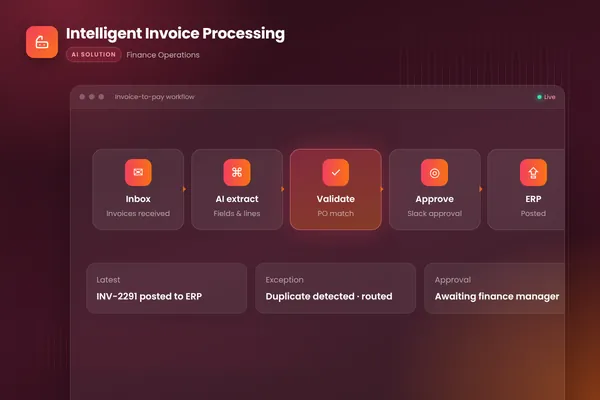
In our intelligent invoice processing project, a finance team was keying hundreds of supplier invoices by hand each month from PDFs, scans and emails, then chasing approvals over email. Month-end close was slow and duplicates sometimes slipped through. (We walk through every stage in how AI invoice processing works.)
The workflow we built runs like this:
- Trigger. The workflow watches the invoices inbox. Each new email with an attachment starts a run.
- Extract. Document AI (Azure Document Intelligence in this build) reads every field from PDFs, scans and email bodies, whatever the supplier's layout.
- Validate. Code checks the extracted data: required fields present, line totals add up, supplier known, invoice number not already seen.
- Match. Each line is matched against the purchase order and goods receipt. Mismatches and likely duplicates are flagged with a plain explanation.
- Route. Clean invoices go to the right approver in Slack, based on policy, with reminders if the approval stalls.
- Post. Approved invoices are posted to the accounting system with a full audit trail.
- Exceptions. Anything that fails a check lands in a review queue with the reason already written, so the reviewer starts from an answer rather than a blank screen.
- 01Watch the inboxEach supplier email with an attachment starts a durable workflow run.
- 02Extract with document AIFields and line items pulled from PDFs, scans and email bodies into a fixed schema.
- 03Validate and matchCode checks totals and supplier, then matches lines to the purchase order and receipt.
- 04Route for approvalClean invoices go to the right approver in Slack, with reminders and time limits.
- 05Post with audit trailApproved invoices are posted to accounting, with every step logged.
- 06Explain the exceptionsMismatches and duplicates go to a review queue with the reason already written.
BufferSol Technologies · buffersoltech.com
Notice where the AI sits. It does one job, turning a messy document into structured data, plus some help explaining mismatches. Everything else is orchestration, rules and integrations running on a durable engine (Temporal in this build). In our experience, most of the work in a production workflow sits in that orchestration and checking code. The outcome the client cared about was removing manual keying, getting faster approvals and catching duplicates before payment, and each of those maps to a specific step above.
Choosing your AI workflow automation tools
There are two broad families of tools, and most mature teams use both.
Visual, low-code platforms such as n8n, Make and Zapier let operations teams build flows by connecting blocks. They now include AI features directly. n8n's documentation, for example, describes how to "build AI-powered workflows" with model providers, agents, tools, memory and MCP servers. These tools are quick to start and easy for non-developers to adjust.
Code-first durable engines such as Temporal and Inngest are libraries and platforms for writing workflows in a programming language. They are built for long-running, high-volume or critical processes that need automated tests, code review, version control and precise control over retries and state.
| Factor | Visual platform (n8n, Make, Zapier) | Code-first engine (Temporal, Inngest) |
|---|---|---|
| Time to first working flow | Hours to days | Days to weeks |
| Who maintains it | Operations team, with light engineering help | Engineering team |
| Volume and duration | Low to medium volume, short runs | High volume, runs that last hours or weeks |
| Testing and versioning | Limited; varies by tool | Unit tests, code review, version control |
| Complex logic and error handling | Gets hard to follow as flows grow | Expressed in normal code |
| Best fit | Departmental flows between common apps | Business-critical, cross-system processes |
Our default is to choose by risk and volume. A marketing team routing leads between a form, a CRM and Slack is well served by a visual tool. An accounts payable process that posts to the ledger and pays suppliers belongs in code on a durable engine, with tests that run on every change. We often prototype in a visual tool to agree the process with the business, then rebuild the critical path in code.
For the AI steps, choose models by testing, not by reputation. Run two or three candidate models against the evaluation set for each step and compare accuracy, cost per item, speed and data-handling terms. Extraction and classification steps often run well on smaller, cheaper models. Keep the model behind your own interface so you can switch when a better or cheaper one appears.
How to implement AI workflow automation, step by step
This is the process our autonomous workflows team follows. It has four stages, and the second one is the most often skipped.
- 011. Process auditMap the current workflow, volumes, error rates and hand-offs, then pick the highest-return path.
- 022. RedesignRemove steps that should not exist, write down the rules, and decide where AI and people each add value.
- 033. AutomateBuild on durable orchestration with AI steps, integrations, approvals and monitoring.
- 044. MeasureDashboards for throughput, accuracy, savings and exceptions, reviewed with the client every month.
BufferSol Technologies · buffersoltech.com
1. Process audit
Sit with the people who do the work. Record each step, each system, each hand-off and each place where work waits. Count the volume and the rework. Collect real examples, including the awkward ones, with the outcome a good employee would reach. These examples become the evaluation set.
2. Redesign before you automate
Many processes carry steps that exist only because two systems were never connected, or approvals that nobody remembers adding. Remove them first. Then write the rules down explicitly: what counts as a match, which amounts need which approver, what happens when data is missing. The rules you cannot write down are where AI steps belong.
3. Automate in thin slices
Build the full path for the simplest common case first, end to end, including logging and the exception queue. Run it in shadow mode, where the workflow produces its result and a person compares it with their own. Then widen coverage one case type at a time, measuring each step against the evaluation set as you go.
4. Measure and improve
Put the numbers on a dashboard the process owner actually looks at. Review the exception queue every week, because it tells you exactly which case types to handle next. Re-run the evaluation set whenever a prompt, model or rule changes, the same way you run regression tests on code.
Human-in-the-loop design, guardrails and security
People judge a workflow by how it handles exceptions. Decide early which actions a person must approve and how fast they need to respond.
OpenAI's guide gives two triggers for human intervention that work well for workflows too. One is exceeding failure thresholds, such as repeated retries or a step that keeps failing validation. The other is high-risk actions that are "sensitive, irreversible, or have high stakes", with examples such as canceling orders, authorizing large refunds or making payments. We add a third: any decision that significantly affects a person, which we come back to in the compliance section.
Make review easy for the reviewer. Put the item, the AI's proposal, the reason it was flagged and the relevant records on one screen, in the tool people already use (Slack, Teams, the helpdesk or a simple review app). Give them one-click approve, edit or reject, and record which they chose. Those decisions are your best source of new evaluation cases.
Security needs the same attention as in any AI system. AI workflows read untrusted text all day: supplier emails, uploaded documents, customer messages. The OWASP Top 10 for LLM applications ranks prompt injection first, and lists sensitive information disclosure, improper output handling and excessive agency among the other main risks. In workflow terms, that leads to a short checklist:
- Treat every document and email as data, never as instructions to the workflow.
- Give each step only the permissions it needs. An extraction step needs no write access to anything.
- Validate model output against a schema and business rules before using it.
- Keep secrets and personal data out of prompts unless the step truly needs them.
- Log every step, input reference and output, so any run can be replayed and explained.
- Set limits on volume and spend so a loop or an attack cannot run up costs.
Compliance for AI workflows in the US, UK and EU
Most back-office workflows, such as invoice processing or order updates, carry the same data protection duties as any other system that handles business and personal data. The rules tighten when a workflow makes decisions about people. This is the map we use with clients.
United States. The NIST AI Risk Management Framework, released on January 26, 2023 and followed by a Generative AI Profile on July 26, 2024, is intended for voluntary use. It organizes AI risk work into four functions: govern, map, measure and manage. It gives legal, security and engineering teams a shared vocabulary for describing controls. Sector rules, such as those for lending, hiring and health data, still apply on top.
United Kingdom. The Data (Use and Access) Act 2025 reorganized the UK GDPR rules on automated decision-making into articles 22A to 22D. The ICO's draft guidance on automated decision-making, updated on 31 March 2026, describes a decision in scope as one "based solely on automated processing" with no meaningful human involvement, that has a "legal or similarly significant effect" on a person. Where that applies, the guidance covers safeguards such as telling people about decisions, letting them make representations, offering human intervention and letting them contest the decision. The guidance was still a draft under consultation when we checked, so confirm the current version before you rely on it.
European Union. The AI Act entered into force on 1 August 2024 and sorts AI systems into four risk levels: unacceptable, high, transparency and minimal. The Commission names CV-sorting software for recruitment and credit scoring that could deny a loan as high-risk examples. The Commission's page states that under the AI Omnibus, which entered into force on 27 July 2026, high-risk rules for areas such as employment and essential services now apply from 2 December 2027 rather than August 2026. Transparency duties, such as telling people when they deal with an AI system, apply from August 2026.
Source: NIST, Information Commissioner's Office, European Commission (checked October 2026)
BufferSol Technologies · buffersoltech.com
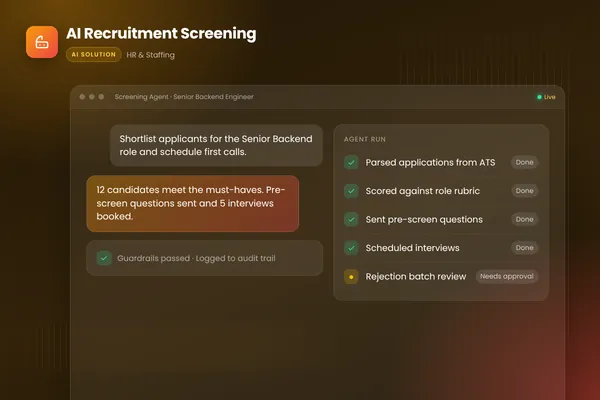
In design terms, if a workflow screens job candidates, scores credit, decides eligibility or does anything similar, build a meaningful human decision point into it and record it. Our recruitment screening agent is built that way. It scores applications against each role's must-haves with written reasons, uses bias-aware rubrics, and a person reviews every batch of rejections. The full log makes every decision explainable after the fact.
How to measure the ROI of AI workflow automation
You can only show a return if you measured the starting point. Before building anything, record the baseline for the process you plan to automate.
| Metric | What to measure | Why it matters |
|---|---|---|
| Volume | Items per day, week or month, including peaks | Sets the scale of any saving |
| Handling time | Minutes of work per item, by case type | The main source of time saved |
| Cycle time | Time from input arriving to outcome done | Often what customers and suppliers feel |
| Error and rework rate | Items corrected, returned or reprocessed | Errors cost more than handling time |
| Straight-through rate | Items completed with no human touch | The headline measure of automation |
| Exception rate and age | Items sent to review, and how long they wait | Shows where to improve next |
| Running cost | Model usage, hosting and tool subscriptions per item | Keeps the return honest |
The return is the cost of time and errors removed, minus the cost to build and run the workflow, over a period agreed in advance. Count the gains that are harder to price as well, such as faster month-end close or replies sent in minutes instead of days, but keep them separate from the hard numbers so the business case stays credible.
Running cost deserves a line of its own. Measure the model cost per item during the pilot, multiply by expected volume including peaks, and check whether cheaper models or caching can handle the routine steps. A workflow that saves ten minutes per item but costs more per item than those ten minutes is not a win.
Why AI workflow projects stall, and how to avoid it
Automation projects usually stall for reasons that have little to do with the model. These are the ones we look for first.
The process was automated as it was. Every unnecessary approval and workaround was faithfully copied into software. Redesign first.
There was no evaluation set. Nobody could say whether the extraction step was accurate enough, so the workflow never left pilot. Collect real examples with known outcomes in week one.
The exception path was an afterthought. Flagged items went into a shared inbox with no context, reviewers lost trust, and people went back to doing everything by hand. Design the review screen as carefully as the main flow. Our guide to workflow exception handling shows how to route each type of exception.
The orchestration was fragile. A chain of scripts or a single long-running function had no retries, no resume and no record of where it stopped. A single outage could leave records half posted. Use a durable engine for anything that matters.
Ownership was unclear. IT built it, operations used it, and nobody owned the rules. Name a process owner who approves rule changes and reviews the dashboard every month.
Costs were checked too late. The pilot used the largest model for every step. Measure cost per item from the first week and right-size each step.
Getting started: a 30-day plan
- Week 1: List five candidate processes and score each one with the table above. Pick one with a clear owner.
- Week 2: Map the process, record the baseline numbers and collect 50 to 100 real examples with correct outcomes.
- Week 3: Redesign the process on paper and build a thin end-to-end slice for the most common case, with logging and an exception queue.
- Week 4: Run it in shadow mode, measure accuracy and cost per item against the baseline, and decide with evidence whether to build out, adjust or stop.
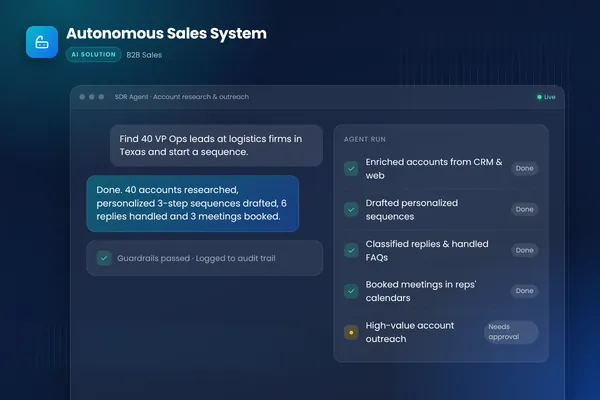
If you want help with that first month, our autonomous workflows practice can run it with you, and our AI agent team handles any steps that need an agent. For a related example of AI working across several systems, see the autonomous sales system we built. You can also talk to an engineer about the process you have in mind.
Frequently asked questions
What is the difference between AI workflow automation and RPA?
RPA bots copy what a person does on screen and follow fixed rules, so they tend to break when a layout or input format changes. AI workflow automation connects to systems through APIs and uses a language model to read unstructured inputs such as emails and PDFs, then hands its output to rules and checks. It copes with variation better and is easier to test and monitor.
Which business processes are best for AI workflow automation?
Good first candidates are high-volume processes where people read documents or emails and then update several systems: invoice processing, order and shipment updates, support triage, onboarding paperwork and lead routing. They have a clear owner, a measurable outcome and plenty of past examples to test against. Rare, high-stakes decisions are better kept with people.
Do I need an AI agent or an AI workflow?
Use a workflow when you can describe the steps in advance and only some steps need judgment. Use an agent when the steps themselves depend on what the system finds along the way. Many production systems combine both: a fixed workflow for the predictable parts with a narrowly scoped agent inside one or two steps. Start with the workflow and add agent steps only where tests show they help.
Should we build AI workflows in n8n, Make or Zapier, or write custom code?
No-code tools are a good fit for low-to-medium volume flows between common apps, owned by an operations team. Custom code on a durable workflow engine such as Temporal fits long-running, high-volume or business-critical processes that need version control, automated tests and detailed audit trails. Many teams prototype in a visual tool and move the critical paths to code later.
How do you measure the ROI of AI workflow automation?
Measure the current process before you change it: volume, handling time per item, error and rework rate, cycle time and the cost of delays. After launch, track the same numbers along with straight-through rate, exception rate and running costs. ROI is the time and error cost removed, minus build and running costs, over a period the business agrees on in advance.
Is AI workflow automation safe for personal data?
It can be, if it is designed for it. Limit each step to the data it needs, keep processing in regions and providers your contracts allow, log every action, and check model outputs before they change records. Where a workflow makes significant decisions about people, UK and EU law adds duties such as transparency and human review, so plan a data protection impact assessment early.
Sources
- Building effective agents, Anthropic
- A practical guide to building agents, OpenAI
- What is Temporal?, Temporal Technologies
- Integrate AI, n8n
- 2025 Top 10 Risk & Mitigations for LLMs and Gen AI Apps, OWASP Gen AI Security Project
- AI Risk Management Framework, NIST
- Automated decision-making, including profiling, Information Commissioner's Office
- AI Act, European Commission
Cite this article
BufferSol Editorial Team (2026). AI Workflow Automation: The Complete Guide (2026). BufferSol Technologies. https://buffersoltech.com/blog/ai-workflow-automation-guide
BufferSol Editorial Team
AI & software engineering team
Senior engineers, AI specialists and product leads at BufferSol Technologies who design, build and run AI agents, autonomous workflows and custom software for companies in the US, UK and Europe.
Reviewed by Sufyan K., Senior Writer, BufferSol Technologies.