Key takeaways
- AI agent development means building software where a language model plans steps and uses your tools (APIs, databases, business apps) to finish a task, with rules and approvals around it.
- Build an agent only for work that needs judgment, has brittle rules or depends on unstructured data. Otherwise a simpler, deterministic workflow is cheaper and more reliable.
- Start with one agent and a narrow job. Move to multiple agents only when one agent's instructions and tool list become hard to manage.
- Guardrails, human approval for high-risk actions, evaluations and monitoring are part of the build, and they decide whether an agent can go to production.
- At BufferSol, you get a working agent on your real data in under 30 days, and full production rollout typically takes 4 to 8 weeks, depending on integrations and risk.
AI agent development is the work of building software in which a large language model plans the steps of a task and carries them out through your own tools, such as your CRM, order system, inbox or database. A well-built agent works inside clear rules, asks a person to approve risky actions and logs everything it does. This guide covers how agents work, when to build one, what the build involves and how to run one safely in the US, UK and EU.
We wrote it from the delivery side. Our team designs and runs AI agents for sales, support, finance and operations teams, and the advice below is what we use with clients in discovery workshops.
What is AI agent development?
An AI agent has three core parts, as OpenAI's practical guide to building agents describes them: a model that reasons and decides, tools it can use to take action, and instructions that set its goal, rules and guardrails. Development means designing all three for one job, connecting the tools safely to real systems, and proving with tests that the agent does the job well enough to trust.
Anthropic draws a useful line between two kinds of systems in Building effective agents. A workflow runs a language model through steps that a developer fixed in code. An agent decides its own steps and tool calls as it goes. Both are valuable, and many of our projects mix them: a fixed workflow for the predictable parts, with an agent handling the steps that need judgment.
The difference from a chatbot is practical. A chatbot answers. An agent acts. We walk through one support request handled both ways in AI agent vs chatbot.
| Chatbot | AI agent | |
|---|---|---|
| Goal | Answer the question in front of it | Complete a task, such as resolving a ticket or booking a meeting |
| Actions | Replies with text | Calls tools: CRM, order system, calendar, ERP, email |
| Steps | One turn at a time | Plans and repeats steps until the task is done |
| Memory | Usually the current conversation | Conversation plus task state, records and retrieved documents |
| Risk controls | Content filters | Permissions, approvals, action limits and audit logs |
| Where it runs | Chat window | Chat, email, Slack, back-office queues, scheduled jobs |
BufferSol Technologies · buffersoltech.com
When should a business build an AI agent?
Build an agent when the work needs judgment that rules cannot capture. OpenAI's guide names three signals: decisions that depend on nuance and exceptions, rule sets that have grown too complex to maintain, and processes that depend on unstructured data such as emails, documents or free-text requests. Refund decisions, vendor security reviews and insurance claims are its examples.
If none of those apply, build something simpler. Anthropic's advice is to start with the simplest solution and add complexity only when it measurably improves results. A single model call with good retrieval often does the job. A scheduled automation with no model at all is sometimes better still.
That restraint matters because many agent projects fail. Gartner predicts that over 40% of agentic AI projects will be canceled by the end of 2027, citing rising costs, unclear business value and weak risk controls. The same research warns about "agent washing", where older chatbots and RPA tools are relabeled as agents, and estimates that only about 130 of the thousands of vendors claiming agentic products offer real agentic capability.
| Item | Value |
|---|---|
| Significant investment | 19% |
| Conservative investment | 42% |
| Wait and see / unsure | 31% |
| No investment | 8% |
Source: Gartner poll of 3,412 webinar attendees, published June 2025
BufferSol Technologies · buffersoltech.com
Our test before any build is a single sentence: which job will the agent own, and how will we know it did that job well? If a client cannot answer that yet, we start with discovery, not code.
Where AI agents deliver value: use cases by department
The best first agents own a repetitive job that already has a clear owner, a measurable outcome and access to the systems involved. These are the jobs we are asked to build most often.
Customer support
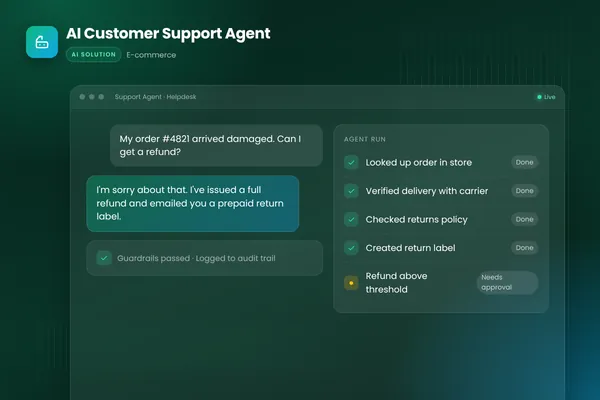
Support agents resolve routine tickets end to end: order status, returns within policy, delivery problems and product questions grounded in the catalog. They connect to the store, the helpdesk and the shipping provider, and they hand unusual cases to a person with the context already written up. The measure of success is how many tickets close without a handover, and how often a handover was the right call.
Sales and business development
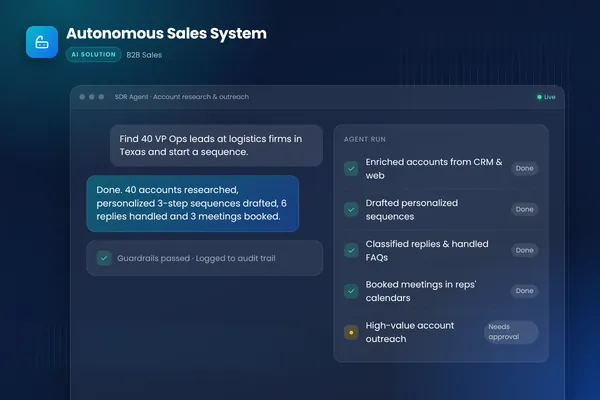
Sales agents research accounts, enrich leads from the CRM and public sources, draft first-touch emails in the company's voice and handle replies that ask simple questions. The value comes from consistency: every lead gets researched and every follow-up goes out on time, while reps spend their day in conversations.
Finance and operations
Back-office agents read invoices, statements and forms in any format, match them against purchase orders or records, and route exceptions for review. These jobs are often better served by an autonomous workflow with agent steps inside it, because most of the process is predictable and only the messy documents need judgment. Our guide to AI workflow automation explains how those processes are designed.
Internal knowledge
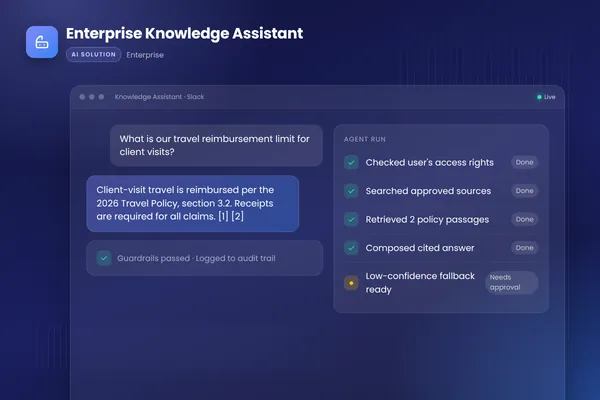
Knowledge agents answer policy, product and engineering questions from approved documents, cite their sources and respect each person's access rights. They cut interruptions for experts and shorten onboarding. The hard part is rarely the model. It is cleaning up sources and permissions so the answers can be trusted.
What to avoid as a first project
Avoid jobs where a wrong action is expensive and hard to reverse, where nobody owns the process today, or where the data the agent needs is locked in systems with no API. These can work later, once the team has an evaluation habit and a working guardrail stack from a lower-risk agent.
How does an AI agent work?
Every agent runs a loop. It reads the goal and the current state, decides on the next step, calls a tool, reads the result and decides again. The loop ends when the task is complete, when a limit is reached or when the agent hands over to a person.
Around that loop sit the components you design (our post on AI agent architecture goes through each layer in detail):
| Component | What it does | What to decide |
|---|---|---|
| Model | Reasons, plans and writes | Which model for planning, and which cheaper model for routine steps |
| Instructions | Goal, policies, tone and escalation rules | Written like an operating procedure for a new hire |
| Tools | Read and write actions in your systems | Smallest set of narrow, well-described tools |
| Knowledge | Documents and records the agent can retrieve | Sources, freshness and who may see what |
| Memory and state | What the agent remembers within and across tasks | What to store, for how long, and where |
| Guardrails | Checks on inputs, outputs and actions | Limits, validations and approval points |
| Observability | Traces of every step and tool call | Logging, dashboards and alerts |
Tool design deserves more time than most teams give it. Anthropic recommends treating the agent-computer interface with the same care as a user interface: describe each tool the way you would brief a junior developer, include examples and edge cases, and shape inputs so mistakes are hard to make. In our experience, a clearer tool description fixes more agent errors than a bigger model does.
Single agent or multi-agent system?
Start with one agent. OpenAI's guide recommends keeping a single agent and adding tools until its instructions or tool list become hard to manage, and only then splitting the work. A single agent is easier to test, cheaper to run and simpler to debug. Our post on single-agent vs multi-agent systems covers the signals for splitting in detail.
Multiple agents help when the job has distinct specialties. In our autonomous sales system, one agent researches accounts, a second writes personalized outreach in the company's voice, and a third reads replies, answers common questions and proposes meeting times. Each agent has a short, focused set of instructions and tools. An orchestrator routes the work, and high-value accounts wait for human approval before anything is sent.
Anthropic describes the common patterns well. Use routing when inputs fall into clear categories that need different handling. Use an orchestrator with workers when the subtasks are only known at run time. Use an evaluator-optimizer loop when quality can be checked against clear criteria, for example a draft reviewed against a brand style guide.
How to choose the model for an AI agent
Model choice matters less than most teams expect and should be settled by testing, not by benchmarks or brand. Shortlist two or three capable models whose data terms suit you, then run each one against your evaluation set. Compare four things: task success rate, cost per completed task, time to complete, and how the model behaves when it is unsure. A model that asks for help at the right moment is worth more than one that is slightly more accurate but confidently wrong.
Many production agents use more than one model. A strong reasoning model plans the work and handles hard cases, while a smaller and cheaper model does routine steps such as classifying an email, extracting fields from a document or checking a reply against a style guide. Design the agent so the model sits behind your own interface. Models improve every few months, and you will want to switch without rewriting the agent.
Check data handling before you commit. For UK and EU clients we confirm where requests are processed, whether inputs are retained or used for training, and whether a data processing agreement is in place. Some clients need regional hosting through a major cloud provider, which narrows the shortlist early.
The AI agent development process, step by step
This is the process we follow at BufferSol. The timings are BufferSol delivery data from recent projects. They vary with the number of integrations and the level of risk.
- 01Job mappingPick one high-value job, document the steps, systems and rules, and agree the success metrics.
- 02Evaluation setCollect real examples with the right outcomes, so quality is measured from day one.
- 03Prototype in two weeksA working agent on real data, scored on the evaluation set for accuracy, cost and speed.
- 04Harden and integrateGuardrails, approvals, permissions, SSO, logging and production integrations.
- 05Staged rolloutShadow mode, then a small share of live traffic, with people reviewing outcomes.
- 06Monitor and improveDashboards, alerts and regular tuning from real conversations and failures.
BufferSol Technologies · buffersoltech.com
Source: BufferSol delivery data
BufferSol Technologies · buffersoltech.com
For a phase-by-phase breakdown of these timelines, see how long it takes to build an AI agent.
Two habits separate the projects that ship from the ones that stall. The first is writing the evaluation set before the prompts: a list of real inputs and the outcome a good employee would produce. The second is running the agent in shadow mode, where it proposes actions that people review, before it acts on its own.
Tools, integrations and the Model Context Protocol
An agent is only as useful as the systems it can reach. Most of the build effort sits here: authentication, data mapping, rate limits, error handling and permission design for each connected system.
The Model Context Protocol (MCP) is an open standard for connecting AI applications to data sources, tools and workflows. Its documentation compares it to a USB-C port for AI applications: you expose a system once as an MCP server, and any compatible agent or assistant can use it. For a business, that means a CRM or ERP connector built for one agent can serve the next one, and access rules live in one place.
Whatever the protocol, follow three rules for tools:
- Give each tool one narrow purpose and a plain description of when to use it.
- Validate inputs before the tool runs and check results before the agent continues.
- Scope credentials to the job. An agent that reads orders should not be able to delete customers.
Guardrails, security and human approval
Agents read untrusted text all day: customer emails, web pages, PDFs, ticket histories. That makes prompt injection the first risk to design for. It is number one on the OWASP Top 10 for LLM applications, and "excessive agency", meaning an agent with more permissions or autonomy than its job needs, is number six.
OpenAI's guide treats guardrails as layers, because no single check is enough. A practical stack looks like this:
- Input checks: relevance and safety classifiers, length limits, and blocklists for known attack patterns.
- Tool safeguards: rated by risk, with read-only tools allowed freely and write actions checked or approved.
- Output checks: policy and brand rules, personal data redaction, and validation of structured output.
- Human approval: for irreversible or high-value actions, and whenever the agent fails repeatedly.
The same guide names two triggers for human intervention: exceeding failure thresholds, such as repeated retries, and high-risk actions, such as canceling orders, authorizing large refunds or making payments. Our AI customer support agent follows that rule. It looks up orders and creates return labels on its own, but refunds above a set threshold go to a person with a summary of the case and a suggested reply. Our post on human-in-the-loop AI agents explains how to set thresholds like this.
How to evaluate and monitor an AI agent
You cannot improve what you do not measure, and agents fail in quieter ways than ordinary software. Track these from the first prototype:
| Metric | Why it matters |
|---|---|
| Task success rate | Share of tasks completed correctly against the evaluation set |
| Escalation rate | How often the agent hands over, and whether those handovers were right |
| Tool error rate | Failed or invalid tool calls, an early sign of poor tool design |
| Cost per task | Model and infrastructure cost for each completed task |
| Time to complete | End-to-end latency compared with the manual process |
| Policy violations | Outputs or actions blocked by guardrails, reviewed weekly |
Run the evaluation set before every release, the same way you run regression tests. Our post on AI agent evaluation gives a case template and pass criteria. In our enterprise knowledge assistant, an evaluation suite measures answer accuracy before each release, and feedback buttons in Slack feed new cases back into the set.
Why AI agent projects fail, and how to avoid it
The reasons Gartner gives for canceled projects, cost, unclear value and weak risk control, match what we see when clients bring us a stalled project to rescue. The root causes are usually earlier and simpler.
The job was never defined. A team asks for "an agent for operations" instead of "an agent that reconciles supplier statements every Monday". Without a defined job there is no evaluation set, and without an evaluation set nobody can say whether the agent is good enough, so it never ships.
The agent was given too much at once. Twenty tools and a long list of goals make an agent unpredictable. Narrow the job until the agent succeeds reliably, then widen it one capability at a time.
Costs were measured too late. A prototype that runs a long chain of model calls per task can look impressive and still cost more than the person it was meant to help. Measure cost per task from the first week and design for it.
Nobody planned the handover. Every agent hits cases it cannot handle. If those cases land nowhere, or land with a person who has no context, trust collapses quickly. Design the escalation path with the same care as the happy path.
Security came last. Agents that read emails or web pages and then act on them need prompt injection testing and strict permissions before launch. Retrofitting that after a near miss is slow and expensive.
Compliance for US, UK and EU deployments
Governance is easier to design in than to add later. Three references cover most of what our clients need.
In the US, the NIST AI Risk Management Framework organizes AI risk work into four functions: govern, map, measure and manage. NIST released version 1.0 in January 2023 and a Generative AI Profile in July 2024. It is voluntary, but it gives security and legal teams a shared vocabulary.
In the UK, the Information Commissioner's Office publishes guidance on AI and data protection, organized around UK GDPR principles such as accountability, transparency, lawfulness, accuracy and fairness, with a risk toolkit. If an agent processes personal data, plan a data protection impact assessment early.
In the EU, the AI Act entered into force on 1 August 2024 and sorts AI systems by risk: unacceptable (banned), high-risk, transparency risk and minimal risk. Most business agents fall under transparency duties, for example telling people when they are dealing with an AI system. Agents used in areas such as employment decisions or access to essential services can be high-risk, with stricter obligations. Check the Commission's page for current application dates, because several were updated in 2026.
What drives the cost of AI agent development?
Every agent is priced differently, so we prefer to explain the drivers rather than quote a figure without context:
| Cost driver | Lower cost | Higher cost |
|---|---|---|
| Scope | One clearly defined job | Several jobs or open-ended goals |
| Integrations | One or two systems with good APIs | Many systems, legacy or no APIs |
| Data | Clean, accessible records and documents | Scattered, inconsistent or sensitive data |
| Risk | Read-only or easily reversed actions | Payments, health data, regulated decisions |
| Evaluation | Small, stable test set | Large test sets and formal sign-off |
| Running | Short tasks on efficient models | Long tasks, large documents, high volumes |
Running cost is the line that surprises people. Measure cost per task during the prototype, then multiply by expected volume. Routing simple steps to a smaller model and caching repeated context can reduce it substantially.
Build or buy: custom agents vs off-the-shelf platforms
Off-the-shelf agent products are the right choice for common jobs inside a single tool, such as a support assistant built into your helpdesk. Custom development makes sense when the agent must work across your own systems, follow your specific policies or create an advantage your competitors cannot buy.
| Off-the-shelf platform | Custom agent | |
|---|---|---|
| Time to start | Days | Weeks, after a discovery sprint |
| Fit to your process | Generic workflows | Your rules, systems and edge cases |
| Integrations | The vendor's connectors | Any system, including legacy and internal APIs |
| Data control | Vendor's hosting and terms | Your cloud, your retention rules |
| Ownership | Subscription, vendor roadmap | You own the code and the prompts |
| Best for | Standard jobs inside one tool | Cross-system work and differentiating processes |
BufferSol Technologies · buffersoltech.com
How to choose an AI agent development partner
Ask any vendor, us included, these questions:
- Can you show an agent you built that is running in production today, and what it measures?
- How do you build the evaluation set, and who signs off on accuracy?
- Which actions will need human approval, and how is that enforced in code?
- How do you test for prompt injection and limit the agent's permissions?
- Who owns the code, prompts and evaluation data at the end?
- What does it cost to run per task, and how will you keep that cost down?
Vague answers to the first two questions are the clearest warning sign. If a vendor cannot show production results or explain how it measures quality, the project is likely to join the canceled ones. Our guide to choosing an AI automation agency covers vetting, pricing and contracts in more detail.
Getting started: a 30-day plan
- Week 1: pick one job, map it step by step, gather 50 to 100 real examples and define success.
- Week 2: build a prototype on real data, score it on the evaluation set and estimate cost per task.
- Weeks 3 to 4: run the agent on a first slice of real work, with your team approving what matters.
- Day 30: decide with evidence whether to roll out to production (typically 4 to 8 weeks in total), adjust scope, or stop.
If you want help with that first month, our AI agent development team runs it as a fixed-price discovery sprint, and our autonomous workflow practice handles the processes around the agent. You can also talk to an engineer about the job you have in mind.
Frequently asked questions
How long does it take to build an AI agent?
A working prototype on real data usually takes about two weeks once the job is clearly defined. Getting to production takes longer because of integrations, guardrails, evaluations and security review. In BufferSol projects, discovery usually starts within a week, a working agent runs on your own data in under 30 days, and full production rollout typically takes 4 to 8 weeks. Multi-agent systems and agents that touch payments, health data or many systems take longer.
How much does AI agent development cost?
Cost depends on how many systems the agent connects to, how clean the data is, how risky its actions are and how much testing that risk demands. Running costs then depend on model usage per task and on hosting. A fixed-price discovery sprint is the most reliable way to get a real number, because it scopes the job, tests it on your data and prices the build against measured results.
What is the difference between an AI agent and a chatbot?
A chatbot answers questions in a conversation. An AI agent works toward a goal: it decides what to do next, calls tools such as your CRM, order system or calendar, checks the result and keeps going until the task is done or a person needs to step in. Many good agents never chat with anyone. They run inside back-office processes.
Which LLM is best for building AI agents?
There is no single best model. Pick by testing two or three strong models on your own evaluation set and compare task success, latency, cost per task and data-handling terms. Many production agents use a capable model for planning and a smaller, cheaper model for routine steps such as classification or extraction. Keep the model behind an interface so you can switch later.
Are AI agents safe to connect to business systems?
They can be, if they are designed for it. Give each agent only the permissions its job needs, validate every tool call, log every action, and require human approval for irreversible or high-value actions such as refunds or payments. Test against prompt injection before launch, because agents read untrusted text from emails, web pages and documents.
Will AI agents replace our team?
In our projects, agents take over repetitive steps such as lookups, data entry, first drafts and routine replies. People keep the judgment calls, exceptions and relationships. The common outcome is that a team handles more volume and spends its time on the work that needs experience, while the agent escalates anything unusual with a summary attached.
Sources
- Building effective agents, Anthropic
- A practical guide to building agents, OpenAI
- Gartner Predicts Over 40% of Agentic AI Projects Will Be Canceled by End of 2027, Gartner
- 2025 Top 10 Risk & Mitigations for LLMs and Gen AI Apps, OWASP Gen AI Security Project
- AI Risk Management Framework, NIST
- What is the Model Context Protocol (MCP)?, Model Context Protocol
- AI Act, European Commission
- Guidance on AI and data protection, Information Commissioner's Office
Cite this article
BufferSol Editorial Team (2026). AI Agent Development: The Complete Guide for Businesses (2026). BufferSol Technologies. https://buffersoltech.com/blog/ai-agent-development-guide
BufferSol Editorial Team
AI & software engineering team
Senior engineers, AI specialists and product leads at BufferSol Technologies who design, build and run AI agents, autonomous workflows and custom software for companies in the US, UK and Europe.
Reviewed by Sufyan K., Senior Writer, BufferSol Technologies.