Key takeaways
- An AI help desk answers employees' IT and policy questions with cited sources, resolves routine requests in your systems, and hands the rest to the right team with a summary.
- Answers must respect access rights: the agent should only use documents each employee is allowed to see.
- Sort requests into four groups: questions, how-to guidance, access and account actions, and incidents. Each needs a different level of control.
- Access changes need approval and identity checks; the agent prepares them, an authorized person or policy approves.
- Put the help desk where people already ask for help, such as Slack or Teams, and measure resolution, not just deflection.
An AI help desk is an AI agent that handles employees' internal support requests. It answers IT and policy questions from approved documents with citations, walks people through common fixes, completes routine requests in connected systems within policy, and opens a ticket for the right team when a person is needed, with the details already gathered. It works where employees already ask for help, such as Slack or Teams, and it only uses information each person is allowed to see.
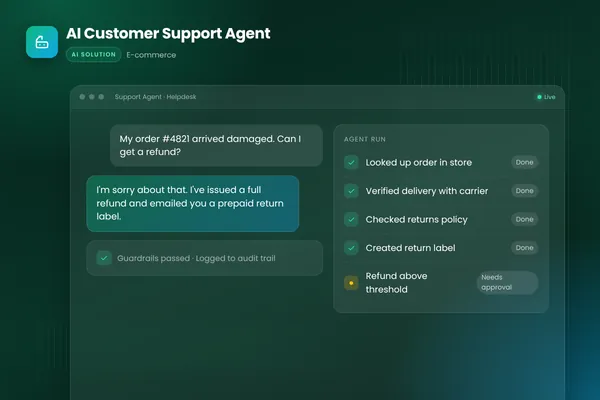
This post applies the design of customer support agents to internal IT and employee support. For the customer-facing version, see our AI customer support agent guide.
Why internal support is a good fit
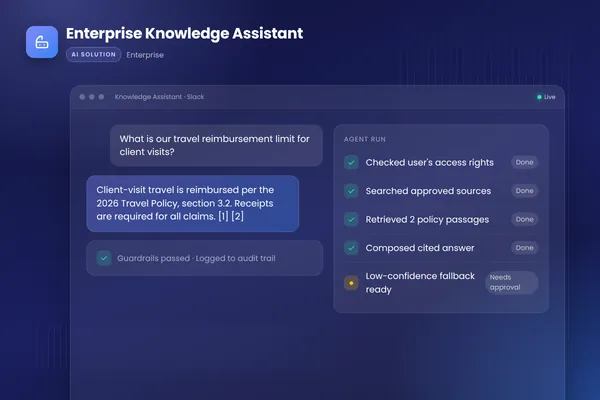
Internal support has the same pattern as customer support: many repeated questions, a smaller number of requests that need action, and a few that need an expert. In the enterprise knowledge assistant we built, knowledge was scattered across wikis, drives, tickets and chat. New hires took months to ramp up and experts were interrupted constantly with the same questions.
We deployed an assistant in Slack and on the web that searches approved sources, answers with citations and only uses documents each user is allowed to see. Permissions follow the existing access controls through single sign-on. An evaluation suite measures answer accuracy before every release, and feedback buttons improve retrieval over time. The outcomes the client wanted were trustworthy answers for every team, faster onboarding and fewer interruptions for subject-matter experts.
An AI help desk takes that foundation one step further: as well as answering, it acts on routine requests.
Four kinds of employee request
| What the agent does | Control needed | |
|---|---|---|
| Questions | Answers from approved policies and docs, with citations | Only documents the employee is allowed to see |
| How-to guidance | Walks through steps such as setting up VPN or a new device | Approved guides only; hand over if steps fail |
| Access and account actions | Collects details, starts the request, routes it for approval, confirms when done | Identity checks and approval by policy or an authorized person |
| Incidents | Gathers symptoms, checks known issues, opens a ticket with a summary | Assigned to the right team; urgent ones flagged at once |
Source: BufferSol enterprise knowledge assistant and support agent design
BufferSol Technologies · buffersoltech.com
Questions
"How many days of leave do I have left?", "What is the expenses policy for client dinners?", "Which laptop models can I order?". The agent answers from approved documents and links to the exact source passage, so the employee can check it. If the answer is not in the approved sources, it says so and offers to open a ticket.
How-to guidance
Many IT requests are really "how do I": connect to the VPN, set up multi-factor authentication on a new phone, share a folder externally. The agent walks the employee through the approved steps one at a time and checks each step worked. If they get stuck, it opens a ticket with what was tried.
Access and account actions
Requests such as "I need access to the finance shared drive" or "please add me to the sales channel" change permissions, so they need control. The agent collects the details, starts the request in the right system and sends it to the approver your policy names. Password resets should go through your identity provider's own self-service flow with its verification, not a reset typed by the agent. OpenAI's practical guide to building agents recommends human oversight for high-risk actions; access changes belong in that group.
Incidents
"My laptop will not start" or "the CRM is down". The agent gathers symptoms, checks for known incidents and, if there is a wider outage, says so and links to status updates. Otherwise it opens a ticket for the right team with the details, device and steps already tried. Urgent incidents, such as a suspected phishing email that was clicked, are flagged straight away.
Permissions are the hard part
Internal documents have access controls for good reasons. Salary bands, legal advice, board papers and security procedures should not appear in an answer to someone who cannot open the source. The knowledge assistant we built only uses documents each user is allowed to see, by checking their permissions through SSO at query time.
Apply the same rule to actions. The agent acts with the employee's own permissions, or through narrow service accounts limited to specific request types, never as an all-powerful admin. The OWASP Top 10 for LLM applications lists sensitive information disclosure and excessive agency among the main risks for LLM applications, and both apply directly to an internal help desk. Prompt injection does too: a document or message that tells the agent to grant access must change nothing, because every access change goes through the approval rules in code.
Where to put it
Put the help desk where employees already ask for help. In our knowledge assistant, that meant Slack and the web. A request in a chat channel is quicker than filling in a portal form, and the agent can still create the formal ticket behind the scenes, so the IT team's queue and reporting stay intact.
Keeping answers current
An AI help desk is only as good as the documents behind it. Out-of-date policies are the most common cause of wrong answers, and they were a problem long before AI: the agent simply makes them visible faster.
- Name an owner for every source. Each policy, guide and FAQ the agent uses has a team that keeps it current.
- Show the date. Answers link to the source, and the source shows when it was last reviewed.
- Retire old versions. Archive superseded documents so the agent cannot find them.
- Close the loop. When an employee marks an answer as wrong, the content owner gets the report, fixes the document and the case is added to the test set.
Before each release, run the evaluation set of real questions with known correct answers, as the knowledge assistant's evaluation suite does. A drop in accuracy after a content or model change is caught before employees see it.
Rolling out in stages
Start with questions only, in one team or one office, for a few weeks. Add how-to guidance next, then incident intake, then access requests for one or two well-defined systems. Each stage reuses the same permissions, logging and evaluation, and each gives the IT team time to see where the agent helps and where it needs better content or rules. Expand to more teams once accuracy and employee feedback are steady.
Governance
Internal AI tools need owners. Decide who owns the content the agent uses, who approves new request types, how often answers are evaluated, and how employees report a wrong answer. NIST's AI Risk Management Framework, a voluntary framework for managing AI risks, is a useful checklist for that structure: who is accountable, where the agent acts, how accuracy is measured and how problems are handled.
What to measure
Track requests handled without a person by type, time to answer, tickets created by the agent with complete details, repeat requests on the same issue within a few days, wrong-answer reports, and time saved for the IT and HR teams. Read a sample of conversations every week with the teams that own the content. Their review often finds missing documents and unclear policies, which are worth fixing even for human support.
Getting started
Export a quarter of IT and HR tickets and tag each as question, how-to, access or incident. Collect the approved documents behind the most common questions and check they are current. At BufferSol, you get a working help desk agent on your real documents and systems in under 30 days, with full rollout typically in 4 to 8 weeks. Our AI agent development team builds it into Slack or Teams, connected to your identity provider and ticketing system.
Frequently asked questions
What is an AI help desk?
An AI help desk is an AI agent that handles internal support requests from employees, such as IT and HR questions. It answers from approved documents with citations, guides people through common fixes, completes routine requests in connected systems within policy, and creates a ticket for the right team when a person is needed, with the details already gathered.
Can an AI help desk reset passwords or grant access?
It can start and guide those requests, but identity checks and approvals stay in control. Password resets should go through your identity provider's self-service flow with its own verification. Access requests should follow your approval rules: the agent collects the details, routes the request to the approver and confirms once it is done.
How is an internal AI help desk different from a customer support agent?
The design is similar, but the data and risks differ. Internal help desks work with company documents and systems that have access controls, so the agent must respect each employee's permissions. Requests often involve access and security, so approvals and identity checks matter more. Employees also expect help inside the tools they use every day, such as Slack or Teams.
Sources
- A practical guide to building agents, OpenAI
- 2025 Top 10 Risk & Mitigations for LLMs and Gen AI Apps, OWASP Gen AI Security Project
- AI Risk Management Framework, NIST
Cite this article
BufferSol Editorial Team (2026). AI Help Desk: Automating Internal IT and Employee Support With an AI Agent. BufferSol Technologies. https://buffersoltech.com/blog/ai-help-desk
BufferSol Editorial Team
AI & software engineering team
Senior engineers, AI specialists and product leads at BufferSol Technologies who design, build and run AI agents, autonomous workflows and custom software for companies in the US, UK and Europe.
Reviewed by Sufyan K., Senior Writer, BufferSol Technologies.