Key takeaways
- An AI customer support agent resolves tickets, not just answers questions: it looks up orders, checks shipping, applies policy and takes allowed actions in your systems.
- Start with the ticket types that are frequent, rule-bound and reversible, such as order status and returns within policy, and keep money and exceptions behind human approval.
- Tool permissions decide safety. Give the agent narrow, scoped access, validate every action, and log everything.
- Escalation is part of the product: hand over with a written summary and a suggested reply so the person starts from an answer.
- Test on past tickets before launch, measure resolution and correct handovers after, and expect a working agent on your real tickets within 30 days, with full rollout planned from the pilot results.
An AI customer support agent is software that resolves customer requests end to end. It reads the message, works out what the customer needs, looks up the order, account or product in your systems, takes the actions your policy allows, replies in your brand's voice and hands the case to a person with a summary when it should not proceed alone. The goal is a resolved ticket, not just an answer.
This guide covers what these agents can handle, how they work, how to connect them safely to your helpdesk and store, how to design escalation, how to test and measure them, and what a realistic 30-day pilot looks like. It is built on the AI customer support agent BufferSol built for a growing online retailer whose team was overwhelmed by repetitive tickets about order status, returns and product questions, with response times stretching to days during peaks.
What an AI customer support agent is, and is not
A support chatbot answers questions. An AI support agent completes the task. OpenAI's practical guide to building agents defines agents as "systems that independently accomplish tasks on your behalf," and is explicit that simple chatbots, which use a model without letting it control the workflow, are not agents. In support, that difference shows up in the outcome: the chatbot explains the returns policy; the agent creates the return.
We walk through one ticket handled both ways in AI agent vs chatbot. The rest of this guide is about building the agent version well.
Which tickets an AI agent should handle first
Not every ticket is a good first candidate. Score your ticket types on four questions: how often they arrive, whether the answer lives in your systems, whether the policy is written down, and whether the action is reversible.
| Good first candidates | Keep with people (agent prepares the case) | |
|---|---|---|
| Orders | Order status, delivery estimates, tracking questions | Lost parcels with high value or repeated contact |
| Returns | Returns and labels within the written policy | Out-of-policy returns and goodwill exceptions |
| Refunds | Explaining refund status and timelines | Refunds above the set threshold |
| Products | Sizing and product questions answered from the catalog | Safety, medical or legal questions about products |
| Accounts | Simple updates after identity checks | Ownership changes, payment details, data requests |
| Tone | Routine, neutral requests | Complaints, threats to leave, press or legal mentions |
Source: BufferSol ticket triage for support agents
BufferSol Technologies · buffersoltech.com
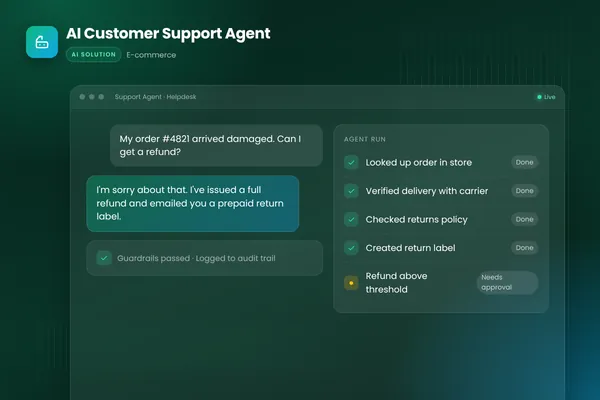
In our build, the agent handles order and shipping lookups in real time, creates returns and labels within the rules, answers sizing and product questions grounded in the catalog, and hands everything else to a person with a full summary and suggested reply.
How the agent works, step by step
Every request runs through the same loop: understand, look up, decide, act or hand over, reply, log.
- 01UnderstandRead the message and history; identify the customer and every request in it.
- 02Look upQuery the store for the order, the carrier for live tracking, the catalog or policy for answers.
- 03DecideCheck the request against written policy and the agent's permissions.
- 04Act or hand overTake allowed actions, such as creating a return label, or route to a person with a summary.
- 05ReplyAnswer in the brand's tone with the outcome and next steps.
- 06LogRecord every lookup, decision and action on the ticket for review and audit.
Source: BufferSol AI customer support agent build
BufferSol Technologies · buffersoltech.com
The "decide" step is where most design work goes. The agent needs the policy written as clear rules it can apply, plus the judgment to recognize when a case falls outside them. Anthropic's Building effective agents describes routing customer service queries, general questions, refund requests and technical support, to different downstream processes. A support agent does the same thing internally, choosing which tools and rules apply to each part of a message.
One ticket, followed through the agent
Here is an illustrative request that combines a product question with an action: "The jacket I ordered last week is too small. Do you have it in the next size up, and can I swap it?"
The agent identifies the customer from the helpdesk record and finds the order in the store. It reads the product's size chart from the catalog and checks stock for the next size. It checks the returns policy: the item is within the return window and eligible for exchange. Because exchanges within policy are an allowed action, it creates the return and the return label, and explains in its reply how the exchange will work, using the brand's tone. Every lookup and action is written to the ticket as an internal note.
Now change one detail. Suppose the customer adds, "and I want a refund for the delivery charge too, it was late." Refunds of that kind are outside the agent's allowed actions. The agent completes the exchange, explains that a colleague will look at the delivery charge, and hands over with a summary: order, delivery dates from the carrier, the policy clause and a suggested reply. The person decides the refund in seconds.
Integrations: helpdesk, store, carrier
A support agent is only as useful as the systems it can reach. Ours connects three:
| System | What the agent does there | Access it needs |
|---|---|---|
| Helpdesk (Gorgias in our build) | Reads tickets and history, posts replies, adds notes, escalates | Read and reply on tickets; no deletion |
| Store (Shopify in our build) | Looks up orders, customers and products; creates returns within policy | Read orders, products and customers; write only for returns |
| Shipping provider | Checks live tracking and delivery status | Read only |
Scope each connection tightly. Shopify's own Admin API documentation notes that "to keep the platform secure, apps need to request specific access scopes during the install process." Request only the scopes the agent's job needs. An agent that answers order questions should not be able to edit prices or delete customers.
Our build uses Claude as the model, the Vercel AI SDK, the Shopify API and Gorgias, written in TypeScript. The same pattern applies to other helpdesks and commerce platforms: the agent works through each system's API, with permissions set per tool.
Policy-aware actions and approval thresholds
The rule we use: the agent may act alone where the action is low-risk, within written policy and easy to reverse. Everything else needs a person.
OpenAI's guide names high-risk actions that should trigger human oversight, including canceling user orders, authorizing large refunds and making payments, and recommends escalating when the agent exceeds failure thresholds, such as failing to understand a request after several attempts. In our support agent, refunds above a set threshold go to a person with a summary of the case and a suggested reply, while returns and labels within policy are created automatically.
Thresholds should be enforced in code, not left to the model's judgment. For a detailed approach to setting and tuning them, see human-in-the-loop AI agents.
Writing policies the agent can follow
Most support policies were written for people who can ask a colleague when something is unclear. An agent needs them written more precisely. Turn each policy into rules with clear conditions and outcomes:
- Conditions: "Items may be returned within the return window if unworn and with tags attached." Define the window, and how the agent can check each condition from data it can see.
- Allowed actions: "Create a return label" is allowed; "issue a refund" is allowed below a set amount; "issue store credit" may need approval.
- Exceptions: list the cases that always go to a person: damaged items, repeated contacts, VIP customers, anything mentioning legal action.
- Wording: give example phrasings for sensitive replies, such as declining a return, so the tone stays consistent.
Writing this down often exposes gaps and contradictions in the current policy. Fixing them helps human agents too, and it is one reason answers become more consistent with policy after launch.
Escalation that helps the human
Escalation is part of the customer experience. A good handover includes:
- what the customer asked, in one or two lines;
- what the agent looked up and found (order, tracking, policy clause);
- why it is handing over (threshold crossed, out of policy, unclear request, sensitive topic);
- a suggested reply the person can send, edit or replace.
The person then starts from an answer rather than reading the whole thread again. In our build, unusual cases go to a human with exactly this kind of ready-made summary, so the team only handles the conversations that need them.
Tell the customer what is happening, too: "I've passed this to a colleague who can approve refunds of this size. You'll hear back within one working day." Silence after a handover destroys more trust than a slower answer.
Grounding answers in your own content
Support answers must be right, and they must be yours. Ground product and policy answers in your catalog, help center and written policies, not in the model's general knowledge. In our build, product and sizing answers are grounded in the catalog.
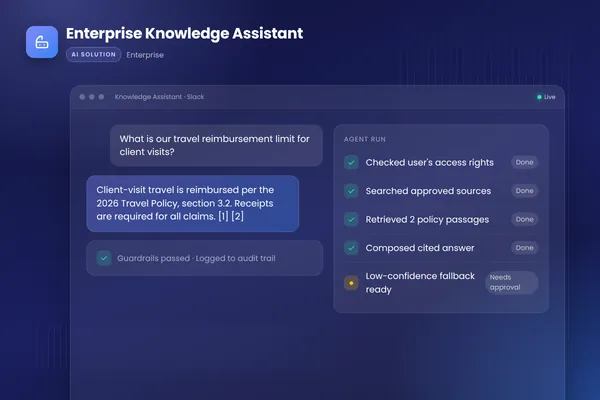
For larger knowledge bases, retrieval-based assistants find the relevant passages and answer from them. Our enterprise knowledge assistant applies the same principle internally: it answers from approved documents with citations and respects each user's access rights. For customer-facing support, add one more rule: when the sources do not answer the question, the agent says so and hands over rather than guessing.
Tone, channels and languages
The agent should sound like your brand, not like a generic assistant. Give it a short style guide with real examples of good replies from your team, including how to apologize, how to say no and how to sign off. Test tone as part of evaluation, using a rubric your support lead agrees with.
Our support agent works across chat and email in the helpdesk. Channels change the format: chat replies are short and quick; email replies can carry more detail and links. If you serve customers in several languages, test each language you support separately, and decide which ones go straight to a person until the agent has proved itself in them.
Handling peaks
Peaks are where support agents earn their keep. Our client's response times stretched to days during sales peaks, because the same repetitive tickets arrived in large numbers at once. An agent that resolves order-status and returns tickets around the clock absorbs much of that load, while people focus on the cases that need them.
Plan for peaks explicitly: check model and API rate limits at peak volume, set alerting on queue length and error rates, and decide in advance which ticket types the agent should pause on if something goes wrong.
Security and privacy
Customer messages are untrusted input. The OWASP Top 10 for LLM applications ranks prompt injection first and sensitive information disclosure second, and a support agent faces both: messages that try to make it ignore its rules, and attempts to get information about someone else's order or account.
Controls we treat as essential:
- Verify the customer's identity before showing order details or changing anything, using your existing rules.
- Show only data belonging to the verified customer; never search across customers from a free-text request.
- Treat message text as data; it can never change the agent's instructions or permissions.
- Validate every tool call against policy and limits before it runs.
- Redact personal data the reply does not need, and log every action.
- Rate-limit actions per customer and per hour.
Data protection still applies: a support agent processes personal data, so check where data is processed, which model providers see it and how long logs are kept.
Verifying customers before acting
Identity checks deserve their own design, because the agent acts on accounts. Match the strength of the check to the risk of the action:
- Low risk (order status, tracking): the customer writes from the email address on the order, or gives the order number together with the postcode or email.
- Medium risk (returns, exchanges, address changes before dispatch): the same, plus confirmation that the request comes from the verified channel.
- High risk (payment details, account ownership, data requests): always a person, using your existing verification process.
Write these rules into the agent's tools, not just its instructions. A lookup tool that only returns orders matching the verified customer cannot be talked into revealing someone else's order.
Transparency with customers
Be clear that customers are talking to AI. In the EU, the AI Act includes transparency duties such as informing people when they interact with an AI system like a chatbot, and the European Commission lists these as taking effect in August 2026. Clear labeling and an easy route to a person are also what customers expect everywhere else.
Testing before launch
Build an evaluation set from past tickets before writing prompts: real messages, the records the agent would see, and what a good agent should do, including which tools to call and when to hand over. Include the awkward ones: several requests in one message, missing order numbers, angry customers and messages that try to manipulate the agent.
OpenAI's evaluation best practices recommend logging during development "so you can mine your logs for good eval cases" and treat evaluation as "a continuous process." Run the set before every release and add every real failure as a new case. Our post on AI agent evaluation includes a case template and pass criteria.
Then run in shadow mode: the agent drafts replies and proposes actions on live tickets, and agents in your team compare them with what they would have done. Move ticket types to automatic handling one at a time, once the drafts are consistently accepted unchanged.
Estimating cost per ticket
Running cost should be measured, not guessed. During the pilot, record model usage and time for each ticket the agent handles, by ticket type. Simple order-status tickets need few steps; exchanges with several lookups need more. Multiply cost per ticket by your expected monthly volume, including peaks, and add hosting and monitoring.
There is usually room to bring the number down. OpenAI's agent guide suggests building with a capable model first to set a quality baseline, then trying smaller models where they still perform well. Classifying a ticket or extracting an order number often runs well on a smaller model, while the policy decision and the reply use a stronger one.
Metrics that show whether it works
| Measure | What it tells you |
|---|---|
| Resolution rate by ticket type | Share of tickets the agent closes without a person |
| Correct handover rate | Whether escalations were the right call, and whether any should have been escalated but were not |
| Time to first response and to resolution | What customers feel, especially during peaks |
| Reopen rate | Whether "resolved" tickets stayed resolved |
| Customer satisfaction on agent-handled tickets | Measured with your existing survey, compared with human-handled tickets |
| Policy violations caught by checks | Whether guardrails are doing their job |
| Cost per resolved ticket | Model usage and hosting, measured at real volume |
Record the baseline for each measure before launch, from your helpdesk data. The outcomes our client targeted were routine tickets resolved around the clock, the support team focused on complex and high-value cases, and consistent answers aligned with policy. Your targets should be set from your own baseline.
Running the agent after launch
A support agent needs regular care, like any member of the team:
- Weekly: review escalations and a sample of resolved tickets with the support lead. Add failures and good examples to the evaluation set.
- When policies change: update the rules, re-run the evaluation set, then release.
- When products change: make sure the catalog and help content the agent uses are current; stale sources cause wrong answers.
- When models change: test a new model version on the evaluation set before switching, and compare cost per resolved ticket as well as quality.
Name one owner for the agent's behavior, usually the support lead, who approves policy and tone changes. Engineering owns the integrations and monitoring.
Common pitfalls
- Launching on every ticket type at once instead of two or three proven ones.
- Letting the agent answer from general knowledge when your own sources are silent.
- Giving the agent broad API access "for flexibility".
- Escalating without a summary, so customers repeat themselves and staff reread threads.
- Measuring only deflection and ignoring reopen rates and satisfaction.
- Forgetting to tell customers what happens after a handover.
Built-in helpdesk AI or a custom agent?
Many helpdesks now include AI features, and for answering common questions from a help center they can be the quickest start. A custom agent makes sense when it must act across several systems (store, carrier, CRM, ERP), follow policies specific to your business, use thresholds and approvals you define, or run in your own cloud with your own data rules. Ask any option the same questions: which actions can it take, how are permissions scoped, how are escalations handed over, and what does the audit log show?
A 30-day pilot plan
A realistic first month delivers a working agent on your real tickets and a live pilot on a first set of ticket types. Full production rollout, with every integration and a staged launch, typically takes 4 to 8 weeks.
- 01Days 1 to 5: choose and mapPick two or three high-volume ticket types; write the policies; collect 50 to 100 past tickets with outcomes.
- 02Days 6 to 14: working agentAgent connected to helpdesk, store and carrier in a test setup; scored on the past-ticket evaluation set.
- 03Days 15 to 21: shadow modeAgent drafts replies and proposed actions on live tickets; your team compares and corrects.
- 04Days 22 to 30: live pilotAgent handles the chosen ticket types live, with approvals for refunds and escalation for everything else.
Source: BufferSol delivery approach; prototype in about two weeks
BufferSol Technologies · buffersoltech.com
What the support team's day looks like after launch
After launch, the support team works differently. The queue they open in the morning holds fewer routine tickets and more escalations, each with a summary, the evidence the agent gathered and a suggested reply. Approving a refund above the threshold becomes a quick decision rather than an investigation. The team lead spends part of the week reviewing a sample of the agent's resolved tickets and adjusting policy wording where answers drift.
New team members also benefit: the written policies and example replies created for the agent become onboarding material, and the summaries on escalated tickets show how each case was reasoned through.
Before you start: a preparation checklist
- Name a support lead who owns policies, tone and the agent's results.
- Export recent tickets and group them by type and volume.
- Write the policies for the first two or three ticket types as rules with conditions and allowed actions.
- Confirm API access to the helpdesk, store and carrier, with scoped credentials.
- Agree the refund threshold and every other approval rule.
- Agree how customers are verified for each risk level.
- Record baseline measures from your helpdesk reports.
Getting started
Export last month's tickets, group them by type, and find the two or three types that are frequent, rule-bound and answered from your own systems. Write down the policy for each and pull fifty to a hundred examples with the right outcome. That is enough to test an agent on your real data in the first two weeks. Our AI agents team builds support agents end to end, and our generative AI team builds the knowledge and retrieval side.
Frequently asked questions
What is an AI customer support agent?
It is software that handles support requests end to end. It understands what the customer is asking, looks up the information it needs in your systems, takes allowed actions such as creating a return, replies in your brand's tone, and hands the case to a person with a summary when it cannot or should not proceed. Unlike a chatbot, its job ends when the issue is resolved, not when it has replied.
Which support tickets can an AI agent resolve?
The best starting points are frequent, rule-bound requests whose answers live in your systems: order status, delivery questions, returns and exchanges within policy, product questions answered from the catalog, and simple account updates after identity checks. Complaints, unusual cases, legal topics and refunds above your limits should go to people, with the agent preparing the case.
Will an AI support agent replace our support team?
Our aim is to remove repetitive work, not people. The agent takes repetitive lookups and routine replies; people handle complex, sensitive and high-value conversations, review escalations and improve policies. The time saved can go into faster responses during peaks and more attention for difficult cases.
How do we stop an AI support agent from making costly mistakes?
Limit what it can do. Give it read access where it only needs to look things up, allow writes only for low-risk actions within policy, put human approval in front of refunds above a threshold and anything irreversible, validate every tool call, and log every step. Then test it on real past tickets, including tricky and hostile ones, before it talks to customers.
Do customers need to be told they are talking to AI?
In the EU, the AI Act includes transparency duties such as telling people when they interact with an AI system like a chatbot, and the European Commission lists these as taking effect in August 2026. It is good practice everywhere: say clearly that the customer is talking to an AI assistant and make reaching a person easy.
How long does it take to launch an AI customer support agent?
At BufferSol, you get a working agent on your real tickets in under 30 days: about two weeks to a prototype tested on past tickets, then a pilot on a first set of ticket types with your team approving what matters. Full production rollout, with every integration and a staged launch, typically takes 4 to 8 weeks.
Sources
- A practical guide to building agents, OpenAI
- Building effective agents, Anthropic
- 2025 Top 10 Risk & Mitigations for LLMs and Gen AI Apps, OWASP Gen AI Security Project
- AI Act, European Commission
- GraphQL Admin API reference, Shopify
- Evaluation best practices, OpenAI
Cite this article
BufferSol Editorial Team (2026). AI Customer Support Agent Development: The Complete Guide. BufferSol Technologies. https://buffersoltech.com/blog/ai-customer-support-agent-guide
BufferSol Editorial Team
AI & software engineering team
Senior engineers, AI specialists and product leads at BufferSol Technologies who design, build and run AI agents, autonomous workflows and custom software for companies in the US, UK and Europe.