Key takeaways
- Start with one agent. Add tools to it until its instructions or tool list become hard to manage, then split.
- Two signals justify a split: instructions full of if-then branches for different situations, and tools that overlap so much the agent keeps picking the wrong one.
- The two common multi-agent patterns are a manager that calls specialist agents as tools, and peer agents that hand work to each other.
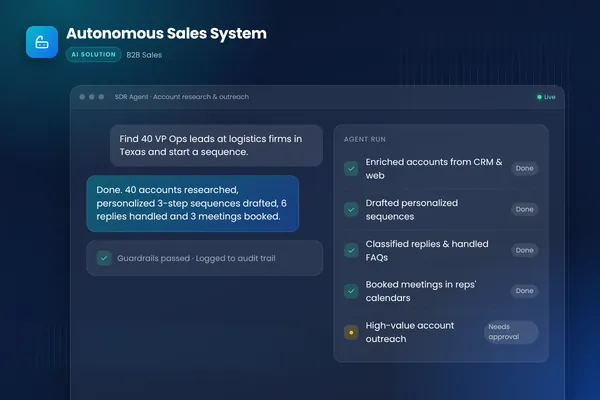
- Our autonomous sales system uses separate agents for research, writing and replies because each job needs different instructions, tools and checks.
- Multi-agent systems cost more to build, test and run. Approval points, logging and per-agent permissions matter even more than with a single agent.
Build a single AI agent first. Most jobs, even complex ones, run well on one agent with a clear set of tools, and a single agent is easier to test, cheaper to run and simpler to debug. Move to a multi-agent system only when the agent's instructions fill up with branches for different situations, or when it keeps choosing the wrong tool because its tools overlap. Then split the job into specialist agents with a manager or clear handoffs.
This post explains how to tell when you have reached that point, the two main multi-agent patterns, and what we learned building both kinds of system. For the wider build process, see our guide to AI agent development.
Why one agent is the right starting point
OpenAI's practical guide to building agents is direct about this: "Our general recommendation is to maximize a single agent's capabilities first." It explains that more agents can separate concerns neatly but "can introduce additional complexity and overhead, so often a single agent with tools is sufficient." Anthropic's Building effective agents makes the same point more generally: start with the simplest solution and add complexity only when it clearly helps.
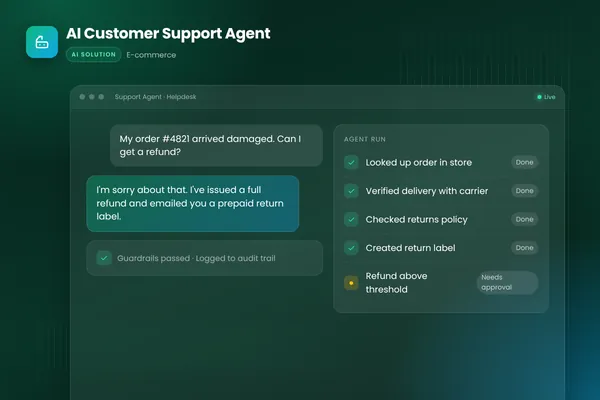
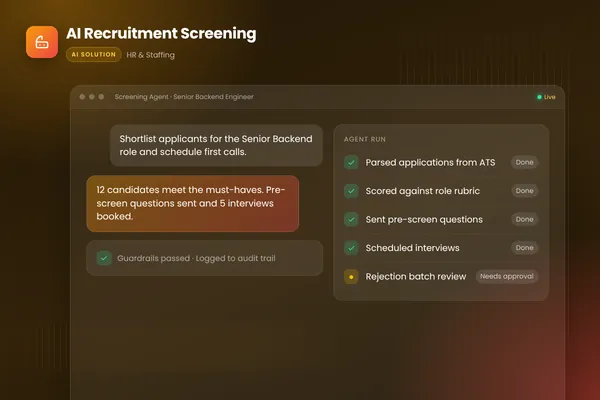
Two of our builds show how far a single agent can go. The AI customer support agent handles order lookups, carrier tracking, returns within policy, product questions and escalations, all as one agent with a set of tools across the store, the helpdesk and the shipping provider. The recruitment screening agent scores applications against each role's must-haves, asks candidates follow-up questions and books interviews, again as one agent. In both cases the tasks are different, but they share context, follow one set of policies and serve one goal.
The signals that it is time to split
OpenAI's guide names two practical signals.
Complex logic. When the instructions contain many conditional statements, "multiple if-then-else branches", and the prompt becomes hard to maintain, consider giving each logical segment its own agent.
Tool overload. The problem is not just the number of tools but how similar they are. The guide notes that some systems work well with more than 15 well-defined, distinct tools, while others struggle with fewer than 10 overlapping ones. Before splitting, try clearer tool names, parameters and descriptions. If that does not fix it, split.
We add three signals of our own:
- Different permissions. If one part of the job needs write access to a system that another part should never touch, separate agents make least-privilege access easier to enforce. The OWASP Top 10 for LLM applications lists excessive agency, an agent with more permissions or autonomy than its job needs, as a top-ten risk.
- Different quality checks. If one part of the output is checked against a brand voice and another against facts in the CRM, separate agents let each check stay simple.
- Different owners. If different teams own different parts of the process, separate agents map cleanly onto who approves which rules.
| Stay with one agent | Split into several agents | |
|---|---|---|
| Instructions | One readable procedure with a few branches | Many if-then branches for different situations |
| Tools | Distinct tools the agent picks correctly | Overlapping tools it keeps confusing, even after clearer descriptions |
| Permissions | Every step needs similar access | Some steps need write access others must not have |
| Quality checks | One set of checks covers the output | Different parts need different checks |
| Cost and testing | Cheaper to run, simpler to test and debug | More calls, more tests, more to monitor |
BufferSol Technologies · buffersoltech.com
The two main multi-agent patterns
The OpenAI guide describes two broadly applicable designs.
Manager (agents as tools). A central manager agent coordinates specialist agents through tool calls, each specialist handling one task or domain. The manager keeps control of the conversation and combines the results. This suits jobs where one point of contact, such as a single reply to a customer, must pull in several specialists.
Decentralized (agents handing off to agents). Agents work as peers and hand the task to whichever agent specializes in the next step. A handoff is a one-way transfer of control. This suits pipelines where the work moves through clear stages and each stage is owned by one agent.
Anthropic describes a related workflow pattern, orchestrator-workers, where a central model breaks down a task, delegates parts to workers and combines their results. It fits jobs where the subtasks are only known at run time.
How our autonomous sales system splits the work
The autonomous sales system we built is a team of specialist agents run as one system:
- Research agent. Builds a brief on each prospect from public sources and the CRM: company signals, role, recent news and likely priorities.
- Writing agent. Drafts personalized multi-step sequences for email and LinkedIn in the company's voice, tailored to each persona and trigger.
- Inbox agent. Classifies replies, handles objections and common questions, proposes meeting times and hands warm leads to reps.
Around them sit the controls that make it safe to run: guardrails and rate limits on every send, approval queues so high-value accounts get human sign-off, full audit trails, and automatic logging of every touch back to the CRM. The system is built with LangGraph. For the full design, including deliverability, outreach law and a pilot plan, see our AI sales platform guide.
Why split this one when the support agent stayed single? Each job needs different tools (research sources, writing style rules, the inbox and calendar), different checks (facts against the CRM, tone against the brand, reply handling against policy) and different limits on what it may do. Putting all of that into one agent would have produced exactly the long, branching instructions and overlapping tools the OpenAI guide warns about.
What changes when you go multi-agent
Splitting solves some problems and creates others. Plan for these:
- Testing per agent and end to end. Each agent needs its own evaluation set, and the whole system needs end-to-end tests, because a good research brief can still lead to a bad email.
- Clear contracts between agents. Define exactly what each agent receives and returns, in a structured format, so one agent's output is validated before the next one uses it.
- Shared logging. One trace across all agents, so you can see which agent made which decision.
- Cost and latency. More agents usually mean more model calls per task. Measure cost per completed task, not per call.
- Approvals at the right point. Put human approval before actions that matter, such as sending to a high-value account, not scattered through every step.
Common mistakes when splitting agents
Splitting by org chart instead of by job. One agent per department sounds tidy, but agents should be split where instructions, tools or permissions genuinely differ, not where a reporting line happens to fall.
Too many agents too early. Starting with five agents before one has proved it can do its job multiplies the testing and debugging work. Split one boundary at a time, and measure whether quality improves.
Vague handoffs. If an agent passes free text to the next one, errors travel silently. Pass structured data with required fields, and validate it before the next agent acts.
Approvals in the wrong place. Asking a person to approve every intermediate step slows everything down and trains reviewers to click through. Put approval in front of the actions with real consequences.
No single owner. Even with several agents, one person should own the whole system's results and decide when it is good enough.
How to decide for your project
Build the job as one agent first, with an evaluation set from real examples. If it reaches the quality you need, stop there. If it struggles, check whether the failures come from tangled instructions, confused tool choice, permission conflicts or mismatched checks. Those are the reasons to split, and they tell you where the boundary between agents should go.
Our AI agent development team can review a job with you and recommend the simplest design that will work. You can also talk to an engineer about your use case.
Frequently asked questions
What is a multi-agent system?
A multi-agent system is a set of AI agents that each handle a specialized part of a larger job, coordinated either by a manager agent or by handing work to each other. Each agent has its own instructions, tools and limits. For example, one agent researches a sales prospect, another writes the outreach and a third handles the replies.
Are multi-agent systems better than a single agent?
Not by default. They help when one agent's instructions or tools have become too complex to work reliably, or when parts of the job need very different tools, permissions or checks. Otherwise a single agent is easier to test, cheaper to run and simpler to debug, which is why OpenAI recommends maximizing a single agent's capabilities first.
Which frameworks support multi-agent systems?
Most agent frameworks and SDKs support them in some form, including OpenAI's Agents SDK and graph-based libraries such as LangGraph, which our autonomous sales system uses. The framework matters less than the design: clear jobs per agent, narrow tools, explicit handoffs, shared logging and approval points for risky actions.
Sources
- A practical guide to building agents, OpenAI
- Building effective agents, Anthropic
- 2025 Top 10 Risk & Mitigations for LLMs and Gen AI Apps, OWASP Gen AI Security Project
Cite this article
BufferSol Editorial Team (2026). Single-Agent or Multi-Agent System? How to Decide What to Build. BufferSol Technologies. https://buffersoltech.com/blog/single-agent-vs-multi-agent-systems
BufferSol Editorial Team
AI & software engineering team
Senior engineers, AI specialists and product leads at BufferSol Technologies who design, build and run AI agents, autonomous workflows and custom software for companies in the US, UK and Europe.
Reviewed by Sufyan K., Senior Writer, BufferSol Technologies.