Key takeaways
- An AI meeting booking agent reads a prospect's reply, decides what it means, checks the rep's real calendar and books the meeting, then writes the result back to the CRM.
- Vendors disagree on approval: Instantly offers a mode where 'You approve replies before they're sent' and another with 'No approval needed', while Reply's docs say an AI handling replies 'should book meetings without a human in the thread'.
- The booking step is only as good as its access: Robylon says value shows up 'only when the agent has write access to the systems where appointments actually live'.
- Microsoft's findMeetingTimes API scores a slot by averaging each attendee's chance of attending: free is 100%, unknown 49%, busy 0%, which makes shared-prospect and round-robin rules a design decision.
- Start the 2027 pilot with human approval on every booking, then relax it for one reply type at a time once a sample review passes.
An AI meeting booking agent reads a prospect's reply, decides whether they want a meeting, checks a rep's real calendar and books the slot, then logs it in the CRM. For 2027 the question is less whether it can book and more where a person should approve. This post walks through seven steps and the approval rules, with vendor facts read in November 2026.
For the wider picture, read our AI sales platform guide. For the agent that sends the outreach in the first place, see the best AI SDR tools for 2027.
What is an AI meeting booking agent, and why does it matter in 2027?
It is the part of an AI SDR that works after the prospect answers. Outbound email sends the message; the booking agent handles what comes back. Instantly says its agent can "autonomously book meetings when prospects confirm availability". monday.com says schedule agents "plug into your calendar, check who's free, propose times, and fire off invites, all automatically."
The cost of not having one is quiet: a warm reply that waits until a rep is back at a desk. We have no sourced figure for how long replies wait at your company, so measure it first. BufferSol view: the first number to pull is the median hours between a positive reply and a booked meeting.
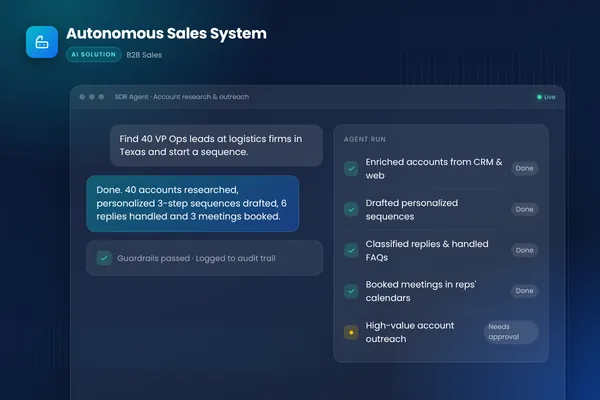
BufferSol built this pattern in its Autonomous Sales System, where an inbox agent classifies replies and books qualified meetings into reps' calendars. This post is the step-by-step version, and our AI SDR explainer covers the agent around it.
- 011 ReadCatch the reply the moment it lands
- 022 ClassifyDecide what the prospect means
- 033 Check CRMLook up owner, stage and history
- 044 Check calendarQuery the rep's free and busy times
- 055 Book or offerBook a proposed time or offer options
- 066 Write backSend the invite and log the CRM note
- 077 Hand offReschedule, or route exceptions to a rep
BufferSol Technologies · buffersoltech.com
1. How does the agent catch and read a reply?
It listens to the inbox the outreach was sent from. Nylas describes a "message.created webhook" that tells the agent a reply arrived, so there is no polling delay. Activepieces describes the same idea more broadly: the agent should "connect your CRM, email, calendar, Slack, and any sheets you use for lists or tracking."
The design choice is the sending address. If the agent replies from the rep's own inbox, the conversation stays in one thread and the prospect sees one person. If it replies from a shared address, the thread splits. Choose the rep's own inbox (the Nylas design) for a small team and a shared sales inbox only if replies are routed by territory. Our AI email automation post covers inbox permissions in more detail.
2. How does the agent decide what a reply means?
It classifies intent before it does anything else. Nylas says an agent can tell "not right now" apart from "send me pricing" apart from "let's find time", and respond to each on its own terms (we paraphrase; read the page for the full wording). Instantly says even its Autopilot mode pauses for review on "Missing product information", "Unclear context" and "Uncertain about the appropriate response".
Four buckets cover most replies, a split Nylas also implies: wants a meeting, wants information, not now, and unsubscribe or complaint. The last two should never reach the calendar step. BufferSol view: let the agent act only above a confidence threshold you set, and send everything below it to a rep with the thread attached. Our AI lead qualification post shows how to set those thresholds.
3. Should the agent check the CRM before it books?
Yes, because the calendar knows nothing about the account. monday.com says schedule agents "pull CRM records to see lead status, deal priority, and account ownership." That lookup stops the agent booking a prospect a rep already declined, or one who belongs to another rep.
Add three checks of your own: is the contact already in an open deal, did a rep mark them do-not-contact, and who owns the account. The first run of these checks on real data is usually where a pilot finds its first problem. Our CRM hygiene automation covers the data side, and the Done For You AI SDR already connects replies to this step.
4. How does the agent find a time that is actually free?
It queries free and busy data, not the whole calendar. Google's Freebusy query "Returns free/busy information for a set of calendars." Microsoft's findMeetingTimes will "Suggest meeting times and locations based on organizer and attendee availability, and time or location constraints specified as parameters."
Two details matter in a real build. Microsoft's page says the default work hours are Monday to Friday, 8am to 5pm in the mailbox's time zone, so a rep who works differently needs those settings checked. And its permission table lists Calendars.Read.Shared as the least privileged delegated permission, so read-only access is enough to find time; writing the event is a separate decision. Writing the event is a different call: Google's Events: insert page says it "Creates an event" and lists four alternative scopes, including calendar.events.owned and calendar.app.created, so you can choose the narrowest one that works. Google's Freebusy page and Microsoft's page cover the read side. Our AI appointment setter post covers the same logic for inbound leads.
What does the shared-prospect case look like?
Microsoft publishes the weights. In its confidence model, a free attendee counts as 100% likely to attend, unknown as 49% and busy as 0%, and a suggestion's confidence is the average. Its own example (free, unknown, busy) works out to (100% + 49% + 0%) / 3 = 49.66%, and by default a slot needs at least 50% to be returned, as the documentation says.
As a BufferSol calculation using Microsoft's weights, two reps who both need to join a call, one free and one unknown, score (100% + 49%) / 2 = 74.5%, which passes the default 50% minimum but fails a stricter 80% setting. The lesson: for shared calls, set the threshold deliberately and have the agent say so in its note, rather than accept the default.
5. Does the agent book the time, or offer options?
Both patterns exist, and vendors disagree on the default. Instantly says that when a prospect names a time, "the agent schedules the meeting directly (not just sends the link)". Reply's docs say "multiple proposed times resolve to the first available slot on your calendar." Robylon says that for a vague request the agent "replies with two or three concrete options and books whichever the person picks."
Our rule, BufferSol view: book directly when the prospect proposes one time that is free, offer two or three options when they are vague, and ask a person when the proposed time is outside working hours or clashes. Activepieces describes the middle path as "offering a few real-time options, reading the reply, and sending the invite right away." For how long the whole set-up takes, see how long it takes to set up an AI sales platform.
6. What does the agent write back after booking?
Three things: the invite, the CRM record and a note to the rep. Robylon's blog says the value shows up "only when the agent has write access to the systems where appointments actually live." It also says the agent "blocks the slot so no one double-books", and Nylas says the booking goes through its Events API and lands in the prospect's calendar like any other meeting.
Log the thread link, the reply classification, the slot, the meeting type and who approved. monday.com says schedule agents "log everything in your CRM automatically", which matters because a meeting nobody can trace is hard to count later. Our meeting prep and follow-up automation picks up from the booked meeting.
7. How does the agent handle reschedules and exceptions?
With the same loop, plus a clear way out. Reply's docs say a reschedule request is rebooked after a calendar check. Nylas describes an agent reading a "can we do Thursday instead" reply, updating the event and sending the new invitation from the same place.
For anything else, Robylon puts the rule plainly: "the agent should ask or escalate, not guess." It also says edge cases "route to staff with the full context attached, so the human picks up mid-stream instead of starting cold." Our workflow exception handling post shows how to build that route.
Where should a human approve the booking?
Vendors give opposite answers, which is why the decision is yours: Instantly offers both modes, Reply leans to autonomy, and monday.com to approval flows.
| What the page says | Implication | |
|---|---|---|
| Instantly | HITL mode: you approve replies before they're sent; Autopilot: no approval needed | Pick the mode per campaign |
| Reply | Should book meetings without a human in the thread | Add your own review step |
| monday.com | Approval flows for executive meetings and custom pricing talks | Approval by meeting type |
| Robylon | Ask or escalate, not guess | Approval by confidence |
Source: Vendor pages as read in November 2026; self-reported product descriptions.
BufferSol Technologies · buffersoltech.com
Instantly's page says its Human-In-The-Loop mode has you "Review and edit drafts" and that Autopilot "Requires a higher-tier Outbound plan"; Reply's page metadata even lists "human_approval_recommended: false". monday.com goes the other way: schedule agents can "Pause execution" and "Wait for approval before finalizing scheduling actions." Nylas mentions "outbound rules" that can stop a message before it leaves.
Our proposed rules, which are BufferSol view and not a published standard:
| Reply or meeting type | Who approves | Why |
|---|---|---|
| Prospect proposes one free time, known contact | Agent books | Low risk, easy to undo |
| Vague "sometime next week" | Agent offers 2 or 3 options | Prospect picks |
| Executive, custom pricing or strategic account | Rep approves first | monday.com's own examples |
| Contact owned by another rep or in an open deal | Rep approves first | CRM conflict |
| Unclear, angry or legal wording | Rep handles | Agent should escalate |
| Unsubscribe | Agent stops all sends | Never book |
Read more on where a person belongs in the loop in our human-in-the-loop post. The related sales automation versus AI sales agent comparison covers what rules-only tools cannot do here.
What questions should you ask every vendor in writing?
Ask for answers in writing, because pages are marketing copy and several describe approval or conflicts without detail. Six to start with:
- Does the agent write events to the rep's calendar, or only send a link?
- Which calendar permissions does it request, and can it run read-only?
- How does it handle two reps sharing one prospect?
- Which reply types can it act on alone, and which pause for review?
- Where is each decision logged, and can we export the log?
- What happens to a booked meeting if the rep declines it?
If a vendor cannot answer the third question, that is information. No page we opened explained how overlaps between reps are detected, so we have no source to give you; ask. For a wider shortlist, see our AI lead generation software comparison and the AI sales outreach personalization post.
What does an AI meeting booking agent not do?
It does not judge fit, negotiate price or decide which meetings a rep wants. It will misread tone, and it will fail on time zones and holidays the vendor never tested. Several pages, such as Instantly's and monday.com's, promise speed ("instantly", "automatically") without a measured result, and we found no independent study of booked-to-held rates.
Measure meetings held, not meetings booked. A booking that the prospect misses is not a win. Also, outbound sending rules (consent, unsubscribe, sender reputation) sit outside this post; the AI lead generation post lists the sources to start with, and this is not legal advice.
What changes for AI meeting booking in 2027?
No source we opened forecasts how booking agents will change in 2027, so this section is BufferSol view, written as reasoning, not fact.
We expect buyers to ask for the approval mode before the demo, because Instantly already sells the choice as a plan feature. We expect "write access" to become the point of comparison, since Robylon frames it as where value shows up. And we expect shared-prospect rules to move from the vendor's default to the buyer's policy. Plan the 2027 budget around one booking flow, with approval on, rather than a full autopilot. Our AI sales platform guide covers the surrounding stack.
When should you build your own booking agent?
Build when your routing rules, CRM or approval policy do not fit a packaged tool. Stay with a packaged reply agent when you have one reply type, one calendar and one rep team.
Build when:
- Your routing is complex. Territories, round-robin and shared accounts need your own rules.
- Your approval policy is strict. You decide which replies a person must see.
- Your systems are mixed. One agent works across the inbox, CRM and calendar you already pay for.
- Your volume grows. You pay for model and hosting use rather than a plan tier for each step.
BufferSol's AI agents service builds these, and the Autonomous Sales System shows the pattern. For the voice side of the same job, see our AI voice lead agent.
What would a 30-day pilot deliver?
In 30 days you get a working booking agent on your real replies, with a rep approving each booking. The plan:
- You bring: read access to one sales inbox and calendar, CRM access for lookups, your routing and do-not-contact rules, and the approval table above, edited to fit.
- We build, in about two weeks: a prototype that classifies replies, checks the CRM and calendar, drafts the booking and logs it, tested on past replies from your inbox.
- We launch, in the final stretch: a live pilot on one reply type with a rep approving each booking, an audit log and a weekly review of 20 threads.
Success is measured by meetings held, wrong bookings found in review, reply-to-booking time and how many replies were escalated. The closest ready-made version is our AI SDR outbound automation, made for sales teams that want replies turned into meetings without more headcount. For inbound leads, see speed to lead, and for software companies, our B2B SaaS page.
Is this right for you?
Check how many of these describe your team:
- Positive replies sit for hours before a rep answers.
- Reps spend time on back-and-forth over times.
- You can write down which replies need a person.
- Your CRM owner and do-not-contact fields are mostly accurate.
- You want a weekly review before relaxing approval.
If few do, fix the CRM data and the routing rules first and pilot after.
Facts checked November 2026. Vendor pages are marketing copy and their booking, approval and speed claims are self-reported; calendar details come from Google and Microsoft documentation. Facts we did not re-check: the Nylas intent-classification sentence is paraphrased, and two pack candidates (Jeeva and Artisan pages) were left out because their dates and detail were unclear. Nothing here is legal advice.
If replies to your outreach wait for a rep, ask BufferSol for a scoped estimate for a meeting booking agent on your inbox and calendar now, so the 2027 budget includes it and the pilot can start in Q1 2027.
Frequently asked questions
What is an AI meeting booking agent?
An AI meeting booking agent is software that reads replies to your outreach, works out whether the prospect wants a meeting, checks a rep's real calendar, and books or proposes a time. Instantly says its agent can 'autonomously book meetings when prospects confirm availability'. The agentic version also logs the outcome to the CRM and hands unclear replies to a person.
Should a human approve every meeting an AI agent books?
Not forever, but at the start. Instantly's Human-In-The-Loop mode has you approve replies before they go out, and monday.com says schedule agents can pause for approval on executive meetings and custom pricing talks. Reply's docs lean the other way. BufferSol view: approve everything in the first weeks, then relax one reply type at a time.
How does an AI agent avoid double-booking a rep?
It needs to check live availability and write the booking itself. Google's Freebusy query returns free and busy information for a set of calendars, and Robylon says an agent with write access blocks the slot so no one double-books. Without write access the agent is an autoresponder that only suggests times, and a human still completes the booking.
Can an AI agent handle reschedules as well as first bookings?
Yes, according to vendor pages. Reply's docs say a reschedule request is rebooked after a calendar check, and Nylas describes an agent reading a 'can we do Thursday instead' reply and sending a new invitation from the same inbox. These are vendor descriptions, so test reschedules on your own calendars, including time zones, before you rely on them.
Sources
- AI Reply Agent, Instantly
- Meetings in Reply · How Reply Works, Reply
- Schedule agent explained: Automate meetings and follow-ups, monday.com
- The AI sales agent that books its own meetings, Nylas
- AI Agents for Sales: What Teams Are Using Today, Activepieces
- AI for Appointment Scheduling via Email: A Practical Guide, Robylon
- Freebusy: query, Google for Developers
- user: findMeetingTimes - Microsoft Graph v1.0, Microsoft Learn
- Events: insert, Google for Developers
Cite this article
BufferSol Editorial Team (2026). AI Meeting Booking Agent: 7 Steps From Reply to Calendar in 2027. BufferSol Technologies. https://buffersoltech.com/blog/ai-meeting-booking-agent-2027
BufferSol Editorial Team
AI & software engineering team
Senior engineers, AI specialists and product leads at BufferSol Technologies who design, build and run AI agents, autonomous workflows and custom software for companies in the US, UK and Europe.
Reviewed by Sufyan K., Senior Writer, BufferSol Technologies.