Key takeaways
- Invoice reconciliation software matches invoices to POs, receipts and statements by rules; an AI reconciliation agent also reads the exceptions, finds the cause and prepares the fix for a person to approve (BufferSol definition).
- Vendor auto-match figures are vendor claims with no stated sample: Medius lists 97% on invoice lines, HighRadius 95% transactional auto match, and Stampli says its AI performs on average 89% of the work.
- At 500 invoices a month, a 95% auto-match claim still leaves 25 invoices for a person and an 80% claim leaves 100 (BufferSol calculation).
- Set tolerance rules first: Tipalti says anything outside your tolerance gets flagged for review with the exception highlighted.
- Keep a record of what was matched, who approved and which exception was cleared; COSO is the standard framework for internal control.
Invoice reconciliation software compares each supplier invoice with the records that should back it, such as the purchase order, the goods receipt and the supplier statement, and flags what does not match. An AI reconciliation agent goes one step further and works the exceptions. For 2027, this is a five-step plan to decide how far to automate, based on vendor pages read in November 2026.
For the full picture of the process, read our intelligent invoice processing guide. For the broader tool comparison, see our accounts payable software roundup.
What is the difference between reconciliation software and an AI reconciliation agent?
Reconciliation software matches and flags; an agent matches, investigates and prepares the fix. Software applies the rules a finance team set. An agent reads the invoice and the PO, works out why they differ, drafts a resolution and sends it to a person to approve. That split is a BufferSol definition, not a vendor standard.
Vendors use the word "agent" loosely. Tipalti names a feature the "PO Matching Agent" and says it "reads line descriptions in context, so a bill finds its PO match even when the wording differs." That is learned matching inside a product. It is useful, and it is not the same as an agent that follows an exception through to a proposed fix. We separate three layers below: rules, learned matching and human review.
The 5-step plan to choose between reconciliation software and an AI agent in 2027
Each step is a decision with a test you can run on your own invoices. Facts about vendors are as of November 2026, and none of the pages we read shows a publication date.
1. What do you match, and what counts as a match?
Decide which records support each invoice before you shop. For goods, that is usually the purchase order and the goods receipt; for services, the PO or contract; for suppliers who send statements, the statement as well. A match is a rule, so write it down: which fields, which tolerance, which spend categories.
Microsoft Learn shows what such a rule looks like in an ERP: in Dynamics 365 Finance, "the business processes might require that the goods or services be received before the invoice can be approved for payment," and the settings include a line matching policy of "Three-way matching" with discrepancies set to "Require approval". Basware says it "Matches against POs, receipts, and contracts before approval", and HighRadius lists "3 Way AP Matching" as a feature. Ramp says it will "Automatically verify invoice line items against purchase orders and receipts (two-way and three-way matching) to catch overbilling."
Our AP automation post covers the wider process. Choose software if your matches are rule-shaped. Add an agent if most of your cost is in the invoices that do not match.
2. What tolerance should you set before comparing vendors?
A tolerance is the gap you accept between invoice and PO before a person looks, for example on price or quantity. Set it per spend category, because freight and software do not behave the same. The tighter it is, the more exceptions you create; the looser it is, the more errors pass.
Tipalti says "Anything outside your tolerance gets flagged for review, with the exception clearly highlighted." That is the standard behaviour to ask every vendor about: what is flagged, to whom, and with what explanation. Ramp says it "checks every line item with two and three-way matching, so you know if something's off before sending." Basware says "Approvals route automatically to the right person, with exceptions flagged before they become a bottleneck."
We found no independent source for typical tolerance values, so we give none. Take three months of your own invoices, apply two candidate tolerances and count the exceptions each creates. Our post on workflow exception handling shows how an agent treats the rest.
Choose software if one tolerance per category is enough. Add an agent if exceptions need a reason and a proposed fix.
3. Does the vendor match rate hold on your own invoices?
Vendor match rates are claims, so measure your own. Medius lists an "Auto-match rate on invoice lines" with a 97% figure. HighRadius shows "95%" labelled "Transactional Auto Match Rate" and "80%" labelled "Auto-Reconciliation". Stampli says "Billy performs on average 89% of the work based on how your business codes, routes, matches, and approves."
None of these pages gives a sample, a definition of "match" or an independent test, and the three figures count different things, so they are not comparable. Treat them as a reason to ask for a test, not as a benchmark.
A BufferSol calculation shows what the claims mean in work: at 500 invoices a month, a 95% auto-match rate (the HighRadius figure) leaves 25 invoices for a person, and an 80% rate leaves 100. Run 200 of your own invoices through each vendor, and count matched, flagged and wrongly matched. Wrongly matched is the number to watch. Our guide to touchless invoice processing explains why a high rate with silent errors is worse than a lower rate with clear flags.
Choose a tool if it passes your own test. Skip it if the vendor will only quote its own average.
4. Do supplier statements get reconciled too?
Invoice-to-PO matching checks one document against another. Statement reconciliation checks what a supplier says you owe against what you have recorded, and it catches invoices that never reached you. It is a separate job, and few tools do it.
Medius says "Use AI to automatically match supplier statements to invoices so you can spot missing or mismatched invoices". It is the only vendor in our set whose page covers statements. We found no source that compares vendors on this feature, so ask each one to run a real supplier statement through its tool.
For a statement, the agent's work is easy to describe: read the statement, compare each line with your ledger, list what is missing or different, and draft a note to the supplier for a person to send. Our post on account reconciliation software versus AI agents covers the same pattern for the ledger side.
Choose software if statements are few and simple. Add an agent if your team chases suppliers by email.
5. Can a reviewer follow the audit trail?
Every match and every exception needs a record: what was compared, what rule applied, who approved and what was changed. Without it, automation moves work faster and makes it harder to review. The record should live in your ERP or a log you control.
COSO says "Effective internal controls are good for business" and describes its framework as "the most widely used internal control framework in the U.S." The page does not cover AP reconciliation or document retention, so we use it as the control reference, not as a source for specific matching rules. Medius says "all risk is automatically flagged, mitigated and logged across the AP lifecycle", and Tipalti says you can "Keep payment data in sync with your ERP system to reduce error-prone manual reconciliation and close the books faster."
Ask each vendor for a sample log of one cleared exception. It should show who, when, what changed and why. Our invoice approval workflow post shows where approvals sit.
Choose any tool if it can show you that log. Skip it if the audit trail is a claim on a slide.
| Step | Reconciliation software | AI reconciliation agent |
|---|---|---|
| 1. What you match | Rule on PO, receipt, contract | Same rules, plus context from the invoice |
| 2. Tolerances | Flags what falls outside | Flags, explains and proposes the fix |
| 3. Match rate | Vendor claim, test it | Test it, and test the wrong matches |
| 4. Statements | Few tools cover it | Reads, compares and drafts the supplier note |
| 5. Audit trail | Log of matches | Log of matches, reasons and approvals |
| What it does | Who decides | |
|---|---|---|
| Rule matching | Compares fields against PO and receipt within a tolerance | Your finance team sets the rule |
| Learned matching | Reads line descriptions in context so wording differences still match | Your team reviews what it flags |
| Agent work on exceptions | Finds the cause, drafts the fix, logs each step | A person approves before anything posts |
Source: BufferSol view; Tipalti describes learned PO matching on its page, November 2026
BufferSol Technologies · buffersoltech.com
What should you ask every vendor in writing?
Ask for answers you can keep. A demo shows the best case; a written answer can be checked later. Put the same six questions to every vendor and compare the replies side by side, then run the same 200 invoices through the two that answer best.
- How do you define a match? Ask which fields, which tolerance and which records.
- What happens outside tolerance? Ask who is told and what the explanation says.
- What was the sample behind your auto-match figure? Ask for the count and the period.
- How do you count wrong matches? Ask for the rate, not only the match rate.
- Can you reconcile a supplier statement? Ask them to run one of yours.
- Where is the log? Ask for a sample record of one cleared exception.
None of the pages we opened shows prices, so ask for a written price for your invoice volume as well.
Source: BufferSol calculation from the HighRadius figures on its homepage, November 2026; the test size is a BufferSol suggestion
BufferSol Technologies · buffersoltech.com
What does an AI reconciliation agent not do?
An agent does not remove the need for approval, and it does not fix bad source data. It can propose a wrong cause, match to the wrong PO or miss a duplicate that looks different. Set limits on what it may change, require a person to approve anything that posts or pays, and review a sample of its decisions each week.
Vendor figures do not change that. The Medius 97%, HighRadius 95% and Stampli 89% numbers above are claims from vendor pages, and none comes with a test we could check. Our AP automation versus custom agent post covers how a build compares, and automated invoice processing software compares the tools.
What changes for invoice reconciliation in 2027?
No source we opened forecasts invoice reconciliation in 2027, and the vendor pages carry no roadmaps. Everything here is BufferSol view, written as reasoning, not fact.
We expect "agent" to appear on more product pages, so test what a feature does, not what it is called. We expect statement reconciliation to move from a rare add-on to a standard check, because missing invoices are what matching cannot see. And we expect reviewers to ask for exception logs, so a tool that explains each decision will be easier to defend. Run the 200-invoice test in Q1 2027 and compare cost per reconciled invoice, including the exceptions.
When should you build your own AI reconciliation agent?
Build when your matching depends on your own rules, your own ERP and your own supplier habits, or when per-invoice fees grow with volume. Buy software when standard matching already clears most invoices. A build has limits: it needs design, testing and upkeep that a packaged product handles for you.
Build when:
- Your exceptions need a reason. The agent reads the invoice and the PO and writes the cause.
- Your ERP has no ready connector. The agent works through your systems with a log.
- Statements and email chasing eat time. The agent drafts the supplier note for a person to send.
- Volume is climbing. You pay model and hosting costs directly, not a fee on every invoice.
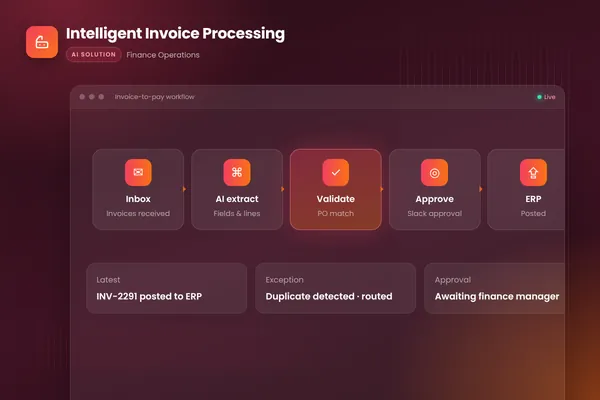
BufferSol's intelligent invoice processing agent is the pattern: it watches the invoices inbox, extracts every field, matches lines to purchase orders, flags mismatches or duplicates, routes clean invoices to the approver in Slack and posts to the ERP once approved, while exceptions land in a review queue with the reason already explained.
What would a 30-day pilot deliver?
In 30 days you get a working reconciliation agent on your real invoices, with a person approving what matters. The plan:
- You bring: three months of invoices with their POs and receipts, your tolerance rules and read access to your ERP or ledger.
- We build, in about two weeks: a prototype that matches, flags and explains exceptions, scored against a test set made from your invoices.
- We launch, in the final stretch: a live pilot on one supplier group or entity, with approvals, a review queue and a log of every decision.
Success is measured by invoices matched correctly, wrong matches found in review, exceptions cleared per day and time to close. The closest ready-made version is our invoice processing automation, which suits finance teams that receive invoices by email. Other teams get a custom build from our autonomous workflows team. For month-end, see our month-end reconciliation automation.
Is this right for you?
Check how many of these describe your AP team:
- Invoices arrive by email in mixed formats.
- A person spends hours each week on the invoices that do not match.
- Suppliers send statements and your team compares them by hand.
- You can export three months of invoices with their POs.
- Your reviewers ask how a match was made.
If few do, start with reconciliation software and measure its exceptions for a month.
Facts checked November 2026. Vendor pages carry no reliable dates and change often, so re-check each one before you sign.
If your AP team spends its week on invoices that do not match, ask BufferSol for a scoped estimate for an invoice reconciliation agent now, so the 2027 budget includes it and the pilot can start in Q1 2027.
Frequently asked questions
What is invoice reconciliation software?
Invoice reconciliation software compares each supplier invoice with the records that should support it, such as the purchase order, the goods receipt and the supplier statement, and flags differences. Basware, for example, says it matches against POs, receipts and contracts before approval. Software of this kind follows rules and tolerances; the people who set those rules decide what counts as a match.
What is the difference between invoice reconciliation software and an AI reconciliation agent?
Reconciliation software matches records using rules and, in newer products, learned matching. An AI reconciliation agent also investigates the exceptions: it reads the invoice and the PO, finds why they differ, drafts a resolution and sends it to a person to approve. The agent works through your ERP and inbox with a log of each step.
How accurate is AI invoice matching?
Published figures are vendor claims. As of November 2026, Medius lists a 97% auto-match rate on invoice lines, HighRadius lists 95% for transactional auto match, and Stampli says its AI performs on average 89% of the work. None of the pages we read states a sample or an independent test, so measure the rate on your own invoices before you buy.
What is three-way invoice matching?
Three-way matching checks an invoice against the purchase order and the goods receipt before payment. Microsoft's Dynamics 365 Finance documentation shows it as a line matching policy setting, with discrepancies set to require approval. It is the usual control for goods, because it confirms the item was ordered and received before the invoice is paid.
Sources
- AI-Powered AP Automation Software, Tipalti
- AP Automation Software | AI-Powered, Basware
- Medius: AP automation and supplier statement matching, Medius
- Stampli: Procure-to-Pay Platform for Finance Teams, Stampli
- Autonomous Finance for O2C, R2R, AP & Treasury, HighRadius
- Internal Control, COSO
- Ramp Bill Pay: Accounts Payable Automation Software, Ramp
- Record vendor invoice and match against received quantity, Microsoft Learn
Cite this article
BufferSol Editorial Team (2026). Invoice Reconciliation Software in 2027: A 5-Step Plan to Move From Matching Rules to an AI Reconciliation Agent. BufferSol Technologies. https://buffersoltech.com/blog/invoice-reconciliation-software-vs-ai-agent-2027
BufferSol Editorial Team
AI & software engineering team
Senior engineers, AI specialists and product leads at BufferSol Technologies who design, build and run AI agents, autonomous workflows and custom software for companies in the US, UK and Europe.
Reviewed by Sufyan K., Senior Writer, BufferSol Technologies.