Key takeaways
- The strongest AI workflow candidates have high volume, messy inputs such as emails or PDFs, and several systems to update.
- In every good example, AI does one or two narrow jobs (reading, classifying, drafting) and ordinary code handles routing, checks and system updates.
- Each workflow has a clear point where a person decides: an approval threshold, an exception queue or a review of decisions about people.
- Finance, customer support and sales operations are usually the fastest places to start, because they have volume, clear outcomes and good system APIs.
- Workflows that make decisions about people, such as candidate screening, need meaningful human review and carry extra legal duties in the UK and EU.
The best AI workflow automation examples share a pattern: a high-volume process with messy inputs, such as emails, PDFs or forms, that touches several systems. Typical examples are invoice-to-pay in finance, ticket resolution in customer support, lead research in sales, candidate screening in HR, shipment updates in logistics and referral intake in healthcare. In each, AI reads or classifies, code checks and updates systems, and people handle exceptions.
Below are twelve workflows by department, several drawn from systems BufferSol has built. For each one we show the trigger, the AI step, the checks and where a person decides. For how these are designed and built, see our guide to AI workflow automation.
Why these examples work
Anthropic's engineers describe a workflow as a system where models and tools are "orchestrated through predefined code paths" (Building effective agents). That is the shape of every example here: the path is fixed, and AI handles the steps a fixed rule cannot.
OpenAI's practical guide to building agents gives three signals that a process needs AI rather than rules alone: nuanced decisions such as refund approvals, rule sets that have become hard to maintain such as vendor security reviews, and heavy reliance on unstructured data such as processing a home insurance claim. Each example below has at least one of those signals.
| What the workflow does | Where the AI step sits | |
|---|---|---|
| Finance: invoice-to-pay | Inbox to approval to posting in accounting | Reading invoices in any layout |
| Finance: expense audits | Checks claims against policy and flags exceptions | Reading receipts and matching to policy |
| Support: ticket resolution | Order lookups, returns and replies | Understanding the request and drafting the reply |
| Support: inbox triage | Sorts and routes shared-inbox email | Classifying and summarizing each message |
| Sales: account research | Enriches leads and updates the CRM | Summarizing public and CRM signals |
| Sales: reply handling | Routes replies and books meetings | Classifying replies and drafting answers |
| HR: candidate screening | Scores applications and schedules interviews | Comparing CVs to role must-haves |
| HR: onboarding packs | Collects documents and updates systems | Checking submitted documents are complete |
| Logistics: carrier emails | Updates shipments from carrier messages | Extracting dates and status from free text |
| Logistics: booking changes | Applies allowed changes to deliveries and bookings | Classifying the request and extracting details |
| Healthcare admin: referral intake | Turns referrals into scheduled appointments | Extracting patient and referral details |
| Healthcare admin: insurance checks | Collects insurance details and checks eligibility | Reading insurance documents and forms |
BufferSol Technologies · buffersoltech.com
Finance and accounting
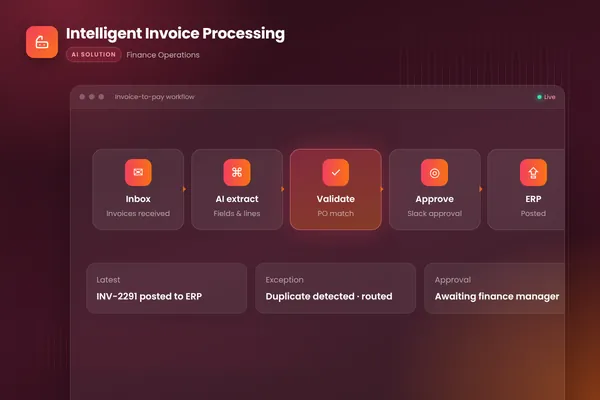
1. Invoice-to-pay. In our intelligent invoice processing build, the workflow watches the invoices inbox, uses document AI to extract every field from PDFs, scans and email bodies, matches lines against purchase orders and receipts, and flags mismatches and likely duplicates. Clean invoices go to the right approver in Slack, and approved ones are posted to the accounting system with an audit trail. Exceptions land in a review queue with the reason already written. We break this workflow down stage by stage in how AI invoice processing works.
2. Expense audits and month-end reconciliation. An AI step reads receipts and statement lines, and code compares them with policy limits and ledger entries. Anything outside policy, or anything that does not reconcile, goes to a reviewer with the evidence attached. People decide on every exception, and the workflow never approves an out-of-policy claim on its own.
Customer support
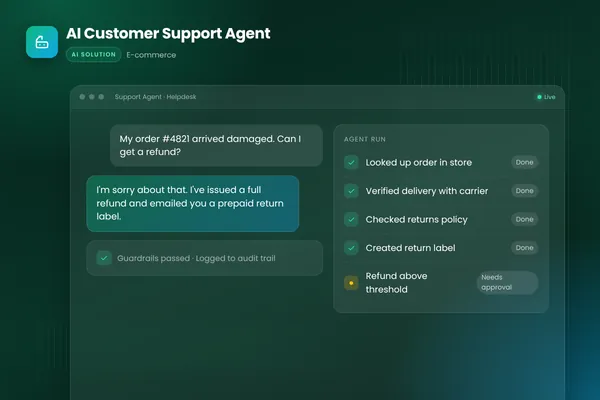
3. End-to-end ticket resolution. Our AI customer support agent connects the store, the helpdesk and the shipping provider. It looks up orders, checks carrier status, creates returns within policy and replies in the brand's tone. Refunds above a set threshold go to a person with a case summary. This one uses an agent inside the workflow, because the next step depends on what the lookup finds.
4. Shared-inbox triage. Anthropic gives customer service routing as a textbook example: classify the query (general question, refund request, technical support) and send it to the right downstream process. An AI step classifies and summarizes each message, code attaches the customer record, and the item lands in the right queue. People still answer anything sensitive. Our guide to AI email automation covers the taxonomy and controls in detail.
Sales and revenue operations
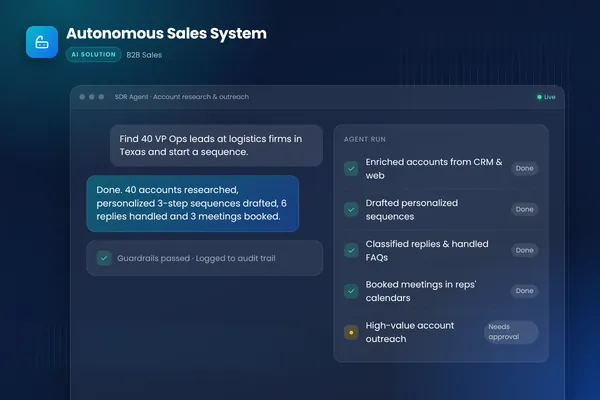
5. Account research and CRM enrichment. In our autonomous sales system, a research agent builds a brief on every prospect from public sources and the CRM, and every touch is logged back automatically, so reps start the day with a clean, prioritized pipeline.
6. Reply handling and meeting booking. In the same system, an inbox agent classifies replies, answers common questions and proposes meeting times, while high-value accounts require human approval before anything is sent. Send limits and an audit trail cover every action.
HR and recruiting
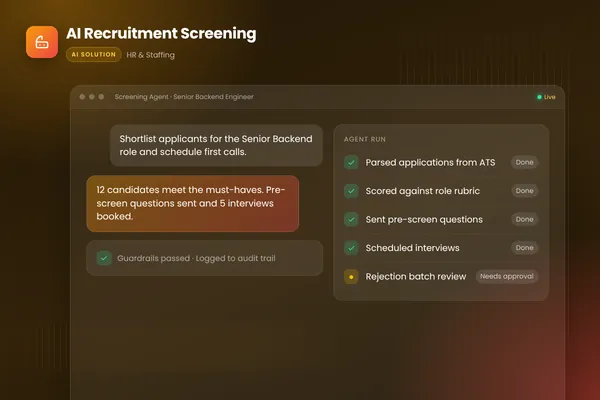
7. Candidate screening and scheduling. Our recruitment screening agent scores applications against each role's must-haves with written reasons, asks candidates structured follow-up questions and books interviews into recruiters' calendars, with statuses written back to the applicant tracking system. Bias-aware rubrics and human review of every batch of rejections keep it fair and auditable.
This is the area where regulation matters most. The EU AI Act lists CV-sorting software for recruitment as an example of a high-risk use. In the UK, the ICO's draft guidance on automated decision-making covers decisions "based solely on automated processing" that have a "legal or similarly significant effect" on a person, and the safeguards that apply, including human intervention. Keep a person making the decision, and record it.
8. Onboarding packs and timesheet checks. An AI step checks that submitted documents are complete and readable, and that timesheets match schedules. Code creates accounts and records in HR and payroll systems. Missing items go back to the new hire automatically, and anything unusual goes to HR.
Operations and logistics
9. Carrier emails and shipment updates. Carriers send status updates as free-text emails in many formats. An AI step extracts the shipment reference, new date and status, code matches them to the right order and updates the system, and customers are notified. Anything that does not match an open shipment goes to the operations team.
10. Booking changes. Requests to change a delivery or booking arrive by email and chat. AI classifies the request and extracts the details, code checks whether the change is allowed, and allowed changes are applied. Changes that need a fee, a new quote or a judgment call go to a person.
Healthcare administration
11. Referral intake. Referrals arrive as faxes, PDFs and emails. An AI step extracts patient details, referral reason and urgency into a structured record, and code checks required fields before a scheduler books the appointment. Incomplete or unclear referrals go to the intake team. Health data raises the bar on hosting, access control and logging.
12. Insurance verification and scheduling. A workflow collects insurance details, checks eligibility through the payer's system where an API exists, and prepares the scheduling step. Coverage questions and denials stay with staff.
What the twelve examples have in common
Read across the departments and the same design shows up every time.
| Part of the workflow | What it looks like in every example |
|---|---|
| Trigger | An event: a new email, file, form, ticket, application or status message |
| AI step | One narrow job: read a document, classify a request, compare against criteria or draft a reply |
| Checks | Plain code that validates the AI output against records, totals, policies and required fields |
| System updates | API calls to the accounting system, helpdesk, CRM, ATS or scheduling tool |
| Human decision | An approval threshold, an exception queue, or a review of any decision about a person |
| Record | A log of every step, so any outcome can be explained later |
Two things are missing from every example on purpose. None of them lets the AI step change a system of record without a check, and none of them leaves an important decision about a person to the model alone. Those two rules do more for reliability and trust than the choice of model.
How to pick your first example
Score your candidates on four questions: how often the process runs, how messy its inputs are, how many systems it touches, and how costly a mistake would be. The best first workflow is frequent, messy, multi-system and low-risk, or has risky actions that can sit behind an approval step.
Then collect fifty to a hundred real examples with known outcomes before building anything. They become the evaluation set that tells you whether the AI step is good enough. Our autonomous workflows team can help you score candidates and build that evaluation set, and our AI agent team handles the steps that need an agent. You can also talk to an engineer about which of these examples fits your business best.
Frequently asked questions
What is a simple example of AI workflow automation?
A shared inbox where an AI step reads each incoming email, classifies it (order question, invoice, complaint, sales lead), extracts the key details and routes it to the right queue or system with a summary. Code checks the extracted details against your records, and anything unclear goes to a person. It is simple to build, easy to measure and removes a lot of manual sorting.
Which department benefits most from AI workflow automation?
It depends on where your volume and pain sit, but finance operations, customer support and sales operations are common starting points. They handle large numbers of similar items, the inputs are often unstructured, the outcomes are easy to measure and the main systems usually have APIs. Start with the process your team most wants to get rid of, as long as mistakes are reversible or caught by a check.
Can small businesses use AI workflow automation?
Yes. A small business might start with one workflow, such as turning supplier emails and PDFs into entries in its accounting tool, or answering and routing customer enquiries. Visual tools such as n8n or Make can be enough at lower volumes. The same rules apply as for larger firms: keep the AI step narrow, check its output and send anything unclear to a person.
Sources
- A practical guide to building agents, OpenAI
- Building effective agents, Anthropic
- AI Act, European Commission
- Automated decision-making, including profiling, Information Commissioner's Office
Cite this article
BufferSol Editorial Team (2026). AI Workflow Automation Examples: 12 Real Workflows by Department. BufferSol Technologies. https://buffersoltech.com/blog/ai-workflow-automation-examples
BufferSol Editorial Team
AI & software engineering team
Senior engineers, AI specialists and product leads at BufferSol Technologies who design, build and run AI agents, autonomous workflows and custom software for companies in the US, UK and Europe.
Reviewed by Sufyan K., Senior Writer, BufferSol Technologies.